Category Archives: Blog

How Mobile Event Apps Make Hybrid Events Seamless

  • Yapp explains how mobile event apps help hybrid events feel connected instead of split between in-person and virtual audiences.
  • Real-time updates, centralized content, and two-way engagement create one smoother experience for everyone.
  • Organizers running hybrid conferences, trainings, and multi-format events can use this model to reduce complexity.

Why do hybrid events still feel so complicated?

Let’s be honest—running an event that blends in-person energy with online accessibility can feel like juggling chainsaws. You’ve got attendees in the room, attendees at home, and a team trying to make both groups feel equally connected. That’s where a mobile event app becomes the glue holding it all together.

Hybrid events aren’t going anywhere. A recent surge in digital participation means audiences expect flexibility. They want to switch between in-person and virtual experiences without missing content or networking opportunities. Event planners, on the other hand, need tools that cut costs, save time, and make coordination painless.

At Yapp, we’ve seen hybrid events succeed when organizers rethink communication—not as a broadcast, but as a living, interactive experience. That’s exactly what our platform was designed for.

“We tell planners all the time: stop thinking of your app as a schedule. Think of it as your event’s central nervous system.” — Yapp Product Team

The London Screenwriters’ Festival (LSF) proved how powerful that mindset can be. When the pandemic halted their live, three-day festival, LSF used Yapp to pivot into a month-long hybrid of livestreams and on-demand sessions—keeping over 1,000 attendees engaged from their phones.

Learn more about mobile event apps.

What makes hybrid event management easier with mobile apps?

Hybrid event success comes down to flexibility and access. A mobile event app can help you handle both—without breaking your budget or your team.

Here’s how Yapp users pull it off:

  • Real-time updates keep everyone aligned.
    When the schedule shifts or sessions move online, instant push notifications keep both audiences informed. Schools That Can used Yapp’s unlimited notifications to streamline communication during its national forum, earning a 96% satisfaction rate from attendees.
  • Centralized content builds trust.
    Instead of juggling email threads and printouts, planners can house livestream links, venue maps, and speaker bios in one accessible hub.
  • Two-way engagement bridges the gap.
    Attendees can post photos, comments, and questions directly in the app—creating shared moments whether they’re on-site or online.
  • Sponsors and partners shine equally.
    Digital banners, profiles, and interactive booths give partners visibility across physical and virtual audiences.
  • Cost efficiency adds up fast.
    Uncubed’s team saved more than $100,000 per year using Yapp to replace printed materials and expensive custom software.

“It’s exciting to watch teams realize they can deliver a professional hybrid experience without an IT department,” said one of our Yapp support specialists. “The magic is in the no-code simplicity.”

The best hybrid events feel like one seamless experience—because behind the scenes, their tech stack is unified. A single app connects schedules, notifications, sponsors, and networking, while giving organizers instant visibility into how people interact. That kind of insight makes planning the next event even easier.

And when you combine data-driven decisions with personalized attendee experiences, you don’t just meet expectations—you redefine them.

We’ve also seen how these apps boost confidence. One Yapp project manager shared, “Clients who were hesitant about hybrid events often call us after their first success saying, ‘We’ll never go back.’ The app makes it feel effortless—and that’s the point.”

How can planners use mobile event apps to level up hybrid strategy?

Once you’ve got the right tools, the key is using them strategically. Here’s what our event specialists recommend:

  1. Plan mobile-first.
    Start by designing your content for the app experience. Build session tracks, speaker lists, and feedback forms that work on every device.
  2. Integrate livestreams and on-demand access.
    Let attendees catch missed sessions right from the app. It extends event life and maximizes content ROI.
  3. Leverage push notifications for connection.
    Short, timely messages can drive engagement far better than emails.
  4. Use analytics to measure hybrid success.
    Track feature usage and engagement data from both audiences to refine your next event.
  5. Create a branded experience.
    Add logos, themes, and sponsor recognition to keep your hybrid event cohesive—no matter where attendees log in.

Our team often works with organizers who think hybrid is twice the work. Once they experience how Yapp unifies both sides, that perception flips fast.

“I’ve seen planners go from spreadsheets and chaos to fully mobile coordination in hours,” said a Yapp Customer Success Manager. “Once they see attendees posting photos and chatting in real time, it’s clear—a hybrid doesn’t divide people; it connects them better.”

Think of it this way: hybrid events aren’t a temporary fix. They’re the future of accessibility. When you give attendees the freedom to participate however they want—and still feel included—you’re not just managing an event. You’re building a community.

At Yapp, we believe hybrid events are about expanding opportunity, not complicating logistics. With a few smart moves, you can transform what feels like chaos into clarity.

“When we watch clients go from paper schedules to live app-driven engagement, it’s night and day. The hybrid format isn’t a hurdle anymore—it’s an advantage.” — Yapp Customer Success TeamReady to make your next event better? Start your trial now!

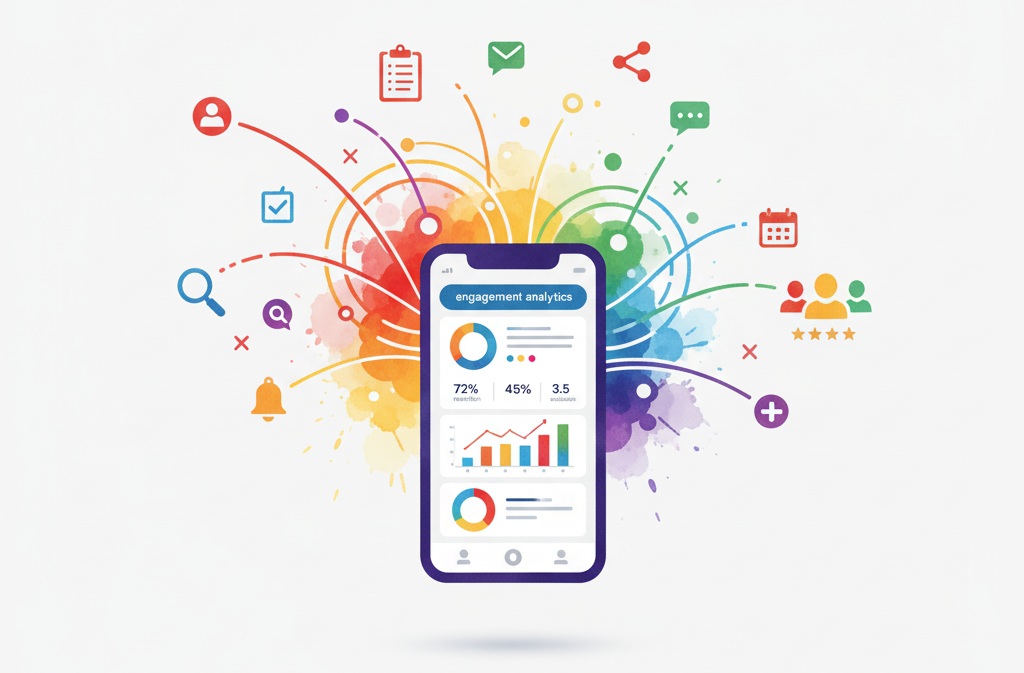
6 Key Event App Metrics That Matter

  • Yapp breaks down the six event app metrics that best show whether your event app is truly working.
  • Adoption, engagement, and analytics data help teams improve attendee experience and make smarter event decisions.
  • Event planners who want clearer ROI and stronger post-event reporting should focus on these KPIs.

What really tells you your event app is working?

Data isn’t just a post-event formality—it’s the heartbeat of your attendee experience. If you’re using a conference app builder, you’re sitting on powerful analytics that go far beyond download counts. Understanding those numbers can reveal what your audience values most, when engagement spikes, and where your event ROI truly lives.

At Yapp, we’ve seen organizations transform their events simply by tracking the right metrics. When Uncubed switched to Yapp, their team slashed $100,000 in costs and boosted engagement across 5,000+ attendees. Those wins weren’t luck—they were data-driven decisions powered by app insights.

So, which event app metrics really matter? Let’s break down the six that should guide every planner’s strategy.

Which engagement metrics drive real insight?

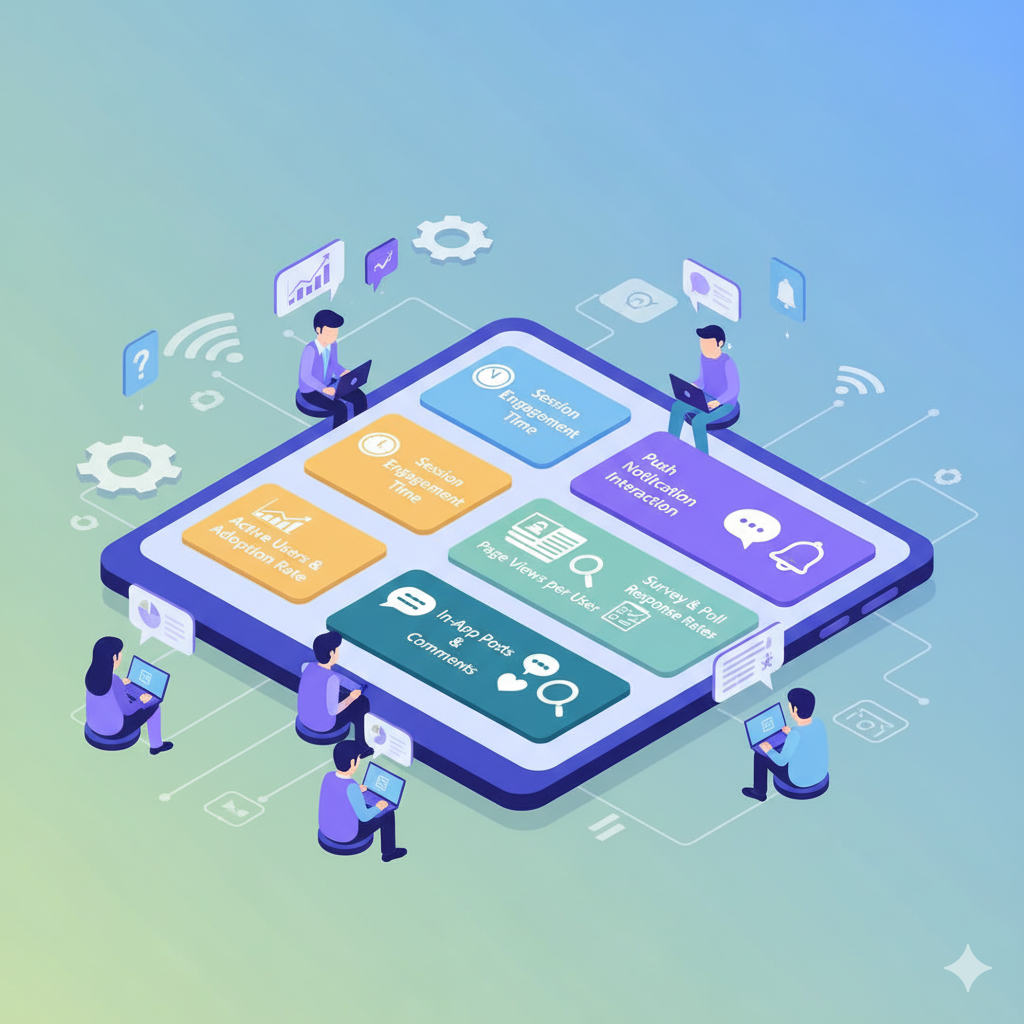
Not all metrics are created equal. Some are vanity stats; others are actionable indicators of success. Here are the six event app KPIs that deserve your attention:

  1. Active Users and Adoption Rate
    Track how many attendees not only download but actively use your app. A healthy adoption rate (60%+) signals that your communication strategy and app content are hitting the mark.
  2. Session Engagement Time
    The longer users stay in your app, the more value they’re finding. Look at average time per session and repeat visits to identify your strongest features—agenda views, polls, or live chat.
  3. Push Notification Interaction
    Measure open rates and clicks on notifications. Frequent engagement means your updates are relevant and well-timed. Schools That Can used unlimited push notifications during their National Forum and saw 96% attendee satisfaction with event logistics.
  4. Page Views per User
    If attendees are exploring multiple sections (speakers, sponsors, schedule), it’s a sign your layout is intuitive. Pages with low engagement may need clearer design or richer content.
  5. In-App Posts and Comments
    Real-time conversations show true community energy. High engagement on social walls or discussion tabs reflects how well your event fosters connection.
  6. Survey and Poll Response Rates
    Post-session feedback tells you what resonated. High participation equals trust—attendees know their input shapes future experiences.

How do you turn metrics into better events?

Here’s how to turn numbers into next-level decisions that improve future events:

  • Compare pre-event, live, and post-event engagement. Notice where participation drops and boost communications before those lulls.
  • Segment your audience analytics. Sponsors, speakers, and attendees often engage differently—use that insight to tailor messaging.
  • Track cost vs. engagement. Yapp’s Uncubed case proves digital updates beat print materials, saving money and increasing impact.
  • Use data for sponsor ROI. Show potential partners how attendees viewed their content or clicked sponsor pages.
  • Automate feedback loops. Sync post-event survey results directly with future planning tools to shorten your iteration cycle.

When Verizon rolled out internal event apps through Yapp, they grew from two apps a year to nearly eight—saving 10% annually and fueling consistent employee engagement. The secret? They paid attention to usage data and doubled down on what worked.

From our own Yapp analytics team, one of us put it best:

“You can’t manage what you don’t measure. Every push, page view, and post tells you where the energy of your event lives—and how to amplify it.”

Why data-led events outperform the rest

Metrics aren’t just for the recap deck. They’re the foundation of smarter, more human experiences. With Yapp, you don’t need a data scientist to understand what works—you just need to track consistently and act quickly.

Here’s how our own team approaches it:

“We look for patterns in engagement spikes. When an organizer’s notifications outperform others, we ask why—and then we share those best practices.”

Data lets you pivot mid-event, not just plan for the next one. Whether you’re using a conference app builder for a 500-person summit or a hybrid training, your analytics can spotlight your strengths and pinpoint gaps before attendees even notice them.

The best events today aren’t just memorable—they’re measurable. Every swipe, click, and push notification adds up to a clear picture of what your audience values. And when you can see that clearly, you’re not guessing—you’re designing experiences that feel personal, seamless, and worth coming back to. That’s what separates great event planners from good ones.

But here’s the real unlock: when teams start treating analytics as part of the creative process, not the cleanup process, events evolve. They get sharper. Faster. More aligned with what attendees crave. Our product team often says, “The data tells the story, but creativity writes the next chapter.” That blend of art and insight is where the magic happens.

And as London Screenwriters’ Festival showed, agility backed by data turns challenges into wins. When their live event went virtual, real-time insights helped the small team coordinate 100 sessions for over 1,000 attendees—without missing a beat.

So don’t just collect numbers. Let them tell your event’s story, one interaction at a time.

Ready to make your next event better? Start your trial now!

Build Stronger Post‑Event Campaigns with Your Event App

  • Yapp shows how an event app can keep attendee relationships going after the event ends.
  • Post-event campaigns use the app to share content, continue conversations, and support retention and long-term ROI.
  • Organizers who want to turn one-time events into lasting communities will benefit most from this strategy.

When the lights go down and the last booth packs up, the real work begins: keeping attendees engaged. Too many organizers treat the end of an event as a hard stop, but it’s actually a launchpad. With the right event app creator, your event community doesn’t have to dissolve—it can evolve.

Your event app already lives on attendees’ phones, which means you have a direct channel to continue conversations, share content, and nurture long-term relationships. At Yapp, we’ve seen organizers use post-event campaigns to boost retention and ROI—without starting from scratch.

How can your event app keep the momentum going?

Post-event engagement isn’t about bombarding attendees with follow-up emails—it’s about using the tools you already have. Your app can help you:

  • Reignite conversation. Use your feed or discussion pages to share session highlights, behind-the-scenes photos, or speaker recaps.
  • Deliver valuable content. Upload recordings, slide decks, and follow-up resources so attendees keep learning.
  • Drive community action. Encourage users to share success stories or tag themselves in photos to stay visible.
  • Collect insights. Post-event polls and surveys can help you fine-tune future events.
  • Promote what’s next. Announce early-bird registrations or tease your next event with push notifications.

We’ve watched this play out firsthand. Uncubed, for example, used their Yapp conference app to keep 5,000+ attendees informed and connected—cutting $100K in costs while driving engagement long after the event. Their team found that push notifications and in-app content re-sparked dialogue weeks after the conference ended.

What makes a strong post-event strategy?

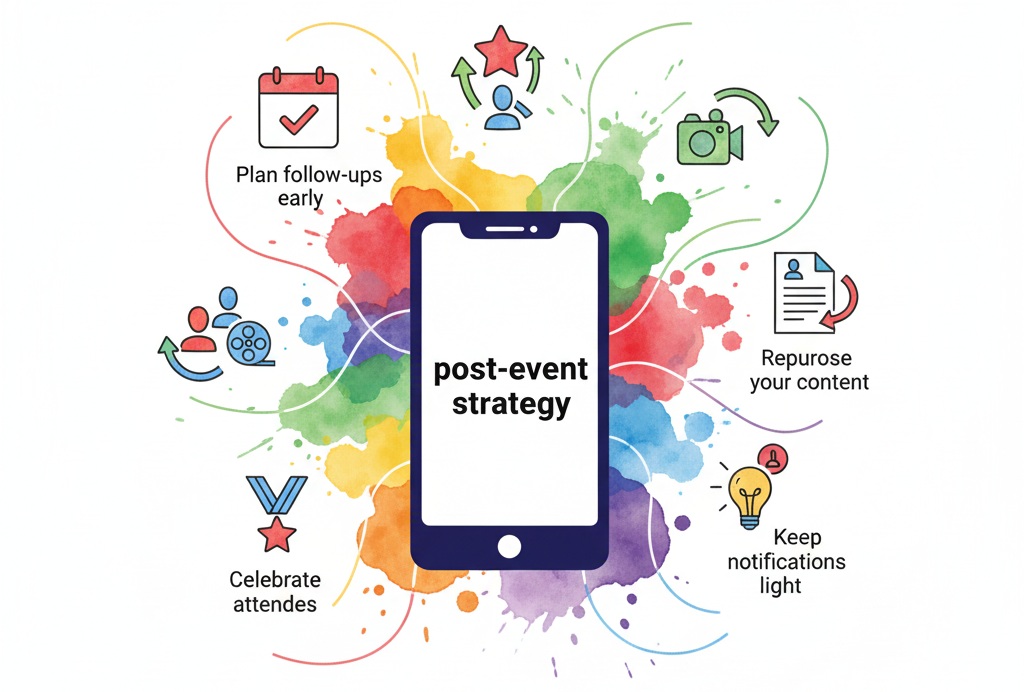
A great post-event plan combines timing, storytelling, and smart automation. Here’s what we recommend:

  1. Plan follow-ups early. Before your event starts, map your post-event content schedule.
  2. Segment your audience. Tailor push notifications for speakers, sponsors, or VIPs.
  3. Repurpose your content. Turn session Q&As into blog snippets or quick video reels.
  4. Celebrate attendees. Recognize top participants or most-shared posts right inside your app.
  5. Keep notifications light. One relevant message beats five ignored ones.

At Yapp, we’ve seen event organizers achieve up to 40% higher engagement rates in the weeks following an event when they plan their post-event content in advance. “Yapp’s push notifications are gold after an event,” says one of our product leads. “We’ve seen clients re-engage more than half their attendees just by delivering one meaningful post-event update.”

Another real-world win: Schools That Can, a national nonprofit, used Yapp to run their annual National Forum smoothly and then followed up with attendees afterward. The team sent thank-you notes, session highlights, and next-year registration reminders right through the same app that hosted their schedules and speaker bios. Attendees stayed engaged long after leaving the venue.

How can you measure long-term impact?

Engagement doesn’t stop when the event ends—it just changes shape. Use your app analytics to track what content users revisit, which notifications they tap, and how your community interacts over time. When Verizon used Yapp to streamline internal events, their teams stayed active between sessions, turning one-off training into ongoing conversations.

A few quick wins we’ve noticed:

  • Reuse your event app as a year-round community hub.
  • Use polls or quick surveys to capture satisfaction data.
  • Track clicks on post-event links or sponsor offers.
  • Keep your content refreshed—post quarterly updates or mini-events.
  • Highlight user-generated content in the app feed.

As one Yapp customer put it, “Our app became our post-event engine. People kept using it for weeks because it was where all the value lived.”

When we review analytics from thousands of Yapp apps across industries, the pattern is clear: the most successful organizers treat their apps like living communities, not disposable tools. That mindset shift—seeing your event app as an engagement ecosystem—transforms short-term buzz into long-term brand loyalty.

Why post-event engagement is your secret advantage

Post-event campaigns often outperform pre-event marketing in driving conversions. Why? Because your audience already knows you and has invested time with you. The goal is no longer to attract attention—it’s to deepen connection.

Using a mobile event app like Yapp, you can build a rhythm of interaction that keeps your brand top-of-mind all year. Push updates about related content, share industry news, or launch micro-polls that keep the community learning and responding. When attendees see consistent value, they stay subscribed, share the app, and show up next year more invested than ever.

Cole Haan, for instance, used Yapp not for external events but to sustain internal communication across stores. They turned their app into a social hub for employees to share inspiration, recognition, and brand updates. That same principle applies to external events: people want to stay part of something meaningful.

At Yapp, we’ve seen this trend explode across conferences, festivals, and nonprofit gatherings. When your app becomes the digital home base of your community, every post-event action compounds the impact of your initial event. That’s what we call sustainable engagement.

Ready to make your next event better? Start your trial now!

Use Live Polls in Mobile Event Apps to Engage Attendees

  • Yapp explains how live polls inside mobile event apps turn passive audiences into active participants.
  • Polls and in-app Q&A boost interaction, surface insights, and make sessions feel more human and responsive.
  • Conferences, nonprofit forums, and internal trainings are all strong use cases for this feature.

Live polls turn passive audiences into active participants. Inside mobile apps for events, they transform the energy in a room, giving every attendee a voice—instantly. At Yapp, we’ve seen live polls and in-app Q&A become the secret sauce for engagement at conferences, nonprofit forums, and internal training alike.

With the right tools, anyone can run polls that boost interaction, gather insights, and make events feel more human.

Read how Yapp helps event organizers connect audiences effortlessly.

Why does interaction matter more than ever?

We’ve all been to that session where the presenter asks, “Any questions?” and the silence could echo across the hall. Attendees want to engage—they just need a simple, low-pressure way to do it. Live polling inside a mobile app for events breaks that barrier.

It encourages quick participation, real-time feedback, and democratic discussion. Instead of one person at a mic, everyone in the room contributes from their phone.

And it’s not just about fun. Engagement has measurable benefits:

  • More attentive audiences retain information longer.
  • Speakers adjust content based on immediate feedback.
  • Organizers collect actionable data for post-event decisions.
  • Sponsors gain visibility through branded polls or trivia.

As one of our customer success specialists puts it: “When attendees open the Yapp app and see a poll pop up, participation skyrockets. You can feel the shift in energy immediately.”

What makes live polling so powerful inside an event app?

Here’s where the magic happens—live polls and Q&A make events interactive from the palm of your hand. These features aren’t standalone gimmicks; they’re built into the flow of a Yapp-powered event.

Five reasons event pros love using live polls:

  1. Instant connection. Attendees can respond from their seats without speaking up.
  2. Actionable insights. Organizers get live data they can display or export.
  3. Increased retention. People remember what they interact with.
  4. Seamless integration. Yapp’s no-code tools make adding polls simple and fast.
  5. Inclusive engagement. Everyone participates equally—onsite or virtual.

When Schools That Can hosted their National Forum, they needed a way to communicate with 150+ educators nationwide. With their Yapp app, attendees received updates instantly and interacted through notifications and Q&A. According to Director of Growth Casey Lamb, “People loved it! Ninety-six percent said logistics ran smoothly, and Yapp helped us communicate more effectively.”

Those same tools that streamlined logistics also encouraged participation—attendees stayed connected, informed, and involved.

One Yapp product manager explains, “We’ve seen event organizers use live polls to choose breakout topics on the fly or even crowdsource awards during closing sessions.” That kind of real-time flexibility simply isn’t possible with paper agendas or static slides.

How can you bring live polls to your next event?

Using Yapp, you don’t need to be a developer—or even particularly tech-savvy. Here’s how to create engagement that lasts beyond the applause:

  1. Start with your goal. Decide what insights or actions you want from attendees—feedback, learning checkpoints, or sentiment tracking.
  2. Set up polls in your Yapp app. Add a Polls page, write a few focused questions, and schedule them to appear at key moments.
  3. Promote participation early. Encourage attendees to download the app before the event and tease interactive elements in emails or signage.
  4. Go live and show results. Display real-time outcomes on screens to validate attendees’ input.
  5. Follow up. After the event, export poll data and share highlights in your next communication.

One Yapp customer in the tech sector told us, “We used in-app polling during our internal summit, and it completely changed the energy of our sessions. People stayed off their email and in the moment.”

From nonprofit forums to corporate training, organizers love how fast Yapp adapts to audience needs. Uncubed, for example, saved over $100,000 annually by switching to Yapp, while keeping over 5,000 attendees informed and engaged across multiple cities.

The takeaway? When communication is centralized and interactive, engagement naturally follows.

What happens after the applause?

The real impact of live polls doesn’t end when the event wraps. The insights you collect continue to add value long after attendees go home.

Poll data helps you understand what topics resonated most, which speakers connected best, and what your audience wants next year. It’s a goldmine for planning future content, improving programming, and even pitching sponsors with evidence of engagement.

As one of our product leads says, “Live polling isn’t just a feature—it’s a feedback loop. The smartest event planners use those results to evolve their experiences year after year.”

That’s exactly what Verizon achieved when they rolled out Yapp across multiple training events. Their teams used notifications and polls to keep hundreds of employees engaged, reducing paper use by 10% and uniting dispersed regional teams under one digital hub.

Whether it’s a 100-person seminar or a 5,000-person conference, the combination of instant communication, live interaction, and post-event analytics gives organizers a full-circle engagement strategy—powered by Yapp.

Ready to make your next event better? Start your free trial now!

Using an Event App Builder to Manage Event Timelines

  • Yapp shows how an event app builder keeps speakers, staff, and attendees aligned as schedules change.
  • Real-time timeline updates replace spreadsheets, scattered emails, and outdated printed agendas.
  • Teams managing complex event schedules across tracks, venues, or audiences will find this especially helpful.

Keeping an event on schedule isn’t just about logistics — it’s about keeping everyone in sync. From keynote speakers to attendees, even a small delay can ripple across the day. That’s where an event app builder changes the game. Instead of juggling spreadsheets, emails, and printed schedules, organizers now rely on centralized mobile apps that update in real time.

At Yapp, we’ve seen this transformation firsthand. Our customers use Yapp to coordinate complex event timelines across industries — from education and tech to retail and nonprofits — saving hours of stress and thousands of dollars. (Just ask Uncubed, who cut over $100,000 in costs while streamlining updates for 5,000+ attendees.)

How can an event app builder simplify your schedule?

Managing a timeline manually means constant back-and-forth. Using an event app builder lets you automate those updates and keep the entire audience informed — instantly. The process looks something like this:

  • Centralized schedule management: Edit and publish session times directly in the app, no coding required.
  • Real-time notifications: Send push alerts when speakers change or sessions move.
  • Interactive agendas: Attendees build personalized schedules on their phones.
  • Cross-team visibility: Everyone — from volunteers to vendors — sees the latest version.
  • Offline access: Even if Wi-Fi drops, schedules stay available on devices.

When Schools That Can hosted their 10th annual national forum, they ditched paper schedules and kept logistics smooth using Yapp’s built-in tools. The result? A 96% satisfaction rate and 2,700 sheets of paper saved. As Casey Lamb, their Director of Growth, put it: “Yapp helped us communicate more effectively.”

Why real-time updates matter more than ever

Last-minute changes are inevitable — and attendees expect immediate communication. We’ve watched countless event teams move from reactive to proactive communication once they start using mobile apps for events like Yapp’s mobile event app. Instead of frantic text chains or crowded inboxes, push notifications do the heavy lifting.

One Yapp product manager explains, “Before we built timeline automation, our users spent hours revising PDFs. Now, they update an event once, and every attendee sees the change instantly.”

Another Yapp designer adds, “We wanted it to feel like a living event — one where the timeline evolves naturally with the day, not against it.”

That approach makes a difference in user engagement, too. Across events built on Yapp, average attendee interaction rates climb sharply when push notifications and schedule updates are used together. It’s about keeping people informed — and reducing that dreaded “Where am I supposed to be?” question.

Events like the London Screenwriters’ Festival saw that value firsthand when they used Yapp to pivot a 3-day live event into a month-long virtual experience. The team pushed over 100 schedule updates during the festival — all in-app and on time. Without it, they would’ve faced chaos. With it, they pulled off an entirely new event format.

We often tell planners: a timeline is more than a schedule — it’s the heartbeat of your event. When that rhythm falters, so does attendee confidence. With instant updates, session reminders, and smart automation, you’re not just keeping people informed; you’re keeping energy high and experiences consistent.

And that’s why Yapp’s team obsesses over ease of use. “If you can send an email, you can build a Yapp app,” one of our engineers likes to say. It’s drag-and-drop simple — but powerful enough for events with thousands of participants.

What steps can you take to keep your timeline on track?

Once you’ve chosen your event app builder, keeping your event on schedule is simple:

  1. Map your timeline early. Start with your core sessions, speakers, and breaks.
  2. Build your app in draft mode. Upload your schedule, speakers, and maps before launch.
  3. Test notifications. Schedule reminder alerts for key sessions or transitions.
  4. Launch to attendees. Share your app link via email or QR code.
  5. Update live. Make on-the-fly edits — attendees see changes instantly.

We’ve seen this process transform events big and small. Uncubed, for example, uses Yapp’s scheduling tools to manage eight multi-city conferences annually, creating each app in under an hour. No developers. No reprints. Just real-time clarity for everyone involved.

As one of our customer success leads says, “When planners realize they can fix a timing issue from their phone while standing backstage, it’s a lightbulb moment. That’s when Yapp stops being a tool and becomes part of their event rhythm.”

And it’s not just about efficiency — it’s also about sustainability. With digital schedules replacing thousands of printed sheets, event teams dramatically reduce waste. It’s good for the planet, and it looks professional to sponsors and attendees alike.

Event teams who integrate digital scheduling also gain better analytics. You can track engagement — who’s viewing sessions, where attendees spend time, and which updates draw attention. Those insights shape smarter future planning and more tailored event experiences.

Event planning is hard enough — your timeline shouldn’t add to the chaos. With an event app builder, your schedule becomes a living, breathing hub of information. Ready to see it in action?

Ready to make your next event better? Start your trial now!

How to Drive Better Attendee Networking with Your Event App

  • Yapp explains how an event app can help attendees connect before, during, and after sessions.
  • Networking features turn the app from a schedule tool into a space for conversation, community, and relationship-building.
  • Organizers of summits, conferences, and education events can use this to create stronger attendee value.

When attendees invest time and money to be at your event, they’re not just showing up for sessions — they’re there to connect. Networking is the heartbeat of any great event. And the good news? The tools to spark those connections are already in your event app.

At Yapp, we’ve seen organizers transform passive crowds into thriving communities just by unlocking the right app features. Whether you’re running a corporate summit or an educational forum, your mobile app can do more than host schedules — it can host relationships.

Read how Uncubed used Yapp to engage 5,000+ attendees and saved over $100,000 by replacing print materials and outdated systems.

What’s holding your attendees back from connecting?

Even the most engaging event loses energy when people struggle to meet. Common blockers include:

  • Too many simultaneous sessions
  • No central hub to share interests
  • Missed updates about networking sessions
  • Limited access to attendee info

We’ve heard it firsthand from customers like Schools That Can, whose team needed one place to coordinate communication between 150 participants. With Yapp, they replaced scattered spreadsheets with one simple app — complete with attendee updates and push notifications — and saw engagement soar.

When you remove friction, connections happen naturally. That’s where your event app becomes your networking MVP.

How can your event app boost attendee networking?

Here’s how you can use built-in app features to turn your crowd into a connected community:

  • Create a central social feed. Give attendees a real-time space to post updates, photos, or start conversations — like Verizon does during internal events with Yapp’s news feed and photo sharing features.
  • Use push notifications to drive meetups. Instant reminders about mixer sessions or group activities keep everyone informed and encourage spontaneous networking.
  • Highlight attendees and speakers. Add short bios and photos so connections feel personal before the first handshake.
  • Incorporate hashtags and shared content. Integrate social media or in-app posts to spark dialogue long after sessions end.
  • Add gamification or “connection challenges.” Reward those who make the most introductions — simple, fun, and surprisingly effective.

These tactics often take minutes to set up in Yapp — no coding or tech skills required.

What does successful in-app networking look like?

The London Screenwriters’ Festival needed a digital hub for 1,000+ attendees to access schedules and connect despite constant changes. With Yapp, they built an easy-to-update app that became everyone’s go-to networking guide. Attendees stayed informed, engaged, and connected — all from their phones.

As one Yapp customer put it, “We needed something we could put in people’s hands and say, ‘Look at your phone for the answers.’” That’s exactly what a smart event app does — it keeps the information flowing and the conversations alive.

How we’ve seen it work behind the scenes

We’ve helped organizers host everything from nonprofit forums to retail summits — and the most successful networking outcomes share three ingredients: clarity, access, and fun.

1. Clarity through communication.
With unlimited push notifications, Yapp organizers can make quick updates when schedules shift. Jenna from our team shared, “I’ve seen customers save entire sessions by pushing out real-time updates minutes before a networking lunch. That single tap can make the difference between 20 people showing up and 200.”

2. Access through community features.
Not every attendee wants to approach someone cold. By using the People page or photo-sharing tabs in Yapp, they can recognize familiar faces before they meet. “When attendees can browse speaker bios and connect online first, they walk into the room with confidence,” says Miguel, our customer success lead.

3. Fun through engagement tools.
Adding photo contests or polls sparks conversation naturally. One client ran an “Event Selfie Challenge” using Yapp’s photo-sharing feature — by the end of the day, their feed was full of smiles and spontaneous connections.

How Yapp bridges virtual and in-person networking

Today’s events often mix formats. You might have half your audience on-site and the rest tuning in virtually. A mobile event app bridges that divide beautifully. Attendees can join the same conversations, react to live polls, and browse content, no matter where they are.

When Cole Haan used Yapp internally, they turned their mobile app into a digital lounge for store managers nationwide. Team members shared photos, recognition shoutouts, and style ideas — all within the app. Over 2,400 in-app interactions later, engagement hit an all-time high. The same principles apply to professional conferences: when people see and celebrate each other’s wins, they connect faster.

Turning your event app into a networking powerhouse

If you’re ready to level up your event’s networking energy, start with these steps:

  1. Set up your app early. Add session schedules, attendee lists, and social feeds before launch.
  2. Encourage interaction. Send push notifications inviting attendees to share thoughts or photos on day one.
  3. Spotlight super connectors. Feature attendees or sponsors driving the most engagement.
  4. Keep conversations going post-event. Leave the app open for a few weeks so connections can continue to grow.

As our senior product manager, Lila, often says, “Networking shouldn’t stop when the event ends — your app can turn every event into a year-round community.”

Ready to make your next event better? Start your trial now!
How to Choose the Best Mobile Event App Platform

  • Yapp outlines how to evaluate mobile event app platforms based on real event needs, not just feature lists.
  • The right platform improves communication, attendee experience, and data visibility without draining budget or staff time.
  • Event organizers comparing vendors or planning a new app rollout will benefit most from this guide.

Why does choosing the right mobile event app matter?

Not all event tech is built the same. The right mobile event app can transform a chaotic event into a connected, data-rich experience. The wrong one? It can drain your budget, frustrate attendees, and leave your team scrambling to update information manually.

We’ve seen this firsthand with event organizers who switched to Yapp’s mobile event app after struggling with clunky, expensive tools. One Yapp product lead put it simply: “A good event app should save you time before the event, not just engage people during it.”

At Yapp, we’ve helped everyone from global brands to nonprofits streamline event management. Uncubed used Yapp to power conferences across multiple cities and cut over $100,000 in costs by ditching printed materials and outdated software.

For many teams, switching to a flexible event app builder means more than just going paperless. It creates a single source of truth for schedules, updates, and attendee engagement. When your app becomes the hub of your event, people stay informed—and your staff stays sane.

A Yapp customer experience manager told us: “When planners see how fast they can publish changes or send push notifications, it clicks. They realize they can manage live events without feeling overwhelmed.” That sense of control is what defines the best mobile event platforms.

What features define the best mobile event app?

Before signing a contract or starting a trial, take a close look at what really matters.

Here are the top criteria our team recommends when evaluating mobile event platforms:

  • Ease of use — Can non-technical staff update the app quickly? You shouldn’t need developers or weeks of prep.
  • Instant updates — Push notifications, schedule changes, and announcements should happen in real time.
  • Customization — The app should look and feel like your event, not a generic template.
  • Engagement tools — Polls, photo sharing, and social feeds keep attendees active between sessions.
  • Affordability — Transparent pricing and no hidden per-event fees make scaling simple.

From our perspective, these are non-negotiables. One Yapp customer success manager put it best: “If your team needs to call support to change a session time, the app isn’t helping—it’s slowing you down.”

Schools That Can, a national nonprofit, learned this lesson fast. They used Yapp to run their 10th annual National Forum and saw 96% of attendees say logistics ran smoothly thanks to the app’s unlimited push notifications.

A few organizers even told us they’ll “never go back to spreadsheets or printed schedules again.” That’s the real ROI—time saved and stress reduced.

Plus, engagement doesn’t stop when the event ends. The best mobile event apps allow organizers to capture post-event data and feedback instantly. By tracking which sessions attendees liked most or how often they engaged with updates, event teams can improve next year’s experience effortlessly.

Yapp’s analytics dashboard, for example, lets organizers measure engagement across multiple events in one place—something larger platforms often charge extra for. As one Yapp product designer said, “We wanted to give planners the power of big data without the big learning curve.”

How should event organizers evaluate mobile event app options?

Choosing the right platform isn’t just about ticking boxes—it’s about finding a tool that grows with your needs.

Follow these steps to evaluate your options effectively:

  1. Define your must-haves. Start with your team’s pain points: Are updates slow? Is communication scattered?
  2. Test for usability. Give the app to someone who’s never built one before. If they can create an event app in under an hour, you’re on the right track.
  3. Compare pricing transparency. Look for vendors with flat rates or inclusive models rather than per-event costs.
  4. Ask about support. Responsive customer service during your event can make all the difference.
  5. Check references and case studies. Look for real-world examples, like how Yapp helped nonprofits and conferences save money and boost engagement.

Our product manager at Yapp always reminds new users: “Your event doesn’t pause for tech delays. Choose an app that moves at your speed.”

When Uncubed moved to Yapp, their events went from taking weeks to prep to being ready in under an hour, while improving communication and sponsor visibility. That’s the power of a flexible, intuitive mobile event app designed for real-world challenges.

If you’re planning your next big event—whether it’s a corporate conference, a school forum, or a community gathering—don’t underestimate the role of simplicity. The best platforms let you focus on your audience, not your technology stack.

As one Yapp engineer said, “We built Yapp so organizers could spend less time managing apps and more time creating experiences people remember.” That’s the heart of what makes a great event app—technology that disappears into the background while your event shines.

And if you’re curious what that looks like in action? Try Yapp’s event app builder and see how quickly your ideas can turn into a beautiful, branded app that’s ready to share.

Ready to make your next event better? Start your trial now!
Build an Event App That Reflects Your Brand

  • Yapp shows how a branded event app can make every attendee touchpoint feel more cohesive and intentional.
  • Visual consistency and brand-aligned design help strengthen engagement, trust, and the overall event story.
  • Organizers who want their app to match signage, messaging, and event tone should use this approach.

Consistency isn’t just about logos or colors—it’s about the experience. When your attendees open your event app, every tap should feel like your brand. The right app doesn’t just share schedules and maps; it extends your event’s identity into everyone’s hands.

At Yapp, we’ve seen it firsthand. From Schools That Can’s National Forum to Uncubed’s multi-city conferences, branded event apps keep audiences engaged and informed while strengthening the story behind the event.

When your attendees feel that cohesion—visuals that match your event signage, tone that mirrors your emails, and navigation that feels intuitive—they don’t just participate. They belong.

How can your event app deliver your brand story?

Your brand lives in the details—tone, visuals, and how people interact with your content. When those details carry over into your event app, attendees trust your organization more deeply.

Here’s what our customers tell us works best:

  • Use your brand visuals. Upload your color palette, fonts, and logo to keep a cohesive look.
  • Match your tone. Customize page names and section headers so they sound like you, not a template.
  • Personalize notifications. Write updates that sound friendly, helpful, and in tune with your brand’s voice.
  • Add multimedia. Photos, videos, and sponsor spotlights make your app feel alive.
  • Align content order with your brand priorities. If community is your core, make social feeds front and center.

As one of our customer success managers puts it, “A well-branded app isn’t about decoration—it’s about recognition. People should know it’s your event before they even see your logo.”

When you combine design, voice, and function, your event app becomes an extension of your marketing team. It reinforces your brand at every moment—from registration to the post-event survey.

What can branded consistency do for engagement?

When Uncubed launched their event apps with Yapp, they cut costs by over $100,000 and made communication smoother across 5,000+ attendees. Their branding—modern, bold, and people-focused—was reflected throughout the app, helping them connect job seekers and employers in one cohesive digital space.

Similarly, Cole Haan uses Yapp to reinforce its refined, fashion-forward brand. Their internal communication apps help employees “show off their style” while staying true to Cole Haan’s mission of elegance and innovation.

For nonprofits like Schools That Can, a branded Yapp app improved logistics and attendee satisfaction—96% of attendees agreed their event ran smoothly thanks to clear, consistent messaging.

Brand consistency in your app does more than make things look nice. It:

  • Strengthens recall and trust for sponsors and partners.
  • Encourages attendees to engage with in-app content.
  • Makes it easier for staff and volunteers to communicate effectively.
  • Reduces friction in navigation and comprehension.
  • Enhances post-event surveys and follow-up participation.

When your branding shines through every pixel, attendees feel like they’re part of something polished and purposeful.

As one of our Yapp designers shared, “Every well-branded app creates a sense of calm for users. They instantly understand where they are and what to expect. That’s design psychology working hand in hand with brand strategy.”

How do you create a branded event app in minutes?

You don’t need a designer or a developer to get started. Here’s how to build your own on-brand app fast:

  1. Start with a mobile event app from Yapp. Choose your layout and upload your logo, banner, and colors.
  2. Add your content. Create pages for schedules, maps, speakers, sponsors, and social feeds.
  3. Use push notifications to communicate real-time updates in your brand’s voice.
  4. Invite attendees by sharing your app’s unique link or QR code.
  5. Collect insights. Use analytics to see which pages resonate most with your audience.

But creating a branded app isn’t just about setup—it’s about evolving it as your event grows.

Advanced branding moves we’ve seen work well:

  • Integrate brand storytelling: Use your welcome page to share your mission, not just logistics.
  • Feature your partners or sponsors with custom sections that align with your tone.
  • Incorporate feedback loops: Create a quick survey page where attendees can offer ideas—on-brand transparency builds trust.
  • Keep your tone consistent: Even alerts (“Doors closing soon!”) can sound friendly and brand-aligned.
  • Leverage analytics: Track engagement and optimize future event design.

Why does Yapp make branding so easy?

Unlike custom app builds that take weeks and cost thousands, Yapp lets you make updates in minutes—no code, no stress.

When Verizon used Yapp for internal events, they replaced printed guides and cut their event spending by 10%. But more importantly, they created a single branded experience that connected employees across multiple regions.

Yapp’s flexible structure means you can bring your brand to life—no matter your industry:

  • Corporate teams can unify internal culture.
  • Nonprofits can stay mission-aligned while saving resources.
  • Conferences can look professional while staying nimble.

As one Yapp engineer puts it: “We built Yapp so teams could design and own their mobile experience. Branding shouldn’t require a dev team—it should just work.”

Turning consistency into connection

A strong brand builds recognition. A consistent brand builds loyalty.

When your event app mirrors your website, signage, and social tone, your audience doesn’t just interact—they immerse. Every page click, notification, and update becomes another touchpoint that strengthens your connection.

Think about it: your event app isn’t just a utility. It’s your event’s voice in your attendees’ pocket.

Ready to make your next event better? Start your trial now!

How Internal Apps Help Distributed Teams Stay Connected & Inspired

  • Yapp explains how internal apps help distributed teams stay informed, connected, and motivated across locations.
  • Mobile-first communication supports stronger culture, better visibility, and more consistent engagement than scattered tools.
  • Companies with remote, hybrid, or field-based teams will get the most value from this strategy.

Why distributed teams struggle with connection

Work doesn’t happen in one office anymore. From retail associates in stores to field reps on the road to hybrid teams across time zones, today’s workforce is more distributed than ever. Flexibility is a strength—but it also makes communication harder.

Emails, intranets, and video calls can’t bridge the emotional or logistical gap. They’re too static, too siloed, and too overwhelming to sustain engagement. Distributed teams need tools that feel alive—immediate, accessible, and interactive.

As one Yapp teammate said: “When employees feel connected, geography stops mattering. But when tools don’t work, distance feels bigger than ever.”

A connected culture doesn’t just happen—it’s built intentionally. The right communication platform can turn miles into moments, giving teams a shared sense of purpose even when they’re apart.

What happens when communication tools fall short?

When distributed teams rely on outdated systems, the ripple effects hit both morale and productivity:

  • Delayed communication: By the time updates arrive, they’re already outdated.
  • Uneven experiences: HQ stays informed, while remote and retail staff are left behind.
  • Low morale: Disconnected employees lose motivation fast.
  • Missed opportunities: Great ideas get stuck locally instead of spreading company-wide.

Cole Haan lived this reality. With store associates across the U.S., HQ struggled to keep everyone aligned. Email updates and printed materials created inconsistent experiences. By building an internal app with Yapp, Cole Haan centralized training, recognition, and campaign content—connecting hundreds of stores through one branded hub. The change was immediate: associates felt more informed, supported, and inspired to represent the brand consistently.

Verizon faced similar communication gaps during its large-scale training programs. Hundreds of employees attended regional events, but logistics relied on paper-heavy systems. After shifting to Yapp’s mobile event apps, Verizon improved communication, boosted participation, and reduced event costs by 10%.

These examples show that when communication tools evolve, culture follows.

How internal apps create connection and inspiration

The solution isn’t more emails—it’s smarter, more human communication. An internal communication app or mobile event app repurposed for employee engagement gives distributed teams what they need most: clarity, consistency, and connection.

Here’s how internal apps make it happen:

  • Instant communication: Push notifications deliver updates immediately to everyone.
  • Shared resources: Training guides, policies, and videos live in one searchable hub.
  • Two-way engagement: Polls, feedback forms, and social feeds let employees contribute, not just consume.
  • Recognition at scale: Shoutouts and achievements get celebrated company-wide.
  • Cultural alignment: Consistent messaging ensures every employee connects to the brand mission.

A Yapp teammate shared: “The best part is watching employees engage with each other across regions. Suddenly it’s not just communication—it’s community.”

When employees can interact instead of simply receive, communication becomes a source of inspiration. They see wins across departments, learn from each other, and feel part of something larger than their own role.

And as reinforced in our guide to transforming internal communication, mobile-first platforms outperform static systems by over 60% in adoption and engagement.

Empowering leaders and local voices

Internal apps don’t just connect teams—they amplify leadership communication. When managers, executives, or team leads can post updates, recognize wins, or share reflections directly in the app, employees hear one voice across all locations. That visibility builds trust.

At the same time, local empowerment thrives. Store managers, regional leads, and field reps can post localized updates, celebrate wins, or share creative solutions. This balance—top-down alignment with bottom-up participation—creates a culture that feels both unified and authentic.

Recognition posts, training recaps, and campaign stories become daily touchpoints that strengthen belonging. Teams no longer feel like distant satellites—they feel like part of one connected organization.

How to roll out an internal app for distributed teams

If you’re ready to close the communication gap between HQ and the frontline, here’s a practical roadmap:

  1. Identify communication gaps — Map where information currently stalls or gets lost.
  2. Choose a no-code platform — Platforms like Yapp let non-technical teams create and update content fast.
  3. Pilot with one region or department — Gather early feedback before scaling.
  4. Incorporate interactivity — Use polls, recognition posts, and Q&A to build engagement.
  5. Scale gradually — Expand the app to new teams, track analytics, and iterate your approach.

Both Cole Haan and Verizon followed this model—and the results went beyond operational improvements. Employees began sharing more ideas, engaging with peers, and feeling a stronger connection to company culture.

A Yapp employee explained it best: “When communication is centralized and interactive, employees stop feeling like they’re working for the company and start feeling like they’re building with it.”

Connection is culture

Distributed teams don’t have to feel disconnected. When you make communication easy, recognition visible, and participation effortless, you transform distance into unity.

Internal apps bring culture to life—making every employee part of the same conversation, no matter where they log in. The result is a stronger sense of belonging, lower turnover, and a team inspired to deliver their best work every day.Your employees deserve more than email threads and outdated portals. Give them a connection that inspires.

Build your internal app today and see how Yapp helps distributed teams stay aligned, engaged, and motivated.

The Power of Recognition: Using Apps to Celebrate Employee Wins

  • Yapp shows how internal apps can make employee recognition more visible, timely, and meaningful.
  • Recognition tools help improve engagement, retention, and culture by making appreciation easier to scale.
  • Leadership teams and internal comms managers can use this to celebrate wins across the whole organization.

Why recognition matters more than ever

Recognition isn’t a “nice-to-have.” It’s the foundation of engagement, retention, and culture. Employees who feel valued are 4x more likely to be engaged and 31% more productive. Yet many organizations still fall short—not because leaders don’t care, but because the systems they use don’t scale.

Emails get buried. Intranet shoutouts go unread. Announcements only reach part of the team. The result? Recognition loses its impact, and employees feel unseen.

As one Yapp teammate put it: “Recognition is only powerful if people actually see it. That’s where traditional methods fail.”

The modern workforce expects immediacy, visibility, and participation. Recognition can’t live in a quarterly slide deck—it has to live where employees already are: on their phones.

What happens when recognition falls short?

When employees don’t feel celebrated, the ripple effects reach every corner of the company:

  • Decreased motivation — Teams lose momentum when effort goes unnoticed.
  • High turnover — Employees who don’t feel valued are twice as likely to leave.
  • Culture gaps — Recognition often favors certain teams while others feel forgotten.
  • Missed opportunities — Peer accomplishments and everyday wins go unseen by leadership.

Cole Haan faced this problem with its distributed retail workforce. Recognition efforts often stalled at HQ, leaving store associates disconnected from brand celebrations. By adopting an internal communication app powered by Yapp, the company built a space where recognition became part of daily operations. Associates could see updates, post peer shoutouts, and celebrate milestones across hundreds of stores—all in real time. Engagement soared, and employees reported feeling more connected to the brand than ever before.

Verizon saw similar results. Their large-scale training and sales events relied heavily on in-person recognition before switching to Yapp’s mobile event apps. Now, achievements are celebrated instantly across teams, with photo feeds and notifications highlighting standout performances. The switch cut event costs by 10% and strengthened cross-department collaboration.

Recognition, once an afterthought, became a driver of company culture.

As explored in our guide to transforming internal communication, organizations that use mobile-first tools see higher engagement, stronger morale, and lower turnover rates.

How apps transform recognition into culture

Recognition shouldn’t happen only at annual meetings or award ceremonies. With an employee recognition app—or even a mobile event app adapted for internal use—companies can make appreciation constant, visible, and participatory.

Here’s how these apps transform culture:

  • Push notifications for instant celebration: Acknowledge wins right when they happen.
  • Photo sharing & social feeds: Let peers spotlight one another in real time.
  • Leaderboards & gamification: Add friendly competition to boost motivation.
  • Dedicated recognition sections: Create a central hub for shoutouts and milestones.
  • Scalable visibility: Share wins across departments, offices, or regions—instantly.

When recognition becomes part of the workday, culture shifts. Employees no longer wait for leadership approval—they celebrate each other freely. It’s recognition democratized.

Psychologically, peer-driven recognition creates a powerful feedback loop. When employees see their peers celebrated, they’re inspired to contribute more and recognize others in turn. That positive momentum fuels engagement across all levels of the organization.

Leadership visibility matters too

Recognition works best when it flows both ways. While peer-to-peer celebration is critical, leadership visibility adds weight and credibility. When executives or managers publicly acknowledge achievements in-app—whether it’s a sales milestone, a customer service story, or a creative breakthrough—it signals that great work is seen and valued from the top.

Internal recognition apps make that easy. Leaders can post quick notes of appreciation, comment on shoutouts, or even share short videos thanking their teams. These micro-moments of connection are small in effort but massive in cultural impact.

It’s not just about motivation—it’s about belonging. Employees want to know their work matters, not just to their direct manager, but to the entire organization. When the CEO “likes” a post or comments on a store win, employees feel an immediate sense of pride and connection.

How to start celebrating wins with an app

If you’re ready to make recognition part of your daily culture, here’s your roadmap:

  1. Launch a recognition hub — Dedicate a section of your internal app for shoutouts, awards, and milestones.
  2. Empower peer-to-peer recognition — Encourage employees to celebrate each other’s contributions openly.
  3. Use multimedia — Share photos, videos, and personal stories to make appreciation authentic.
  4. Align recognition with company goals — Reinforce achievements that support broader business objectives.
  5. Track engagement — Use analytics to understand what kind of recognition resonates most with your teams.

Companies like Verizon and Cole Haan show that when recognition is consistent and visible, it builds stronger teams and measurable engagement gains. The best recognition programs don’t just celebrate outcomes—they celebrate effort, progress, and collaboration.

And the beauty of doing this in an app? It scales effortlessly. Whether you have 50 employees or 5,000, everyone sees and feels the recognition in real time.

Celebrate your people the way they deserve

Employees don’t want recognition once a year—they want it woven into everyday moments. When appreciation is visible, immediate, and shared widely, it becomes part of your culture’s DNA.

With Yapp, you can turn recognition into a daily habit. Build a branded internal app in minutes—no coding or IT team required—and start celebrating wins in real time.

Recognition doesn’t just make employees happier; it drives retention, productivity, and loyalty. When people feel seen, they stay—and they thrive.

Create your internal app today and see how Yapp helps companies turn appreciation into performance.