Category Archives: Product Updates

Exploring Yapp’s New Features: Practical Enhancements to Improve the Yapp Experience

  • Yapp highlights practical product updates that make the app more useful and easier to navigate for creators and users.
  • New features like speaker schedule visibility, company sorting, PowerPoint uploads, Document Cards, and richer sponsor fields improve convenience and engagement.
  • Event organizers and app creators who want a smoother Yapp experience will benefit most from these enhancements.

At Yapp, we continue to evolve using feedback to make practical improvements that make the app more user-friendly and efficient. Let’s dive into what these latest features offer and how they enhance your Yapp experience.

1. Schedule Items on a Speaker’s Profile

Now, with a simple glance at a speaker’s profile, you can see all the sessions they’re involved in. This feature helps to ease navigation within the app. It’s a straightforward addition aimed at helping you quickly find and engage with the sessions most relevant to you.

2. Sort by Company on People Pages

Sorting by company on People pages helps aid app creators in categorizing participants. This enhanced feature offers a neater and more organized view for everyone, potentially aiding in your networking efforts by providing clearer information.

3. Upload PowerPoint Files

The ability to upload PowerPoint files directly helps reduce steps for app creators saving time. Previously, PowerPoint files needed to be converted to PDF in order to upload. This update is about efficiency and convenience, ensuring presentations are uploaded smoothly and without format concerns to improve the creator experience.

4. Document Card

The Document Card feature expands your ability to embed information directly into Rich Text documents. This integration means your users don’t have to switch from a Rich Text page to a Documents page in order to view a document you mention. Less time searching for information, more time engaging with it!

5. LinkedIn and Instagram Fields on Sponsor Pages

The addition of LinkedIn and Instagram fields to Sponsor pages helps improve the connections you make with sponsors and exhibitors. These fields were requested by several customers, and they offer more ways to connect and interact via the Yapp ecosystem.

Continuous improvement of Yapp is our mission

Each new update in Yapp is a step towards a more efficient and user-friendly experience. These features are part of our commitment to continuously refine and improve the app for both creators and users. These enhancements are automatically available to all users, ensuring everyone has access to these practical enhancements.

To learn more about Yapp and start a free trial, check us out here.

Sunsetting the Invitation and Information Pages hero

[Heads Up] We’re Sunsetting the Invitation and Information Pages

Sunsetting the Invitation and Information Pages hero
  • Yapp announces the sunsetting of Invitation and Information pages and explains what that change means for creators.
  • The update helps customers understand which features are being retired and how to adjust their app content moving forward.
  • Yapp users managing older app page types will benefit most from this notice.

We’re gearing up to launch a whole set of new mobile app features and as we do, we felt a little housekeeping was in order first. Since our Rich Text page has more functionality than our Information and Invitation pages, we decided to sunset our Invitation and Information pages.

Why an Invitation Page?

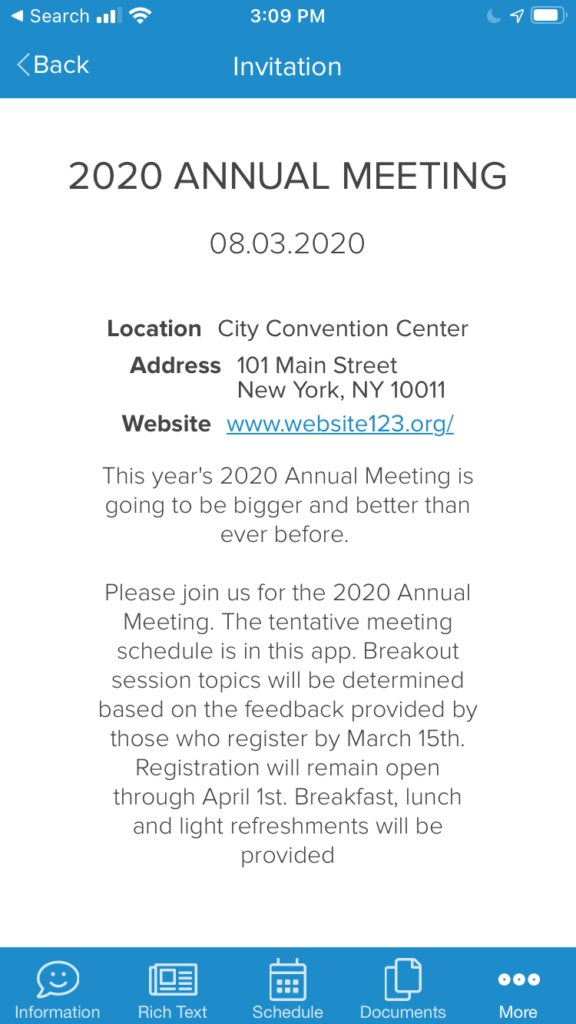
When we first created Yapp, the Invitation page was one of the first page types that we introduced. Since we originally developed Yapp as a mobile app builder for in-person events, the idea for this page was that it would serve as a splash page or teaser page for inviting people to your next event in the app. For example, I could share my app before my event kicked off with an Invitation page that provided app users with details about the upcoming event. Or, create an Invitation page for sharing the details of my next event with my app users.

Here is an example of an Invitation page:

Some Yapp customers also confused our Invitation page with the ability to invite people to their app, which is done instead from your Yapp dashboard or privacy settings. Since it’s important for us to eliminate confusion for a good user experience, we felt removing this page would help.

To invite someone to your app, you can do the following:

  • Add the email address to your privacy settings which will trigger an automatic invite email.
  • Click on the share button below your app on the Yapp dashboard to share via email, QR code, Twitter, Facebook, and one-off SMS messages.

Why an Information Page?

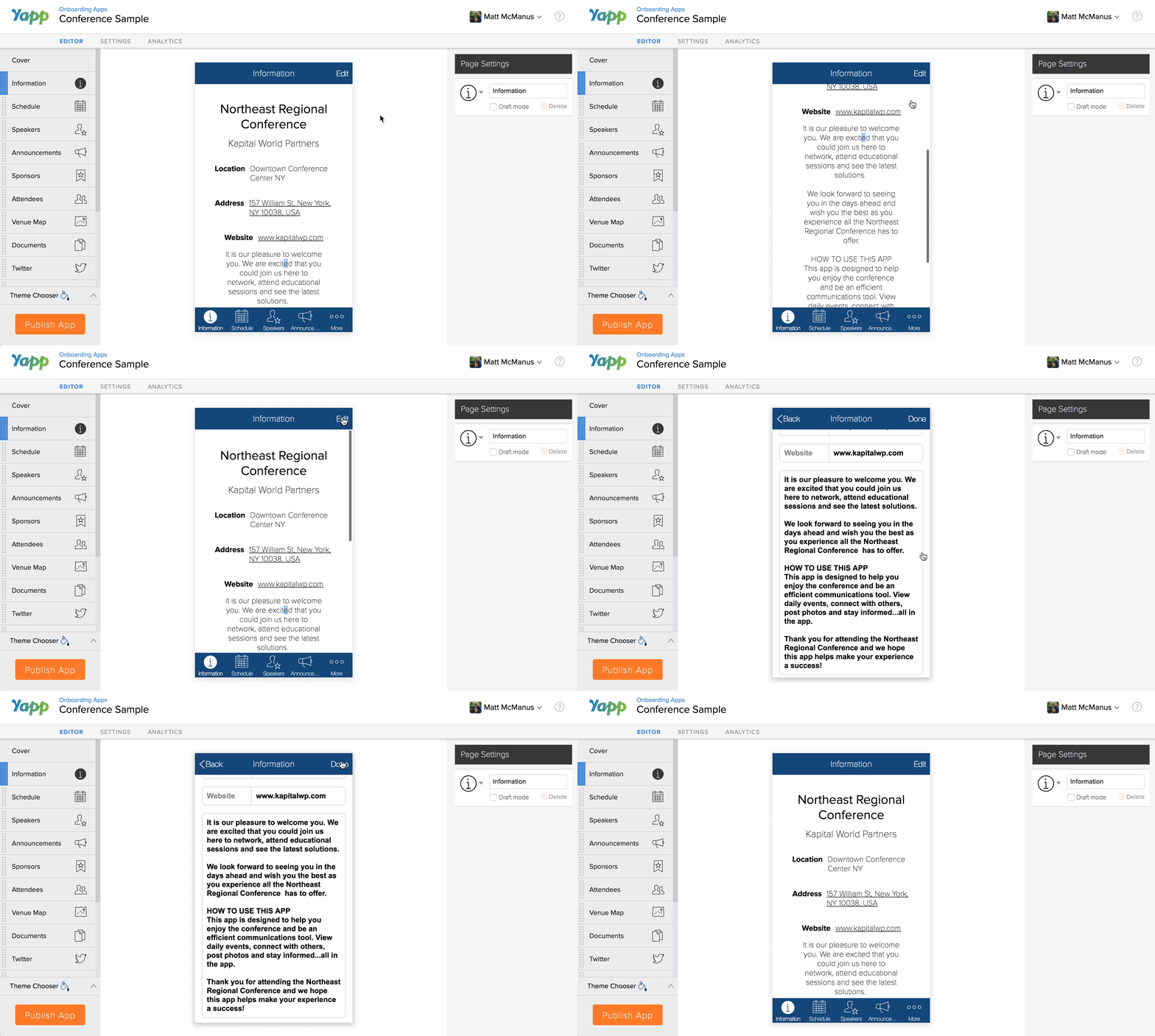
Core to Yapp’s values are ease of use and simplicity, and our Information page was created with that mission in mind. The Information page previously was a template-based page that included a handful of fields you could fill in such as Event Name, Date, Location, and Website URL. However, as our customers grew with our platform, they needed greater flexibility and customization of their content, and soon found this page to be a little too simple for their needs.

Here is an example of our basic Information page:

Information Page Editing - Yapp

Now, we have our Rich Text page which allows you to add simple text and information about your event, community, organization, and app – just like you would have with an Information page. Plus, you can format text with bullets, numbered lists, headers, hyperlinks, call-to-action buttons, images, and videos. Read on to learn about using our Rich Text page in place of the Info page.

Benefits of the Rich Text Page

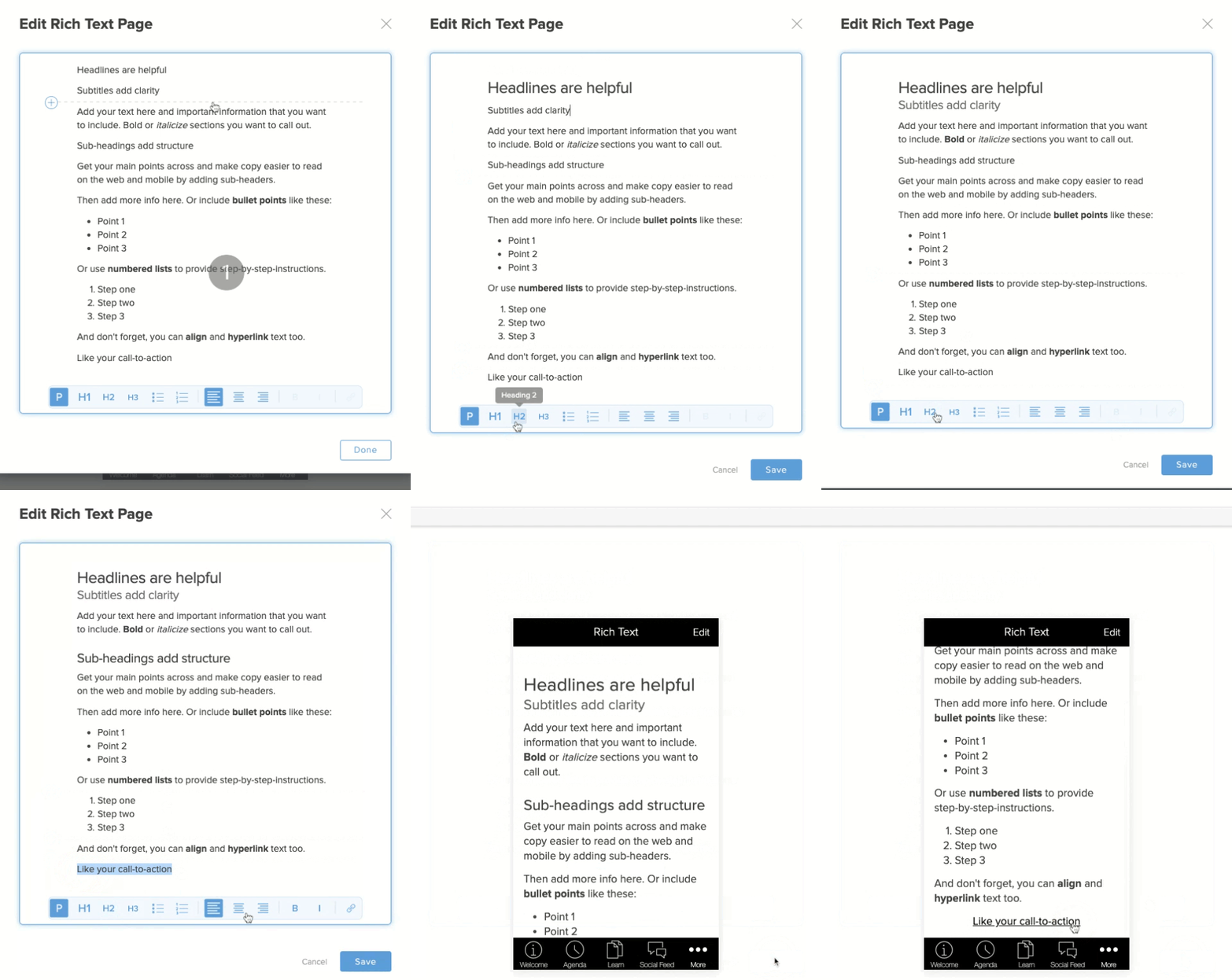
Our Rich Text page is one of our most flexible page types in our Yapp Editor, which is why it has taken precedence over our Information and Invitation pages. With Rich Text Editing you can:

  • Add bullets and numbered lists
  • Bold, italicize, and align text
  • Add H1, H2, and H3 section headers
  • Include JPEG and PNG images
  • Insert YouTube and Vimeo videos
  • Hyperlink text to link to external sites or in-page pages
  • Add call-to-action buttons for visually engaging links

Here is an example of our Rich Text page editing:

Migrating Your Invite & Info Pages

If you currently have Invitation and/or Information pages created in your mobile app(s), these pages will automatically be converted to Rich Text pages on our back-end, and there is nothing you need to do. The content should render and display exactly as you had it before – only with Rich Text functionality. However, if the content is not displaying correctly, please message us at support@yapp.us or start a live support chat with us so we may assist you.

https://vimeo.com/501914505
Information and Invitation Page Conversion

What’s Next?

Now that we’ve tidied things up a bit, we’re ready to move forward with more exciting and useful features for your Yapp mobile apps. Some features that we have planned as part of our product roadmap include, but are not limited to:

  • Improved internationalization of your apps
  • Uploading videos (not just images) to your Social Feed pages
  • Better functionality and design when viewing an app from your laptop/desktop

While we hope to release these features in 2021, our timeframe may change based on what our users need the most. So stay tuned for product updates and more with our YappStories.

sunset banner

[Heads Up] We’re Sunsetting the Crowd Pics and News Feed Pages

sunset banner
  • Yapp announces the retirement of Crowd Pics and News Feed pages and explains the transition for users.
  • The post helps app creators understand product changes, feature direction, and what to do next inside their apps.
  • Yapp customers using those legacy page types will benefit most from this update.

We hear all the time how much people love sharing photos and interacting with each other with Yapp. We also hear how critical Yapp is for communicating important updates to attendees. We’ve been thinking a lot about these two aspects of our product and we have big plans! Before we can roll out these bigger changes, we feel it’s important to tidy up the product. To learn more about the changes that are coming, read on.

Consolidating our social pages

You may have wondered what the difference was between our News Feed, Crowd Pics and Social Feed pages are. Don’t worry, you’re not the only one! Those pages came about over the years to achieve different goals. Yet, as the product has evolved, these pages started to share a lot of the same functionality. That’s why we’re consolidating these pages into the new, super-powered Social Feed page. Here’s what’s in store:

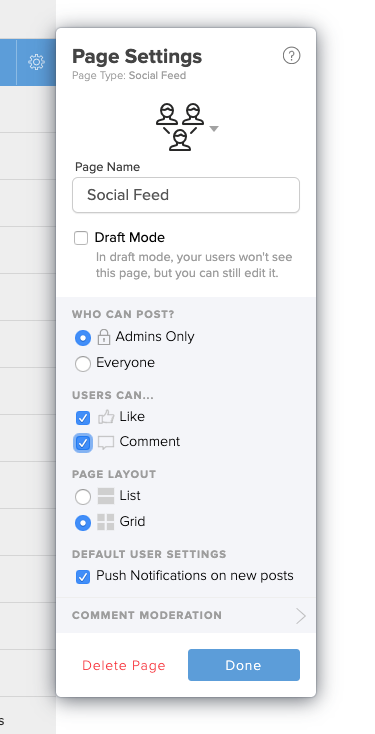
The new social feed page settings

Grid view

Our Crowd Pics page made it easy for users to upload photos and see them in a beautiful grid view. You can now do that with any Social Feed page! Open the page settings, change the layout to Grid, and hit publish. Now your users will see a photo-centric layout.

Admin-only posting

Many of our customers used the News Feed page to send important updates and alerts to attendees. You can now change the permissions on a Social Feed page that only allows App admins to post. This eliminates the need for a separate News Feed page.

Controlling user interaction

Ever wish you could disable comments on your Social Feed page and allow likes? What if you think “liking” is annoying, but you want to allow folks to respond with thoughtful comments? You can now turn off the ability to like or comment on any Social Feed page.

We have also made other improvements, including better push notification settings and design.

“Neat. The Social Feed page is receiving new features. What about my beloved Crowd Pics/News Feed page?”

In the coming weeks, we will be retiring our Crowd Pics and News Feed pages. This will involve migrating all existing users over to configured Social Feed pages. If you used a News Feed page for announcements, it will become a Social Feed page. The settings applied will be “admin-only” with disabled Likes and Comments.

If you used a Crowd Pics page, it will become a Social Feed page with Grid View enabled and disabled Likes & Comments. This should be a seamless and invisible transition for you. The only difference is that you will have access to all the features the Social Feed page has to offer. Want to enable Liking on what used to be your Crowd Pics page? Enable it and then click “publish”.

Despite the retirement of the old page types, when you go to add a new page to your app, you’ll see the same icons as before. The Crowd Pics icon will create a Social Feed page with the appropriate settings. We’ve renamed News Feed to Announcements, but the idea is the same as before.

Future plans for the Social Feed page

As we mentioned earlier, we have some big plans to improve the Social Feed page. Now that we have tidied up these page types, we can start to roll out some shiny, new features! Here are the next releases two on our roadmap:

  • Desktop Posting: We will be adding the ability to post to your Social Feed pages from the desktop. No need to go thumb-crazy on your phone screen if you have your laptop handy.
  • Scheduling Posts: We will be enabling the ability to add social posts in advance and send them out at a set time. This will only be accessible through our desktop editor.

We know many of you have been asking for these features. That’s why we’re doing our best to continue to support the feature folks have come to know and love. Further, this allows us to create new and interesting features that we hope you’ll find useful.

If you have any feedback for us, we’d love to hear it! What features are most important to you? Do you have reactions or ideas to all that we talked about above? Please share them here:

Take 1-min survey

Link
New Features! Richer Profiles, Dynamic People Lists & Profile Claiming banner
  • Yapp highlights new people-focused features that make app profiles and attendee connections more useful.
  • Richer profiles, dynamic people lists, and profile claiming improve networking, personalization, and participant visibility.
  • Event organizers who want better attendee directories and stronger in-app networking will benefit most.

Great news! You can now create richer profiles with dynamic people lists & profile claiming!

Richer Profiles 

You asked for it and we listened. Today, we are pleased to announce even more ways for users to connect with richer profiles. We’ve taken what we built and added more fields providing a richer, more complete profile. 

Your users can now add:

  • Personal information (job title, photo, location and bio)
  • Contact information (phone, email, WhatsApp)
  • Social Accounts (Twitter, Facebook, Instagram and more!)

With the addition of these new fields, users can connect with each other easier than ever before. 

Dynamic People Pages

We have taken our People Page, which up until now needed to be manually maintained and updated by an admin, and made it dynamic. This means that your app users can now be in charge of their profiles including what contact information they want to show. 

As an admin, you can go to any People page and enable users to add themselves to it. All a user has to do is tap on the “Add Profile” button from their device to open their Profile Editor, complete the information and tap “Save” to add their profile to the page. 

Until users start adding their profiles to the page, it can look somewhat empty. But don’t worry, this is where Profile Claiming comes in. 

Profile Claiming

With Profile Claiming, you can take the next step with our dynamic People Page by adding your own standard person records in advance. You can do this individually or by bulk uploading a CSV list to pre-populate the blank page you created. Then select the page setting for “Claim a profile added by an admin”.

A user can now click on that record and rather than add a profile, simply claim their profile. Once a user claims their profile, it will replace any admin added content with user generated content. Now, anywhere that record shows in the app, it will show the users content. 

Don’t worry, if you don’t like what a user has added, or they claimed the wrong profile, you can remove the claim over the original record.


We’d love to hear what you think! Give the new features a try and share your feedback here, post a comment below, or let us know your thoughts by sending a note to support@yapp.us. We are always working on new features and would love to hear from you.

Link
  • Yapp introduces banner advertising as a paid feature for mobile event experiences.
  • In-app banner placements create new sponsor visibility and revenue opportunities inside the event app.
  • Event organizers looking to add sponsor value or monetize app space will benefit most from this feature.

You could now display banner ads showcasing your sponsors

If you are an association and want an extra way to display sponsors banner ads throughout the mobile app you created with Yapp you can now do so. You can now attach as many banner ads as you want to as many primary pages as you want inside of your app. The primary pages are pages like your schedule list but not an individual schedule page. As this feature requires custom work there is a small fee if you want it to be enabled on your plan.

If you are interested in testing out banner ads in your app or finding out more please contact us at support@yapp.us.


Link
  • Yapp highlights an updated Crowd Pics experience designed to make event photo sharing feel fresher and easier to use.
  • Better presentation and sharing support more visual engagement inside the event app.
  • Organizers who want attendees posting and viewing event photos more actively will benefit most from this update.

New! An exciting new look for the Crowd Pics page 🎉

The crowd pics page still lets you and your audience share photos in the app.  We’ve redesigned the page to look even better – so even the most amateur photographer of your group will look like a pro. Simply add a crowd pics page to your app and see it in action

The initial feedback we have been getting has been overwhelmingly positive and we’re curious to hear what you think. Try It Now and Let us know by sending a message to support@yapp.us or posting a comment here. We’re constantly working on new features. Subscribe to our newsletter for updates.


Link
  • Yapp introduces social feed moderation to help organizers control what appears in the app’s social content areas.
  • Moderation tools help protect community quality and reduce the risk of inappropriate or off-brand content.
  • Event teams using in-app social feeds and wanting more control will benefit most from this feature.

New! You can now moderate posts before they appear on the social feed🎉

​Yapp’s Social Feed template page is one of the most loved features of Yapp.  It allows users to interact with each other and post pictures, comment on these pictures or ask each other questions. This has long been one of the most popular feature of our award winning mobile app for conferences, internal events, association meetings, training events, internal communications and more.

As a reminder the social feed allows you and your users to

  • Communicate with each other on the social wall
  • Post pictures
  • Ask questions
  • Propose a meeting place
  • Build camaraderie
  • and more…

Some customers wanted more control over the posts in their feed.  So we’ve launched the ability to moderate a user’s post before it’s shared in the app.  Read about the new feature and how it works on our Help Site.  We hope you APPROVE! Send feedback or questions to support@yapp.us or in the comments below this post.


Link
  • Yapp introduces a Rich Text Editor that makes content creation inside the app more flexible and polished.
  • Better formatting options help creators build clearer pages and deliver information in a more engaging way.
  • App creators who want more control over how text and content appear will benefit most from this feature.

New! Yapp Event App – You can now use rich text in your Yapp Editor 🎉

​For a while now, users have asked for more flexibility and formatting options within Yapp.  Previously we’ve hesitated. We wanted to maintain the ease of use the Yapp editor has won awards for and also ensure customers created usable, great looking apps.  But we heard the call – and for months have worked closely with a select group of users on a major new feature….

Fresh out of private beta, we are thrilled to announce that our new Rich Text Editing feature went live to all users today. Rich Text Editing allows you to create nicer looking pages without requiring you to have any html or css knowledge. It is widely readable and enables you to:

  • Format text (bold, italics, headers, etc.)
  • Created bulleted and/or numbered lists
  • Insert buttons
  • Insert images
  • Create embedded link
  • And more…

There is a new dedicated Rich Text Page you can select from the Page Template Library.  The Rich Text Editor also automatically appears in sections of the creation process where it’s available – currently in the bio section of people detail pages and the description of schedule items pages.

We’ve updated our own sample apps, and you can see what a difference the new rich text makes!

Rich Text Editing will allow you to design more custom looking pages and help you make the app your own. The initial feedback we have been getting from app creators and their users has been overwhelmingly positive.  

“thanks for giving us early access Matt! We love this it’s so much nicer and we can do so much more!” – Jason Dunn

If you participated in the Rich Text Beta program we cannot thank you enough for your help and suggestions in making this new feature awesome!

To find out how to use the rich text editor visit the Rich Text Editing article in our help section.  You can always message us or email support@yapp.us with any questions.

Over the years our customers have surprised us with their ingenuity and the new uses they found for Yapp. We cannot wait to see what you can do with this new feature!

Link
  • Yapp adds the ability to attach documents directly to schedule items so users can access materials in context.
  • This makes event schedules more useful by connecting sessions with the files attendees or staff need most.
  • Organizers who share handouts, agendas, or supporting documents with session content will benefit most.

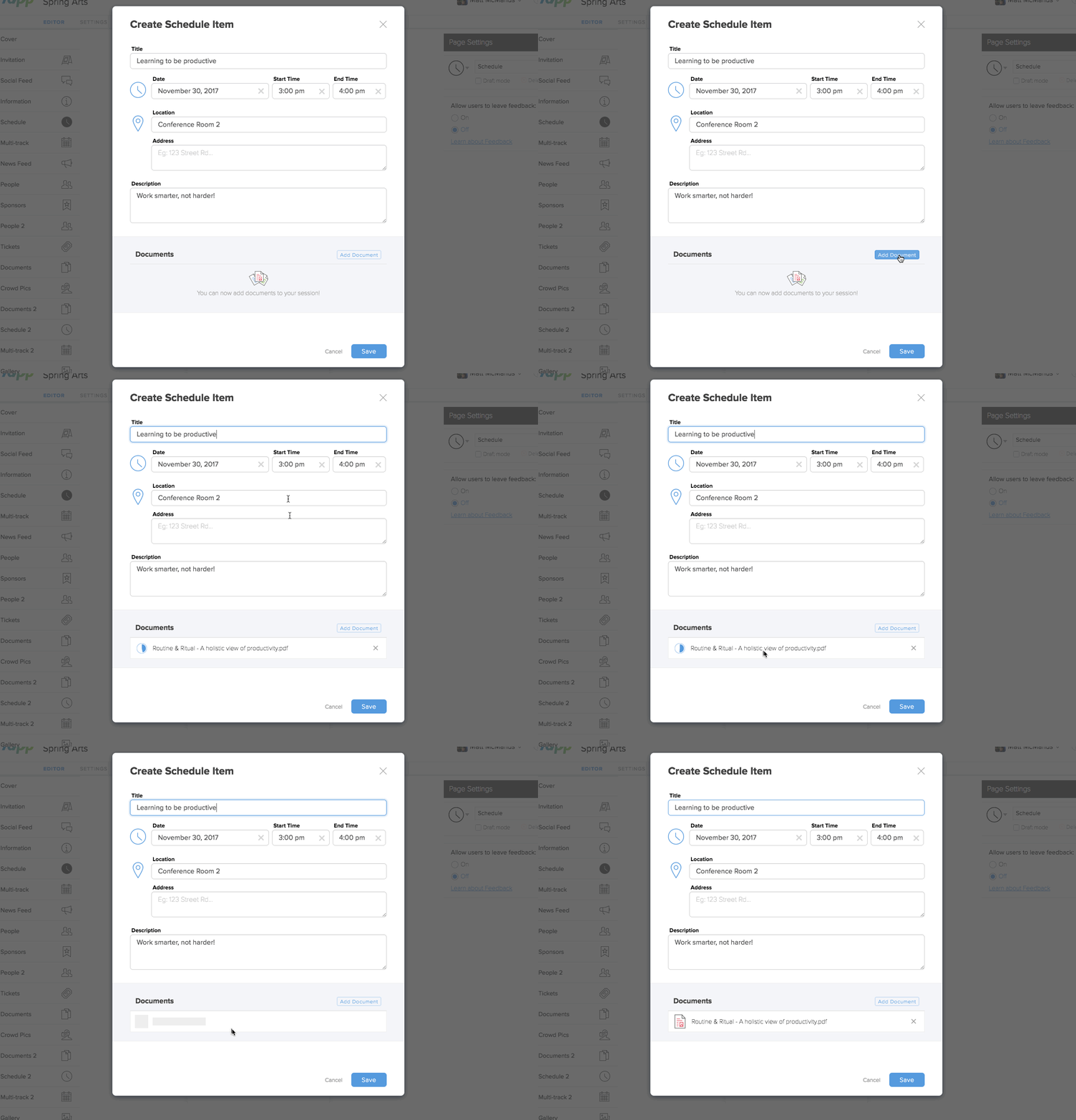
We’ve had much feedback that our customers want to link elements of pages together. You asked, so we’ve delivered! We are excited to announce the first of these enhancements

– the ability to add documents directly to specific schedule items.

To access this feature Create a new schedule item in either a Schedule or Multi-Track Schedule type page. At the bottom of the schedule detail page simply hit “add document”

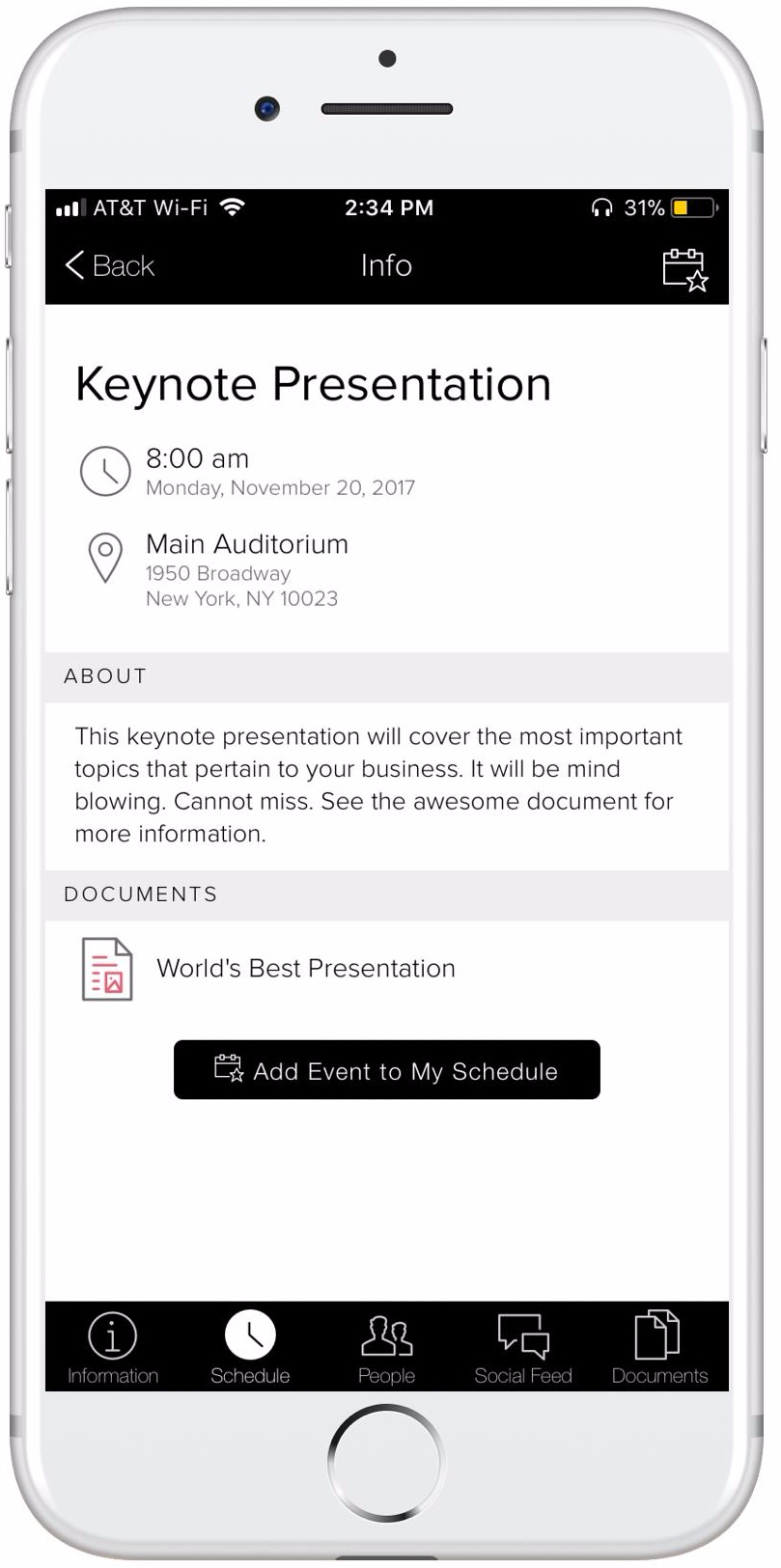
This new feature is particularly useful if you want your users to have access to a specific file – think white paper, presentation, or follow up – during associated with a particular session without having to navigate away from the schedule.


Try it out for yourself in your editor. Navigate to your schedule or your multi track schedule tabs in the editor to link documents to the scheduled event.  You can sign up for a free trial at http://yapp.us

Link
  • Yapp introduces a feature that connects speakers directly to schedule items inside the app.
  • This makes session information easier to understand and helps attendees navigate event content more easily.
  • Conference organizers who want clearer schedules and stronger speaker visibility will benefit most.

New! Yapp Event App – You can now link speakers to their scheduled items 🎉

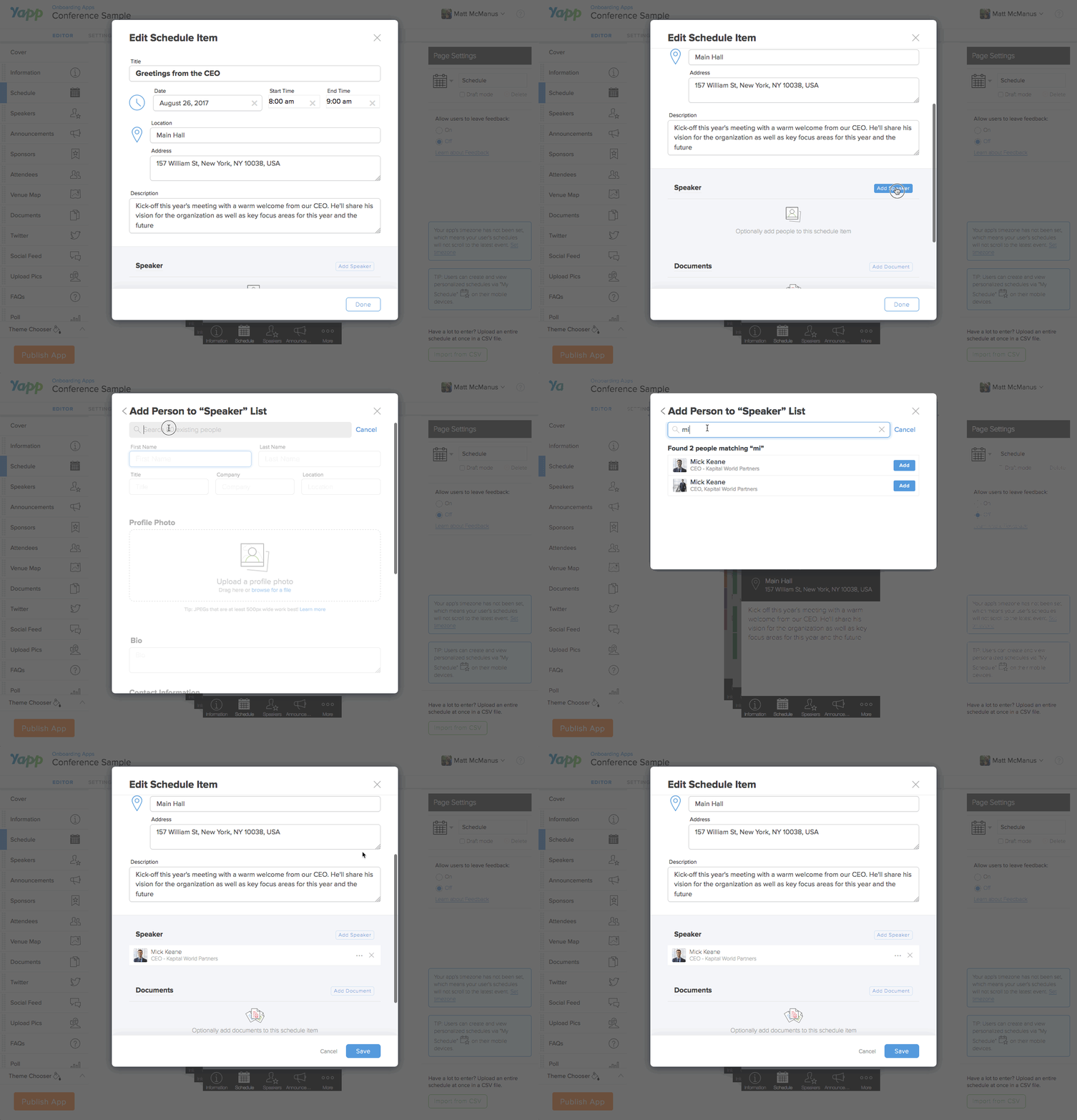
Our schedule page just keeping getting better.  A bit ago, we announced the ability to add documents to schedule items. Now today we are giving you the ability to add speakers to schedule items as well.  This has long been one of the most requested features for building a Yapp event app so we are excited to unveil it today.

To access this feature simply create a schedule item, in either a schedule or a multi-track schedule type page. Scroll down to the bottom of the newly redesigned schedule page and there you will find the option to add a speaker.  You can either choose people you’ve already added to your app create a new person.  These are the beginning steps we’ve taken to make content you add to your app more accessible as you create, in an app content library type format.  

To learn more about the step by step of adding people to schedule items, visit the dedicated help article here.

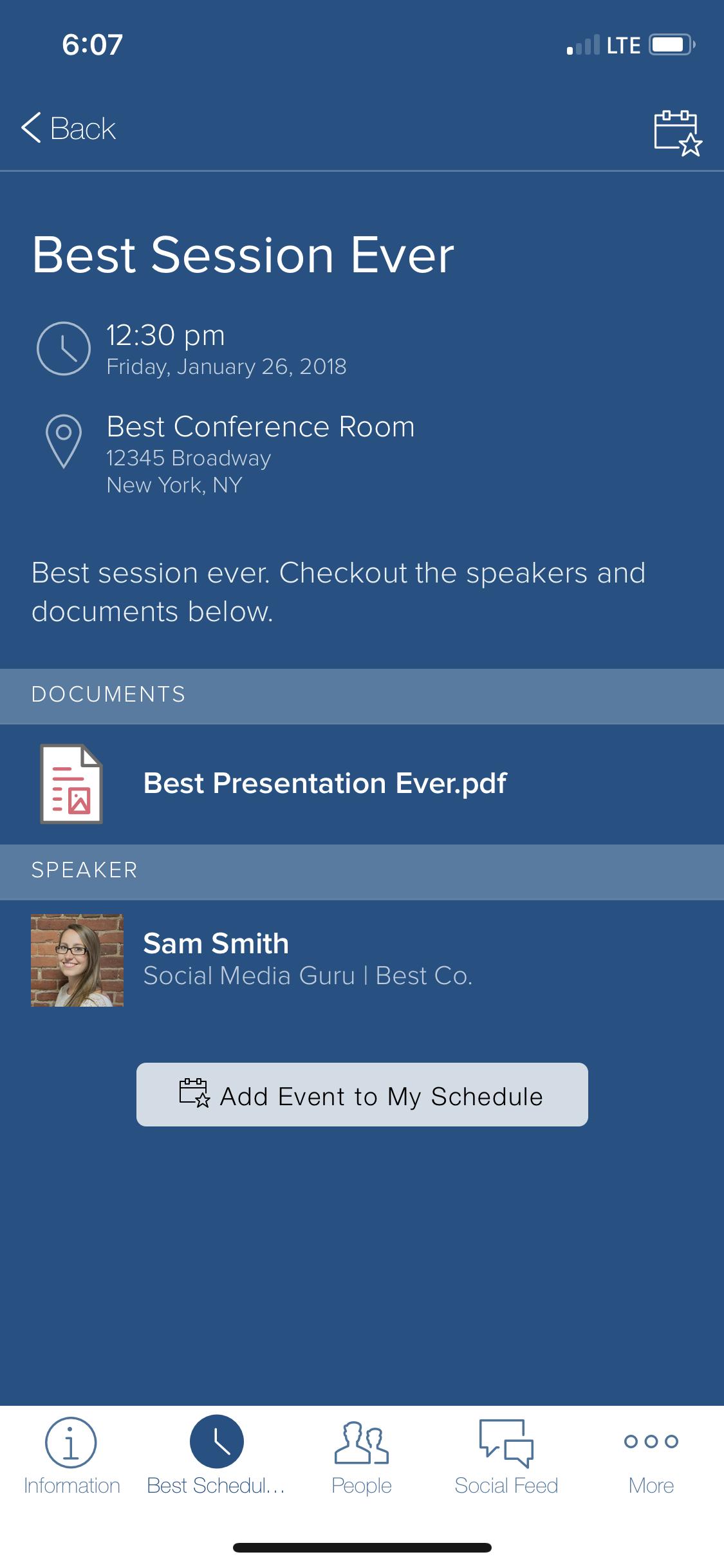
This new feature will allow your attendees to save time by seeing all the information about the speakers without having to search for them in the dedicated Speakers page.

Try it out for yourself in your editor. Navigate to your schedule or your multi track schedule tabs in the editor to link speakers to the scheduled event.  You can sign up for a free trial at http://yapp.us