Category Archives: Product Updates

Link
  • Yapp announces support for adding documents to schedule items to make event content easier to access.
  • Attendees can get session-related files in the same place they view the agenda, which improves convenience and clarity.
  • Organizers sharing resources across sessions or meetings will benefit most from this feature.

Our customers often tell us that they want to link elements of pages together. You asked, so we’ve delivered! We are excited to announce the first of these enhancements:

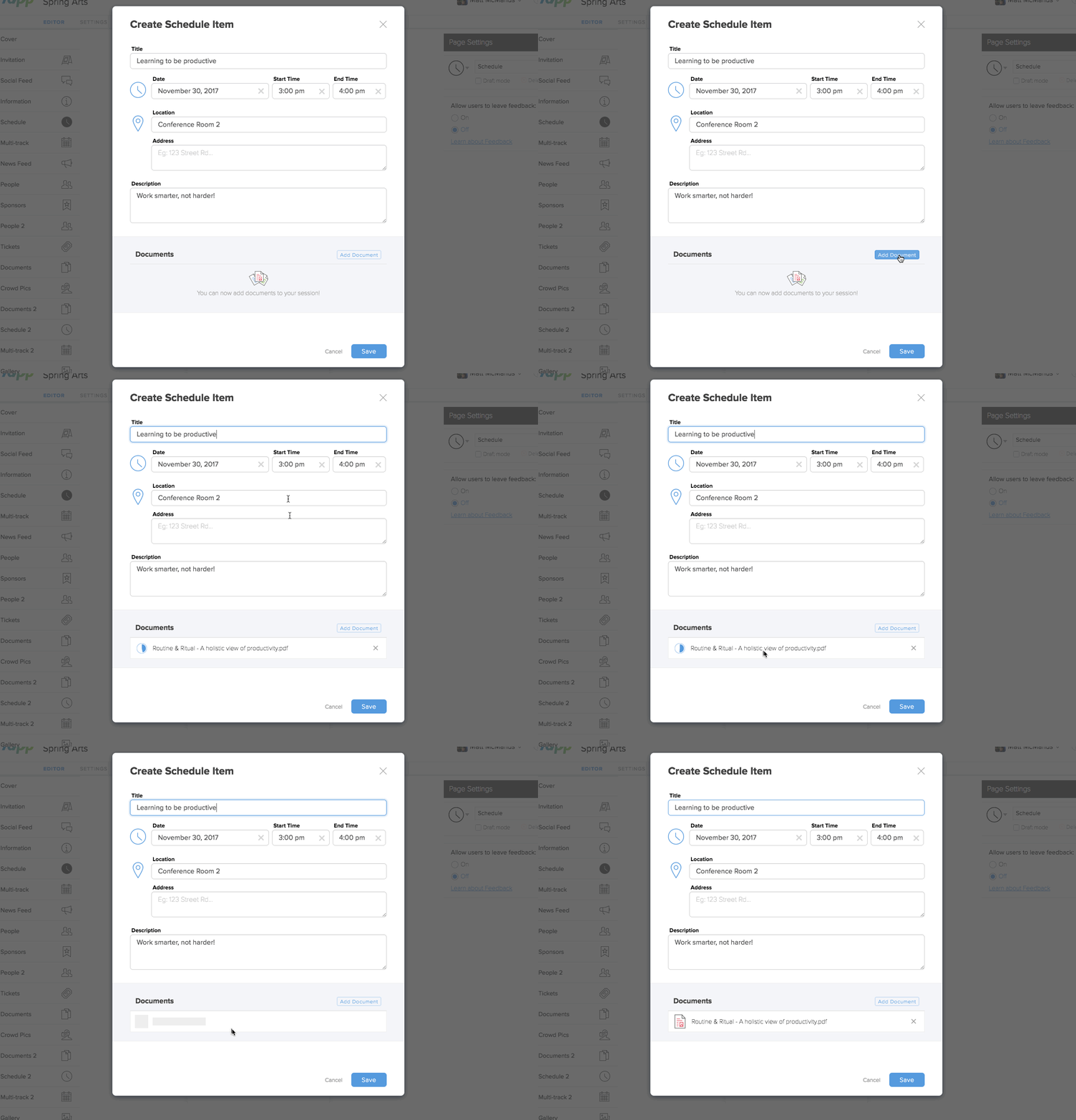
Event App creators are now able to add documents directly to specific schedule items.

To access this feature, simply create a new schedule item in either a Schedule or Multi-Track Schedule type page. At the bottom of the beautiful, new schedule form, simply hit “add document”

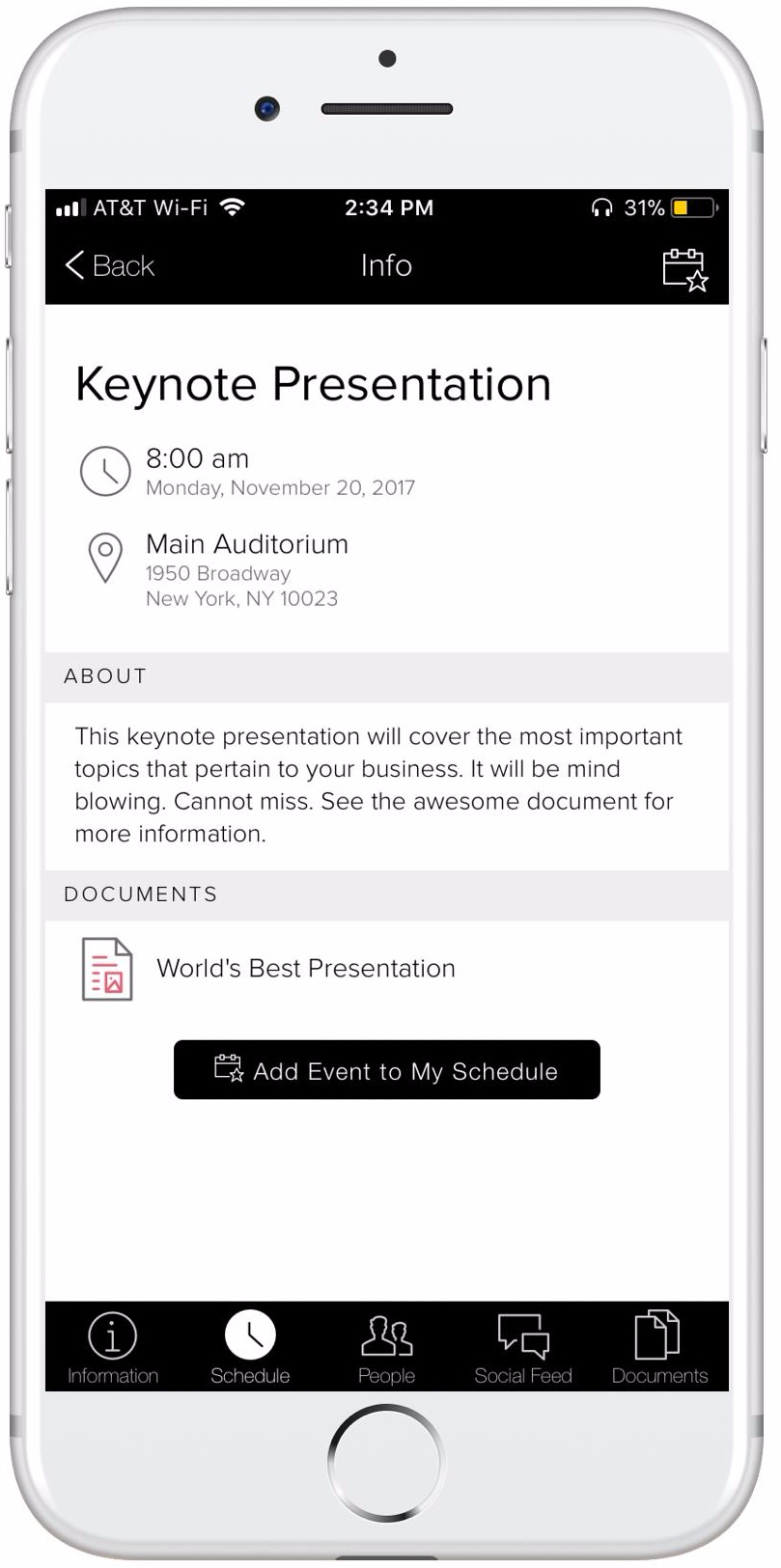
This new feature is particularly useful if you want your event app users to have one touch access to a file associated with a session – think white paper, presentation, or follow up – without having to navigate away from the schedule.

This is the beginning of having assets – in this case, documents – stored in a library for access on other pages.  For example, a document you add to a Schedule page can then be added to a Documents or a Multi-Track Schedule page.  For more detail on how all this works, read the support article on adding documents to schedule items.

Try it out for yourself in your editor. Navigate to your schedule or your multi-track schedule tabs in the editor to link documents to the scheduled event.  If you’re not yet a Yapp user, you can sign up for our no obligation 14 day free trial at http://yapp.us

Introducing New 2017 Yapp Mobile Event App Plans

  • Yapp introduces updated 2017 plans designed to better match different customer needs and app use cases.
  • The plan changes help users understand feature access, pricing structure, and how to choose the right option for their goals.
  • New and existing Yapp customers comparing plan levels will benefit most from this update.

Over the last months, we launched many new mobile event app features such as Session Feedback, Sponsor Listings, Social Feed as well as admin features such as App Analytics, Privacy Settings and CSV Uploads. We’re thrilled to hear the overwhelmingly positive feedback about these features!

Going into 2017, we spoke to many of our customers about their mobile event app needs. Based on these discussions, we are announcing three new 2017 plans: Basic, Core, and Team. Our plans are still the most affordable on the market and still start at $399. The major change is that these new plans are differentiated by feature and offer flexibility to choose the exact number of apps in your plan.  

What are the new plans?

Our Basic plan is $399 for a mobile evernt app with all app features. The $499 Core plan offers additional admin tools like Privacy, Analytics, and Bulk Content Uploads while the $599 Team plan allows for an unlimited number of admins to help you create and edit apps. You can add more apps to the Team plan and get increasing volume discounts if you buy more apps upfront. You can see our new pricing below as well as on our pricing page starting December 1, 2016.*

mobile event app

For customers looking to purchase more than one app upfront, we offer volume discounts. You can see details of our volume pricing here.  

Why this change?

Our new plans address two key things we learned from talking to customers:

  • Flexibility in the number of apps: Our legacy plans bundled specific number of apps per plan. Customers told us they wanted the flexibility to choose the exact number of apps in their plan.
  • Flexibility in features: Many of our customers only had one event a year but had a team of people they wanted to work on the app with them. Some also needed sophisticated admin features such as mobile event App Analytics and Privacy settings. While others wanted the low price of Yapp and didn’t need all of the admin controls.

Our new plans try to balance these aspects of customer needs and provide more flexibility to choose apps based on the needs of the customer.

For current mobile event app customers

If you’re a current customer and happy with your current plan, nothing is changing for you. You are grandfathered into your existing plan and your current pricing and package including for when you renew. We appreciate the loyalty of our customers, and if you have any questions, please see our FAQ.  In addition, if you are an existing customer you will see old pricing until the end of 2016 when you go to the pricing page. If you want to upgrade for more apps, until 12/31/16 you can choose either legacy or new plans to upgrade to.

*Must be a new user or logged out to see new pricing

Featuring Maps in Event Apps

  • Yapp shows how maps inside event apps make it easier for attendees to navigate venues and find key locations.
  • Built-in maps reduce confusion and improve the overall event experience by keeping location details in one place.
  • Conferences and multi-space events with complex layouts will benefit most from this feature.

Maps are a crucial part of almost any type of event: 

  • Exhibition hall maps at conferences
  • Floor maps at trade shows
  • Venue or hotel maps for internal conferences
  • City maps for an event in a new city
  • Activity specific maps for social events

Attendees will rely on these throughout the event and hence easy, consistent and reliable access to these maps is very important to their event experience. Yapp event apps have several different ways you can include these apps. Additionally, since Yapp apps can be published instantly and are accessible without Wi-Fi, attendees will always have access to the most up-to-date maps whenever they need them!

Here are the Yapp templates pages you can use to feature maps in Yapp event apps:

1. Image and Text: Add the map as an image at the top. In the text area include a key for the map, instructions on how to get around or any other relevant information. You can even include links. Perfect for small area maps that needs supporting information in text format or clickable links.

image-and-text-map

2. Gallery: Simply upload the map(s) as an image to the Gallery. You can have unlimited maps here. Visually a minimum of two is best for this page type. Perfect for medium area maps stand on their own (no supporting text needed).

gallery-map

3. Documents: Upload PDFs of your map(s). You can upload one PDF with all maps but individual PDFs for each map will be easier to view for attendees. You can upload unlimited maps to this page. On computers, attendees download the map to their desktop and use it as any other PDF. On mobile devices, they tap on the PDF to open up the map right in the event app. They can zoom in and out of the map as needed. After the map(s) is opened once, it will be accessible without internet. Any text such as a key can be included as part of the PDF. Perfect for large area maps with or without supporting content.

documents-maps

Want to link to Google Maps? You can use the Image and Text page mentioned above. Include a snapshot of the map as the image and link out to Google Maps in the text area. Alternatively, use the Simple Text page to include basic information about the map and link out to Google Maps. You may need to use the free Google URL shortener (or another like bitly.com) to shorten the URL to Google Maps.

Executed maps differently in your Yapp app or have further questions? Write to us in the comments below!

More engagement in mobile event apps with Social Feed

  • Yapp shows how Social Feed can create more engagement inside mobile event apps.
  • Shared posts, comments, and event conversation help attendees interact instead of only consuming information passively.
  • Event teams that want a more social and active in-app experience will benefit most from this feature.

We’re excited to launch a brand new page type: Social Feed. With this page, your mobile event app users can not only post photos, comments and questions but also ‘like’ and comment on posts by other attendees. Supercharge your event app engagement in seconds.

How does Social Feed for event apps work?

  • Event app users can post a text comment or photo from their mobile device. They’ll need to be logged in to post.
  • Other event app users can then ‘like’ the photo or comment.
  • In fact, event app users can even comment on a previous comment or photo post allowing them to have a back-and-forth conversation right in the Social Feed!
  • Best part? Users will be notified via push notifications when someone comments or likes on their posts bringing them back to your event app!
  • Finally: We get it, mistakes happen so users can also edit or delete their posts.


social-feed-share-and-engage

You can leverage Social Feed in many ways for your event. Here are some ideas:

  • Engagement: Much like Facebook, your attendees will have one place in the event app to post comments and photos and engage with each other.
  • Networking: Attendees often seek to network at events. Social Feed will serve as a perfect platform for event app users to network with each other.
  • Scavenger Hunt: Event app admins can post clues or questions. Attendees can then respond to the post with their guesses.
  • Q&A: Social Feed can serve as a forum for event app users to post questions about the event and get quick responses from admins or other attendees.
  • Feedback: Leverage Social Feed as a place to collect real-time and candid feedback from attendees. This will give you the opportunity to address their concerns right away.

Social Feed can be added to all apps immediately, including apps created as part of Yapp’s 14-day free trial. Get your 14-day free trial of Yapp today or click here to login to your Yapp account.

Can you think of other ways to leverage Social Feed to supercharge your events? Post your ideas in the comments below!

Supercharge employee engagement with Social Feed by Yapp

  • Yapp shows how Social Feed can boost employee engagement by making workplace communication more interactive.
  • A shared stream for updates, recognition, and conversation helps employees feel more connected to the team.
  • Internal comms and HR teams looking to increase participation will benefit most from this feature.

Many corporations like Cole Haan and Verizon are using Yapp on an on-going basis to inspire, connect and engage their employees across the nation. Their year-round engagement and internal team communication apps serve as a tool for employees to connect with the brand, share brand inspiration, recognize peers and simply build a deeper bond with colleagues.

We’re taking employee engagement to the next level with a new feature: Social Feed

With Social Feed by Yapp, employees using their company’s internal communication app can not only post photos, comments and questions but also ‘like’ and comment on individual posts by their peers. Social Feed will supercharge your internal communication and employee engagement in seconds!

How does Social Feed for internal communication work?

social-feed-share-and-engage

  • Employees can write a text comment or post a photo from their mobile device. They’ll need to be logged in to participate.
  • Other employees can then ‘like’ the photo or comment posted by other users.
  • In fact, employees can even comment on a previous comment or photo post allowing them to have a back-and-forth conversation right in the Social Feed!
  • Social Feed is also a great public yet fun outlet for peer recognition.
  • Best part? Users will be notified via push notifications when someone comments or likes on their posts bringing them back to the app!
  • Finally: We get it, mistakes happen so employees can also edit or delete their posts.

You can leverage Social Feed in many ways for your employees. Here are some ideas:

  • Socialize: Much like Facebook, your employees will have one place in the communication app to interact with each other. They can post comments and photos and react to each other’s posts. Giving employees one place where they can post their brand inspiration, success stories and recognize their peers.
  • Networking: Building a bond with colleagues is often a priority for employees and in the best interest for employers as it helps with retention rates. Social Feed will serve as a perfect platform for employees to network with each other.
  • Scavenger Hunt: Event app admins can post clues or questions. Attendees can then respond to the post with their guesses.
  • Q&A: Social Feed can serve as a forum for employees to post questions whether it’s about HR policies, styling tips, product updates or anything else. Plus, admins (or other employees) can post a quick response right in the app!
  • Feedback: Leverage Social Feed as a place to collect real-time and candid feedback from employees. This will give you the opportunity to address their concerns right away.

Social Feed can be added to all apps immediately, including apps created as part of Yapp’s 14-day free trial. Get your 14-day free trial of Yapp today or click here to login to your Yapp account.

Can you think of other ways to leverage Social Feed to supercharge your employee engagement? Post your ideas in the comments below!

csv upload into a mobile event app

Get Content in Your Mobile Apps in Seconds

csv upload into a mobile event app
  • Yapp shows how to get content into your mobile app quickly so setup feels faster and easier.
  • Faster content loading reduces manual work and helps creators publish more efficiently before launch.
  • App creators working on tight timelines will benefit most from this feature.

At Yapp we pride ourselves in having an incredibly user-friendly mobile app builder so professionals at small associations to large enterprises can create mobile apps for events, meetings, groups, internal communication and employee engagement quickly and easily. We aim to make app creation as simple and fast for you as possible. With that in mind, we are excited to launch a new feature in Beta that will significantly reduce the amount of time spent on building an app with Yapp…

.CSV Uploads – Bulk upload content into the app in seconds

CSV Upload Screencast

How does this work: 

  1. Prepare the content you’d like to upload in a .CSV file (Tip: To save an excel file as a .CSV, just hit save as and choose .CSV for the format).
  2. Make sure the date format is mm/dd/yyyy and time format is hh:mm AM/PM.
  3. If you are uploading content to a People or Sponsor page and want to include photos, make sure the URL is something that is publicly accessible (Tip: To test this out, paste the link into an incognito browser and confirm it is accessible).

If you are unsure what the columns should be or to ensure the smoothest experience, download the template for the appropriate page here.

Best part? This feature will bring you just a couple of steps away from getting data from any spreadsheet, software or website into your mobile app and at your users fingertips! You are already maintaining a spreadsheet with the schedule as you plan your event, or you have a people list for speakers, attendees or staff that can be downloaded to a .CSV file. Now, you can upload this data into the mobile app quickly and seamlessly. This along with many other features that are part of Yapp’s award-winning mobile app builder, you’ll save hours of time on mobile app creation.

Wondering what you’ll do with all of this free time? Here are some ideas:

  1. Pretend to continue working on the app. No one will believe you that the app was ready in minutes anyway!
  2. Go out for a walk (Code for “catch some pokemons”).
  3. Call your parents and chat a little longer this week.
  4. If you insist on sticking to app related work, market your app with tips from this Event App Marketing Guide.


If you have feedback about this or other features, let us know at support@yapp.us or leave us a comment here!

Feature Enhancements: More Privacy Options & Session Feedback

  • Yapp highlights privacy options and session feedback tools that make event apps more flexible and attendee-friendly.
  • Better control over visibility and feedback collection helps organizers balance engagement with privacy needs.
  • Event teams that want stronger app settings and more actionable feedback will benefit most from these features.
ANNOUNCING: NEW FEATURE ENHANCEMENTS
Every day we continue to build out Yapp to make apps for your events or groups better. Today, we bring you two more feature enhancements.

SESSION FEEDBACK

As an organizer, you want to know how your participants feel about your programming. That’s exactly what you’ll learn with Yapp’s new feedback feature. Your attendees can now rate and give feedback for each schedule item in your app.


You can see the ratings and many other insights in the recently launched Mobile App Analytics Dashboard. For more details about Session Feedback read this support article.


MORE FLEXIBLE PRIVACY

We recently announced privacy settings so you can restrict access to your app to a hand-selected list of users. We heard you – you want even more control and flexibility over who installs your app. Today, we’re introducing a 3rd option for privacy settings.


Now choose the privacy setting that’s right for your app:
  • Anyone with your app ID or easy share URL can install your app
  • Anyone can install your app, but email authentication is required
  • Only users whose email address you add to a white list can install

Personalized schedules for event apps

Personalized Schedules in Event Apps with “My Schedule”

Personalized schedules for event apps
  • Yapp explains how personalized schedules make event apps more useful for attendees.
  • Customized agendas help people find the right sessions faster and create a more relevant event experience.
  • Conferences and multi-track events will benefit most from this feature.

 
Event attendees can now create their own personalized schedules in event apps with Yapp. This is perfect if your event is multi-day with a large or complicated schedule or you simply want one more way to engage your attendees with the app. Give your attendees the control and personalization they seek from mobile apps! This feature is a perfect compliment to Yapp’s Multi-Track schedule that allows you to break down complicated schedules into various tracks by day, type of event or anything else.


Use this feature to…

  • Allow your event attendees to add items from the agenda to “My Schedule” resulting in a personalized schedule for event attendees.
  • Make it easier for the attendees to know where to be when at the event.
  • Increase event app usage and engagement especially throughout the event.
 
Try Yapp for free to access personalized schedules and unlock many other features.

Already a Yapp customer? Read about My Schedule here.
 

New Feature: Know Who’s Installed Your App

  • Yapp introduces a feature that helps organizers see who has installed their app.
  • Better install visibility makes it easier to track adoption and improve pre-event communication efforts.
  • Event teams that want clearer app uptake data will benefit most from this update.
NEW ADMIN CONTROLS
Make your App Private
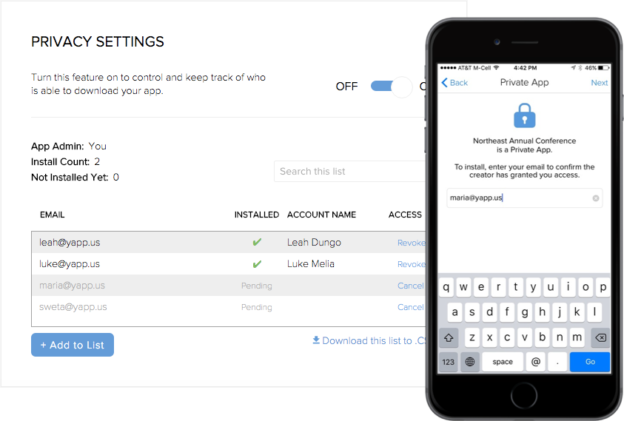
We heard you – sometimes, you just want more control over who downloads your app. Introducing a new control for app creators: app privacy.
 

Use this feature to…

Make your app accessible to a pre-selected list of users.
Monitor who has downloaded your private app.
Revoke access to your app from previously approved users.

Added bonus? When you export your app data such as poll results, there won’t be any anonymous responses – know how your participants interacted with your app.

Watch it in Action


Already a Yapp paying customer? Read about how to make an app private.

Other Feature Updates

  • No more faceless posts! Your users can create profiles with photos right from their mobile devices which means no more faceless posting to News Feed.
  • Set the locale for your app to change how times and dates appear
  • Choose the default level of push notifications your users get
  • ICYMI: Export content from your Schedule, People, CrowdPics, Poll and News Feed pages.

and much more coming this year!

Try Yapp‘s award-wining, self-service platform for free. Then subscribe to a paid plan to  make your app private and start sharing it with your hand-selected list of users. Plans start at just $249. Subscribe by 1/20/2016 to save. On 1/21 we’ll be moving to 2016 prices. New plans will start at $399 so subscribe now to save!

Yapp on iOS 9

  • Yapp shares what users need to know about Yapp on iOS 9.
  • The update helps customers understand compatibility and app behavior on Apple’s mobile operating system.
  • Yapp users running or supporting apps on iOS devices will benefit most from this information.

On September 16, 2015, Apple released the newest version of it’s operating system for iPhones/iPads, iOS 9. There is a known issue for Yapp when using iOS 9.

I have upgraded my device to iOS 9. What does this mean for me?

If your device has been upgraded to iOS 9 and the Yapp app has a News Feed, Crowd Pics or Twitter page template, those pages will appear blank for the time being.

For Newsfeed and Crowd Pics pages, you can still add new content. You will receive a message that the upload failed. However, this content will be added to the feed. You can view this via the unique my.yapp.us URL preview on desktop, an iPhone running iOS 7 or iOS 8, or an Android device. This content will be available on your device when the iOS 9 compliant Yapp version is available on the iOS App Store.

You will continue to receive push notifications if you have them turned on. However, when you click through you will be taken to an empty page.

What is Yapp doing about it?

We have submitted the updated version that fixes the above issues to Apple and are currently awaiting approval. The Apple app approval process is typically 7 to 10 business days but could be delayed due to the rush of apps trying to get their iOS 9 updates through. We will post updates about this to this blog. 

I created an app with these features that has to be used in the next two weeks. What should I do?

  • If you have an iPhone, we recommend that you hold off on upgrading to iOS 9 for now. We will alert you again when the updated Yapp version has been approved by Apple.
  • Remove these pages from your app for the time being or don’t add them for now. Note that your data will be lost if you delete these page types so be sure to export your data.
  • If the pages are important to your app experience, alert your users right away about this known issue. They can choose to hold off upgrading as well.

We sincerely apologize in advance for any inconvenience or confusion this may cause. Please know we are doing what we can to expedite the fix. While we strive to provide the best experience for our app creators and your users, including one that is bug free, we are only human and sometimes issues like this do arise.  

It’s due to this kind of complexity that we decided to start Yapp – so we can carry the burden of bug fixes, 4 AM work nights and approvals from Apple while you can focus on creating beautiful apps that are published instantly!

If you have any questions, concerns or feedback, please send us an email.