Tag Archives: news feed

sunset banner

[Heads Up] We’re Sunsetting the Crowd Pics and News Feed Pages

sunset banner
  • Yapp announces the retirement of Crowd Pics and News Feed pages and explains the transition for users.
  • The post helps app creators understand product changes, feature direction, and what to do next inside their apps.
  • Yapp customers using those legacy page types will benefit most from this update.

We hear all the time how much people love sharing photos and interacting with each other with Yapp. We also hear how critical Yapp is for communicating important updates to attendees. We’ve been thinking a lot about these two aspects of our product and we have big plans! Before we can roll out these bigger changes, we feel it’s important to tidy up the product. To learn more about the changes that are coming, read on.

Consolidating our social pages

You may have wondered what the difference was between our News Feed, Crowd Pics and Social Feed pages are. Don’t worry, you’re not the only one! Those pages came about over the years to achieve different goals. Yet, as the product has evolved, these pages started to share a lot of the same functionality. That’s why we’re consolidating these pages into the new, super-powered Social Feed page. Here’s what’s in store:

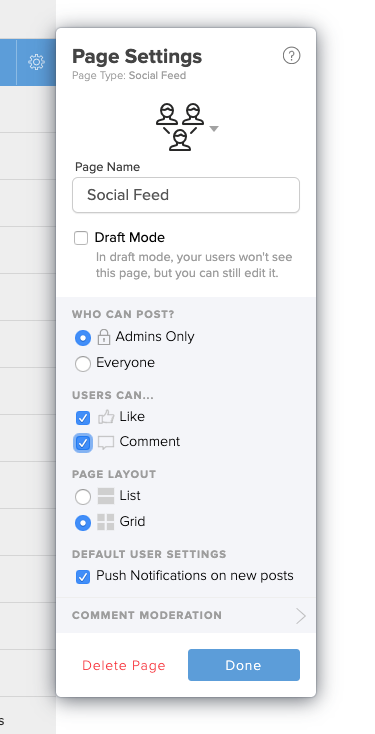
The new social feed page settings

Grid view

Our Crowd Pics page made it easy for users to upload photos and see them in a beautiful grid view. You can now do that with any Social Feed page! Open the page settings, change the layout to Grid, and hit publish. Now your users will see a photo-centric layout.

Admin-only posting

Many of our customers used the News Feed page to send important updates and alerts to attendees. You can now change the permissions on a Social Feed page that only allows App admins to post. This eliminates the need for a separate News Feed page.

Controlling user interaction

Ever wish you could disable comments on your Social Feed page and allow likes? What if you think “liking” is annoying, but you want to allow folks to respond with thoughtful comments? You can now turn off the ability to like or comment on any Social Feed page.

We have also made other improvements, including better push notification settings and design.

“Neat. The Social Feed page is receiving new features. What about my beloved Crowd Pics/News Feed page?”

In the coming weeks, we will be retiring our Crowd Pics and News Feed pages. This will involve migrating all existing users over to configured Social Feed pages. If you used a News Feed page for announcements, it will become a Social Feed page. The settings applied will be “admin-only” with disabled Likes and Comments.

If you used a Crowd Pics page, it will become a Social Feed page with Grid View enabled and disabled Likes & Comments. This should be a seamless and invisible transition for you. The only difference is that you will have access to all the features the Social Feed page has to offer. Want to enable Liking on what used to be your Crowd Pics page? Enable it and then click “publish”.

Despite the retirement of the old page types, when you go to add a new page to your app, you’ll see the same icons as before. The Crowd Pics icon will create a Social Feed page with the appropriate settings. We’ve renamed News Feed to Announcements, but the idea is the same as before.

Future plans for the Social Feed page

As we mentioned earlier, we have some big plans to improve the Social Feed page. Now that we have tidied up these page types, we can start to roll out some shiny, new features! Here are the next releases two on our roadmap:

  • Desktop Posting: We will be adding the ability to post to your Social Feed pages from the desktop. No need to go thumb-crazy on your phone screen if you have your laptop handy.
  • Scheduling Posts: We will be enabling the ability to add social posts in advance and send them out at a set time. This will only be accessible through our desktop editor.

We know many of you have been asking for these features. That’s why we’re doing our best to continue to support the feature folks have come to know and love. Further, this allows us to create new and interesting features that we hope you’ll find useful.

If you have any feedback for us, we’d love to hear it! What features are most important to you? Do you have reactions or ideas to all that we talked about above? Please share them here:

Take 1-min survey

Tips & Tricks: Take RSVPs Digital

RSVP
  • Yapp shows how to collect RSVPs digitally instead of relying on manual tracking.
  • A digital RSVP workflow saves time, keeps responses organized, and reduces event planning friction.
  • Event organizers who want a simpler registration and response process will benefit most from this tip.

Hosting an event is an organizational bear in and of itself. Once you start inviting people, the madness truly begins. And, because there’s a BIG difference in planning for 40 and for 400, the RSVP was born.

While Yapp doesn’t yet have a dedicated RSVP page (it’s in the works!), there are a few ways to get a solid headcount from your attendees.

Many users will create surveys or forms for their attendees to respond to using Google Forms or a service like Survey Monkey, then include the sharing link within the app somewhere. Our invitation page (pictured above) is a great spot for this. If you’re creating a form, keep it simple — name, yes attending or no, not attending, and an email or phone number, in case you want to get in touch.

Others will instead put an email address — either dedicated to receiving RSVPs or personal — on a page like this, asking guests to simply tap and email their attendance plans.

Just need a head count and not a list of names? Use our poll page! Users can easily respond ‘Yes’ that they’re coming or ‘No’ that they’re missing out, and you’ll be able to easily see the breakdown from your app or from the editor.

The News Feed is also a good way to gather RSVPs. Once the app is downloaded, send out a push notification asking your users to post in their plans to attend the event.

All the while, keep an ear out for an announcement that RSVP capabilities are available within Yapp!

Come Together with an app for the family this holiday season

Tips & Tricks: Keep Family Close for the Holidays

Come Together with an app for the family this holiday season
  • Yapp shows how an app can be used to organize and share family holiday plans more easily.
  • Centralized schedules, photos, and updates help reduce back-and-forth and keep everyone informed.
  • Families or informal groups planning shared events will benefit most from this creative use case.

Thanksgiving is on its way, kicking off a season of festivities, food and family.

Even if your family is far apart, you can share words of thanks (and pictures of turkeys) with an app.

Create a simple app — use News Feed and Crowd Pics, plus maybe an Information or Simple Text page to explain for those less tech-savvy. Fancy it up with a stellar cover page and a custom Yapp ID (use your surname, for instance).

Then, send an email to your fam (nuclear or extended, whatever feels right) with the app, explaining that you can all use it to share updates, post pictures, send messages, and generally keep in touch. Make sure to include your Yapp link in the body of the email so that they can easily access it should they have trouble downloading.

From there, it’s up to you! Instead of emailing or messaging photos, post them into the app. Send Thanksgiving hellos to mom and dad, compare dinner spreads, and foster childhood football rivalries all in your News Feed page.

And the best part is — the app doesn’t have to end with Thanksgiving. You can easily edit your theme and cover so that the family can use it to keep in touch year-round. It’ll make for a great tool in planning the annual get-together, rather than trading email after email.

Send us your family and holiday Yapps!

Product Update: Control Your News Feed Posts

tip4-AONF
  • Yapp highlights News Feed posts as a way to keep app content fresh and timely.
  • A feed-style update format helps users share ongoing news and keep audiences engaged inside the app.
  • App creators who want more dynamic, repeatable content will benefit most from this feature.

Depending on your event or group, an open News Feed page might not be the easiest thing to control. There are a few different ways to take control of the page, and a few useful ideas for making use of our premium admin-only news feed page.

With our basic news feed page, anyone who has your Yapp on their phone can post in comments, questions, and pictures. The only way right now to control this is to delete notifications after the fact and, sometimes, that’s too late.

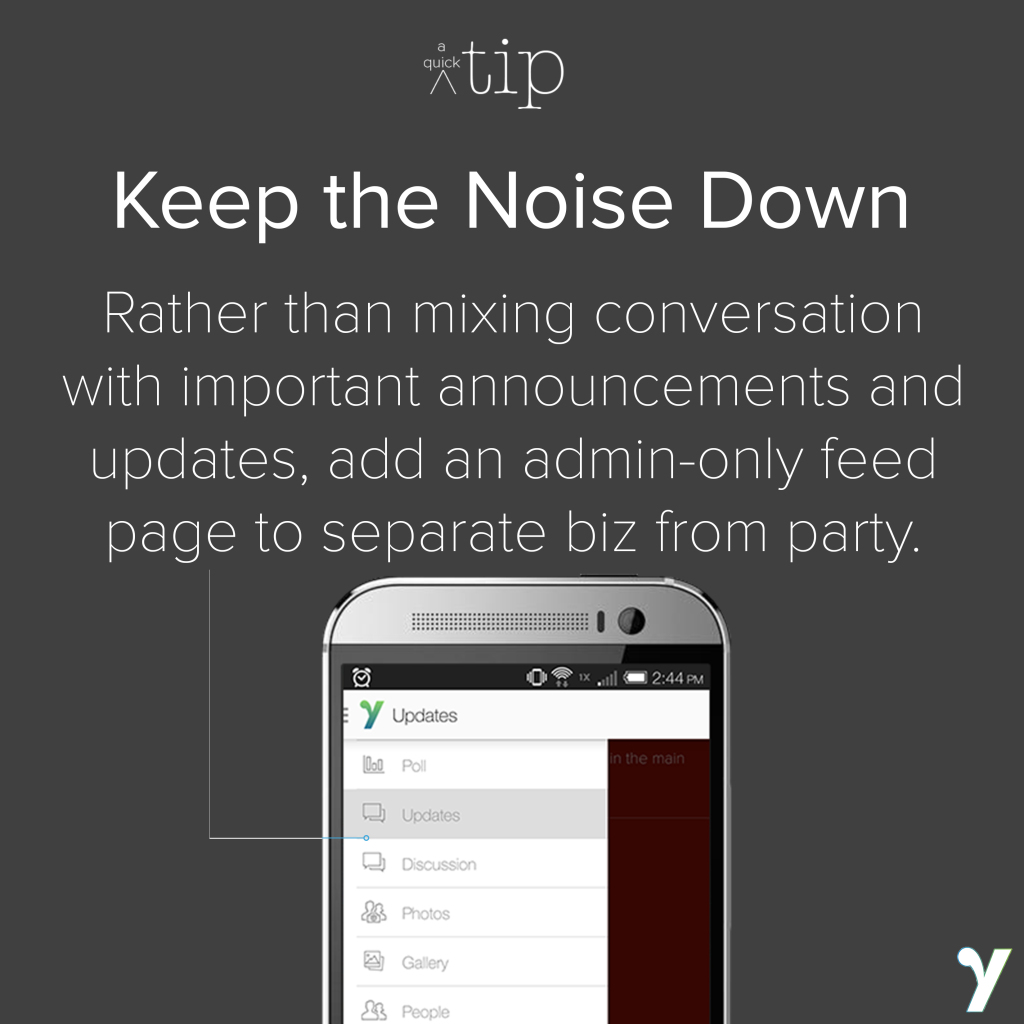
We built our admin-only News Feed template page to address these issues. With it, you can toggle who has the ability to post into the news feed, choosing Creator Only (you and anyone else you add to your account via Account Settings) or Everyone. We’ve seen many teachers and other educators use this page in their classroom to great success. It cuts down on the number of notifications users receive, and makes it easier to separate important updates from conversation.

One of the cool ways we suggest you use this new page (which you can purchase to add to your account by emailing us) is in conjunction with your basic news feed. Use the basic feed as a place for discussion, photos, questions, and comments. If you’d like, we can even change your app’s settings so that only posts from the administrator (e.g., those posted in the admin-only news feed) will go out as notifications to your users. Then, add the restricted feed page and use it to post important updates, like schedule changes, homework assignments or 5-minute warnings.

You can purchase the admin-only news feed page for $49, which allows you to use it in an unlimited number of apps created with your account as long as you stick with Yapp.

Tips and Tricks to Show Off Your Yapp on the Big Screen

  • Yapp shares tips for displaying events and schedules in classroom or school settings.
  • The post shows how apps can help organize and communicate school-related information more clearly.
  • Educators and school event organizers will benefit most from these ideas.

Your app isn’t complete without a news feed — a place for everyone to follow the Twitter action, a spot for conversations to flourish.

What’s even better? Getting to show that feed live on a huge screen in front of everyone to make following the conversation doubly fulfilling — it follows the crowd while the crowd follows it.

How to do this? If you’ve got an iPhone, an iPad or a Mac, you can do this super easily through Airplay Mirroring, which we told you about on Tuesday. If you’ve got HDTVs set up at your event or one in your classroom, you can send info directly from your phone’s control center, as long as the phone and the TV are on the same network.

Continue reading →

Yapper Monday: Special Agent Noah

  • Yapp features a fundraising app story as part of its Yapper Monday series.
  • The post shows how custom apps can support campaigns, communication, and community involvement for a cause.
  • Nonprofits and fundraisers looking for practical app inspiration will benefit most from this example.

Today we’re featuring one awesome Yapp, created to help raise money for Team Special Agent Noah in this year’s Down Syndrome Organization of Southern Nevada Buddy Walk. 

Special Agent Noah's Buddy Walk Yapp AppThe Southern Nevada Buddy Walk is in its 14th year, with teams raising money to bring programs to the community and promote inclusion of those with Down syndrome. 

Noah’s family created their Yapp as a mobile station for donations to their team.

Aside from general event information and a blurb about the Down Syndrome Organization of Southern Nevada, the family is using the app to encourage and recognize their donors.

They’ve got a News Feed page set up where all donors are getting personalized Thank-Yous. With our rich notifications, everyone who is checking out the app can see what incredible friends and family are donating, and can be inspired to give.

Team Noah has their donation link pasted in the app, as well, making it a two-tap process to give money to the cause.

We can’t wait to see some awesome pictures from the Buddy Walk posted into the Yapp come April! Want to donate to help Special Agent Noah? Give here.

Want to make your own Yapp for a non-profit or fundraising event? We’d love to help. Send us an email!

Product Update: Notifications, Polling and a New Name for YappBox

  • Yapp highlights a mobile app update that adds polling, notifications, and YappBox enhancements.
  • These improvements help users create more interactive and responsive app experiences.
  • Event organizers and app creators who want stronger engagement tools will benefit most from this update.

In our newest app store release, we are rolling out a bunch of exciting new updates. Check them out below and let us know what you think!

Richer notifications.

notification_trio


Now, any time a user posts into your Yapp’s News Feed or Crowd Pics page, you’ll get a notification to your phone’s home screen. You can adjust these notifications to show you all posts, only posts from the Yapp creator, or no posts. Here’s more on Notification Settings: http://bit.ly/1bsw0pH

Real-time polling.

poll_duo


We’ve added a simple Poll page to our collection of template pages! Add the page from the editor online, input a question and list of answer choices, then publish for all your users to respond to from their phones. Here’s more on Polls: http://bit.ly/1aZvcYH

YappBox is now Yapp.

It’s the same container app, filled with the same Yapps you love, now called simply Yapp. As always, we have a lot of big plans for Yapp, and are excited to have our app name now officially in line with our online editing experience. We hope this will relieve any confusion that users see when they first try to install a Yapp and are redirected to the app store.

Download on the App Store   Get it on Google Play

As always, we would love to hear your feedback on any of the new features we’ve added. Leave us a comment here or send us an email at support at yapp.us.

Product Update: New Template Pages!

  • Yapp introduces new template pages to help creators build apps faster with less manual setup.
  • Templates make it easier to launch useful, organized app experiences for repeatable use cases.
  • New users and creators who want quicker app setup will benefit most from this update.

On the same day that the Royal Baby might be born, we’ve got a few new additions to the Yapp creator family to announce ourselves.

image

We’ve split our old News Feed page to make it easier for you to show off your Twitter page and encourage conversation. Now, the News Feed page is just for users of the app to post in comments, questions, updates and photos. There is a separate Twitter page (complete with the iconic bird icon) just for your accounts and hashtags to rest in.

And we’ve added a page for your videos! A highly requested feature, the videos page will embed videos from YouTube and Vimeo links right into your app page. We can’t wait to see how you use ‘em.


Keep looking for more exciting product updates to come!

Yapper Mondays: Creativity Abound

  • Yapp highlights creative app uses from its community in another Yapper Mondays feature.
  • The post reinforces how flexible app creation can support many different goals and audiences.
  • Readers looking for imaginative, real-world app inspiration will benefit most from this feature.

Each of the apps created at Yapp are one-of-a-kind, but these creative users have tailored our event-centric platform to make apps for hotlines, books, adventures and tips. Check them out and grab a little inspiration to make your own Yapp!

image

This Yapp user created an app filled with various News Feed pages to report on his hiking journey across Ireland, get supportive messages from friends following their journey, and keep users up to date on Twitter.

image

An Emotional Wellness team at an Arizona campus put together an app to help prevent suicide, filled with information about who to call, what to do, and how to know if a friend is contemplating suicide.

image

This app from Romance author Erin Nicholas features release dates of her upcoming books and links to free reads on her site. Plus, she’s holding a contest to boost app downloads — after 100, she’ll be giving away a signed copy of her next book to one lucky app-user.