Tag Archives: ios apps

Tech Proposal Ideas To Improve App Engagement

  • Yapp shares proposal ideas that help teams build stronger app engagement from the start.
  • Clear planning around content, user value, and interaction helps apps feel more useful and more active over time.
  • Teams creating apps for events, communities, or internal communication will benefit most from these ideas.

In today’s digital landscape, having a highly engaging mobile app is essential for event and internal comms success. But with many struggling with already constrained event budgets, it can be hard to make the case to invest in an event app provider to decision-makers.

Today, we’re going to share several concrete strategies, you can discuss in your tech proposal or pitch, to enhance user engagement, user experience, and retention for your target audience, and ultimately, a return on your investment.

5 Ways To Make The Case For Improving App Engagement

1. Provide a Personalized Onboarding Process

A smooth onboarding process is crucial for new users to understand your app’s value and features. With Yapp’s customizable templates, you can create an engaging, step-by-step onboarding tutorial that guides first-time users through your app.

Personalize the experience by incorporating in-app messaging and tailoring the content to meet individual user preferences. This will help reduce churn, increase user retention rates, and ensure a positive customer experience.

2. Incorporate Elements of Gamification and Real-Time Interaction

Incorporating gamification elements into your app will not only make it more enjoyable but also drive engagement and user retention.

Yapp’s event management features enable you to create interactive polls, quizzes, and scavenger hunts that keep users engaged in real-time. By adding a competitive edge through leaderboards and rewards, you’ll encourage collaboration and social networking among app users.

3. Integrate Social Media and Marketing Strategy

Take advantage of the power of social media by integrating popular platforms into your app. Yapp allows you to include social sharing buttons and live feeds, making it easy for users to connect, collaborate, and share their experiences.

Incorporate your app’s social media presence into your broader marketing strategy to reach a wider audience and increase engagement rates.

4. Utilize Push Notifications and In-App Messaging

Maximize user engagement and retention by leveraging push notifications and in-app messaging. Yapp’s platform allows you to automate and schedule targeted notifications based on user preferences, location, or time.

Delivering personalized messages, reminders, and call-to-action (CTA) prompts will ensure your app users stay informed and engaged.

5. Routinely Incorporate Updates and New Features

Keep your app fresh and exciting by regularly introducing new features and updates. Monitor user engagement metrics and gather feedback to identify areas for improvement or potential new additions.

Yapp’s mobile app development tools make it easy to implement changes and ensure your app remains a high-quality, valuable resource for your user base. Plus, you don’t need any coding ability to leverage our easy to use editor!

Yapp: Your Go-To Provider for Event App Solutions

By implementing these tech proposal ideas and utilizing Yapp’s event and internal comms app software, you’ll create an engaging, personalized user experience that drives app engagement and retention.

From onboarding to in-app messaging, gamification to social media integration, Yapp provides the tools you need to create a successful mobile marketing strategy and keep your app users coming back for more.

And with Yapp’s event app software, you get an affordable, comprehensive suite of tools and features to help you create engaging, user-friendly event and internal comms apps.

With Yapp, you can design, publish, and manage your app without any coding or technical expertise, making it an ideal solution for startups and established businesses alike. Plus, Yapp’s competitive pricing and 14-day free trial make it an accessible choice for businesses of all sizes.

Ready to experience the difference Yapp can make for your event or internal comms app engagement?

Start Your Free Trial

What the Tech?! Apple Music

Headphones - Apple Music
  • Yapp gives a quick look at Apple Music as part of its tech commentary series.
  • The post helps readers understand a current consumer tech topic in a simple, approachable way.
  • Readers who enjoy light tech explainers and trend coverage will benefit most from this piece.

Apple Music, n;

A new streaming music service from Apple, announced yesterday. Apple Music combines iTunes, Beats Radio, and social networking to create a one-stop music haven.

Apple Music’s main branch — streaming — is very similar to Spotify, but likely with a slightly different library (at least when it comes to the biggest and smallest of musical talent). When it’s released at the end of June, you can subscribe for $9.99 a month (which is the same as both Spotify and Google Play Music), and the first three months will be totally free. A kicker for the service is its family plan, which allows 6 users who are already linked in an iCloud family (sorry, college buds trying to save cash) to share access for only $5 more per month.

Besides streaming, Apple Music also has BeatsOne Radio, which will offer free and commercial free radio via real DJs for anyone who downloads, not just paying members, and Connect, a social network for artists. It will be available June 30 for all iOS devices as well as Windows devices. An Android version is in the works for the fall.

The announcement was the last at their Worldwide Developers Conference keynote, where iOS 9, OS X El Capitan, and updates for Apple Watch (does anyone own one of these yet?) were also presented.

There’s a lot to see and a lot to know, so if you’d like the full run-down of features, release dates, etc., read this list from Wired.

Product Update: Multiple Administrator Editing

  • Yapp introduces support for multiple administrator editing to make app management more collaborative.
  • Shared editing access helps teams build and update apps faster without relying on one person.
  • Organizations with multiple stakeholders managing app content will benefit most from this feature.

Great news for our Team Plus subscribers — multiple administrator editing is here!

Welcome - Team Plus Multiple Admins

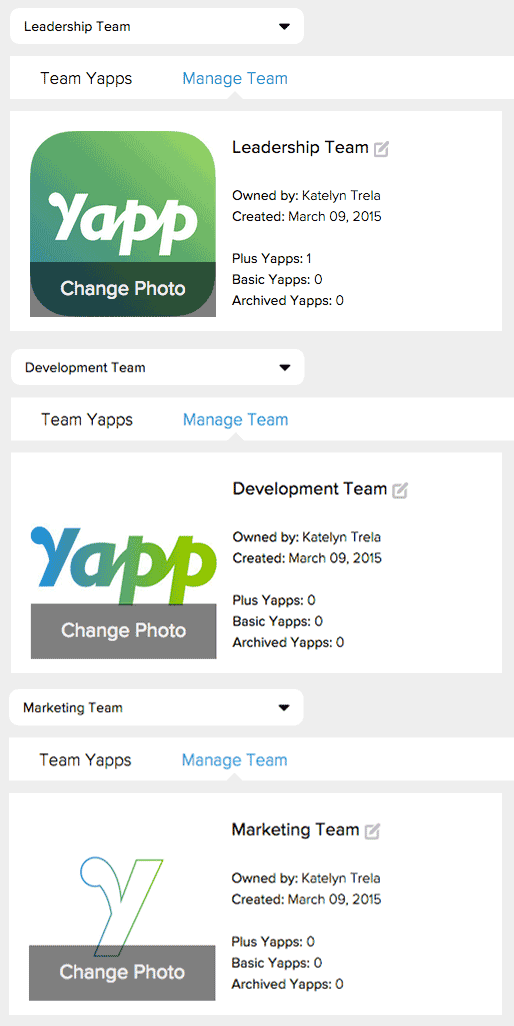
Once created, teams can easily access apps from the main administrator, make changes to any existing page, and post into admin-restricted pages (like News Feed and Crowd Pics) when they are logged in on the phone. The owner (the account subscribed to Team Plus) can create teams, assign editors, and add Plus features to apps.

You can create separate teams for departments and events within your organization, or for your clients so that they can share editing access to their apps.

Teams - Multiple Adminis

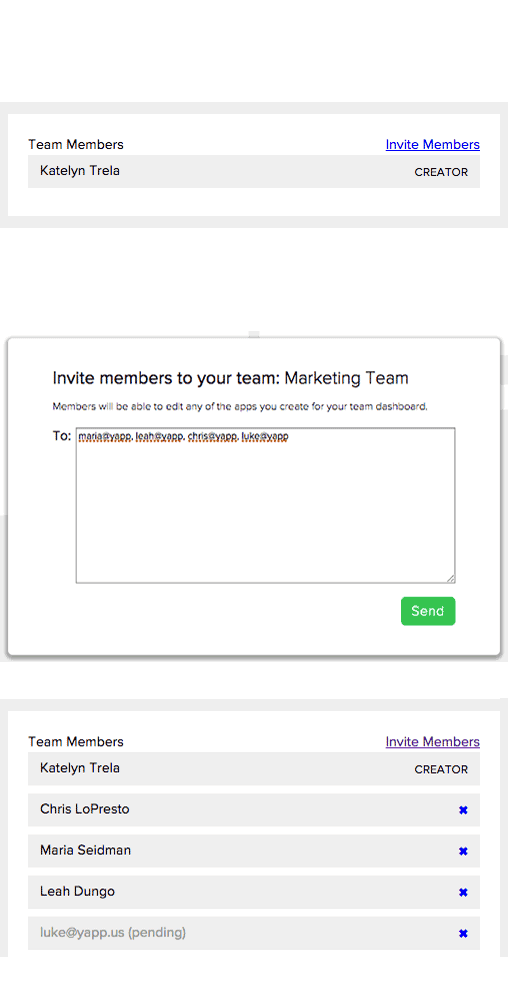
Then, invite users to different teams to give them access to team apps.

Invite - Multiple Admins

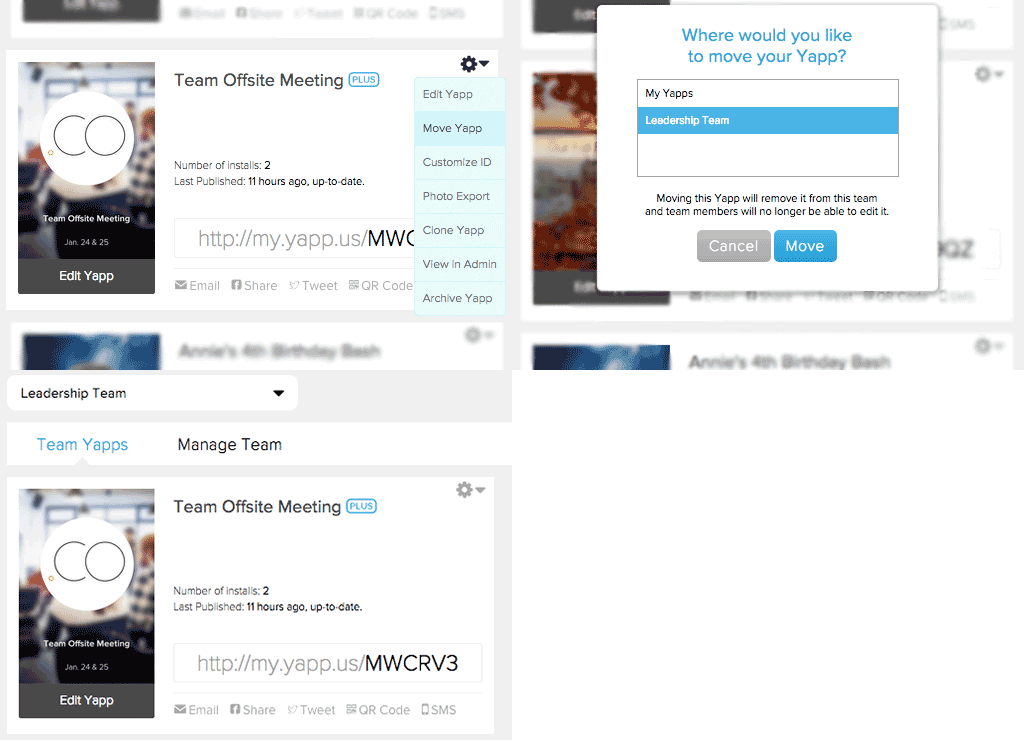
If you have apps in your account already, you can easily move them from your Yapps dashboard into the Team dashboard.

Move Team - Multiple Admins

The feature doesn’t work like Google Docs yet, where multiple people can edit the same thing at one time, so we caution you against editing simultaneously. Read more about using the multiple administrator editing feature on our support page.

To access multiple admin editing, you’ll need to subscribe to our Team Plus plan. Head to Yapp and upgrade to check it out!

Tips & Tricks: Color Your Yapp Users Impressed with Custom Colors

  • Yapp shows how custom colors can make an app feel more polished and visually appealing.
  • A stronger color setup helps users create a more branded experience without much extra effort.
  • App creators who want easier design wins will benefit most from these tips.

With our new style picker, we’re modernizing the look of your Yapps and making the back end of our system more suited for adding awesome custom features. One of our favorite new features so far? Custom color.

Custom Color

As a Yapp Plus subscriber, you’ll get to apply custom-picked colors to all of your Plus apps. If you have brand guidelines to follow, you can easily plug in the hex code for your organization’s color. If you just want to match an image or logo that was designed, you can “eye drop” the color with a variety of tools.

If you have the image open in a program like Photoshop, you can use the eyedropper tool to find the shade in your image, and then pull the hex code. If the photo is more easily accessible on the web (or if you’ve already loaded it onto your Yapp), try a Google Chrome extension like Eye Dropper, ColorZilla, or ColorPick Eyedropper. They’ll let you click on a color and pull the hex code, which you can then plug into Yapp to set up your custom color.

Because the styles all currently use white fonts, we’d advice that you stick with black-based, darker colors so that you can read your information. Soon, we’ll have a good solution for this, for those of you who want to use lighter colors.

If you’re not a Yapp Plus subscriber, but you want to take advantage of custom colors, you can add it to your Yapp for an a la carte fee. The cool new customization tool lets you take more control of your Yapp’s look and feel and add additional branding. We’re excited to introduce it, along with custom covers and (coming soon), custom fonts as a set of solutions to make your Yapp stand out.

Background Templates for Your Thanksgiving Yapps

  • Yapp shares Thanksgiving-themed background templates to help creators customize their apps for the season.
  • Seasonal design options make apps feel more fun, timely, and visually engaging.
  • App creators looking for easy seasonal branding ideas will benefit most from this post.

Thanksgiving is just around the corner in the U.S., and we’re thankful for all of you incredible users.

To show our love, we decided to make a few attractive background images for your new cover pages, to help spice up your app’s look (and make it super simple to create one in time for the holiday!).

Thanksgiving Yapp Covers


These four were designed by our team for you to use, and we’ve also curated some royalty-free stock images on Pinterest that you can try out.

Want More? Head to Pinterest!

Once you’ve set up your beautiful new cover and added content to your Yapp, share it with your friends and family (and us!). We would love to see your Yapp creations — send them to us via social media, email, or in the comments here.

Enjoy, and happy Thanksgiving from all of us at Yapp!


Introducing Yapp Plus

  • Yapp introduces Yapp Plus as a plan or feature update designed to expand what users can do with the platform.
  • The announcement helps customers understand added value, upgraded capabilities, and what the new offering includes.
  • Users evaluating Yapp plan options or premium features will benefit most from this update.

Since Yapp’s launch two years ago, we have been proud to give hundreds of thousands of people the chance to create powerful, great looking mobile apps for free. It fits with our mission of putting mobile creation in the hands of the masses so that YOU can connect better and more personally. That mission hasn’t changed — you will still be able to create apps for free with Yapp.

Our other goal is to create a sustainable business so that we can continue to make Yapp even better.  So, we are excited to announce the biggest addition to Yapp ever — Yapp Plus.

Yapp Plus

After building a foundation on our free plan for two years, we are excited to bring you a plan to fit your needs with Yapp Plus and Team Plus.

With Yapp Plus, you’ll get:

  • Advanced customization — including custom theme colors, uploadable custom covers, and free Yapp IDs for all of your Plus apps.
  • Robust plus template pages — like multi-track schedule, PDF and Documents page, admin-only news feed, and more to come.
  • Top-notch support — with VIP access to our support team, free photo exports, setup credits and more.

Check out the plans and upgrade on our site.

Yapp Plus is built for someone who needs a bit more oomph in their app(s).  Whether your annual event has some complexity, you need to customize to fit your brand, or you just want all the bells and whistles, Yapp Plus is the affordable plan for you.

If you’re creating apps frequently, maybe working with a larger company or organization, check out our Team Plus plan. You’ll have the same great features as Yapp Plus, as well as multiple administrators and more Plus apps.

Get more details on subscriptions from our support page, and check out the Plus plans and features on our website!

Our team has worked tirelessly to bring these exciting new features to you at an affordable price that remains a fraction of what other services or custom app development would cost.

We hope you’ll try out and love the additions. As always, your feedback is welcome — send us an email with your thoughts.

Come Together with an app for the family this holiday season

Tips & Tricks: Keep Family Close for the Holidays

Come Together with an app for the family this holiday season
  • Yapp shows how an app can be used to organize and share family holiday plans more easily.
  • Centralized schedules, photos, and updates help reduce back-and-forth and keep everyone informed.
  • Families or informal groups planning shared events will benefit most from this creative use case.

Thanksgiving is on its way, kicking off a season of festivities, food and family.

Even if your family is far apart, you can share words of thanks (and pictures of turkeys) with an app.

Create a simple app — use News Feed and Crowd Pics, plus maybe an Information or Simple Text page to explain for those less tech-savvy. Fancy it up with a stellar cover page and a custom Yapp ID (use your surname, for instance).

Then, send an email to your fam (nuclear or extended, whatever feels right) with the app, explaining that you can all use it to share updates, post pictures, send messages, and generally keep in touch. Make sure to include your Yapp link in the body of the email so that they can easily access it should they have trouble downloading.

From there, it’s up to you! Instead of emailing or messaging photos, post them into the app. Send Thanksgiving hellos to mom and dad, compare dinner spreads, and foster childhood football rivalries all in your News Feed page.

And the best part is — the app doesn’t have to end with Thanksgiving. You can easily edit your theme and cover so that the family can use it to keep in touch year-round. It’ll make for a great tool in planning the annual get-together, rather than trading email after email.

Send us your family and holiday Yapps!

Tips & Tricks: Give each Yapp a unique style

  • Yapp shows how to give an app a more unique visual style without making setup more complicated.
  • Small design choices can improve branding and help the app feel more polished and memorable.
  • App creators who want a more customized look will benefit most from these tips.

Just because our old theme library is gone doesn’t mean you can’t have a specialized look for your organization, event or business. There are a variety of customizations that anyone can use to add a personal or thematic touch to their Yapp.

tip7-COVER


Our new cover editor lets you add a background image to your cover page. This can be a bit of ambient fun, or it can serve as a thematic tie. Having a Thanksgiving dinner party? Use a photo of a cornucopia as your background. Using Yapp with your running group? Use a photo of you all running your course. Then, choose a color from that photo and let it be your simple style throughout.

If you don’t see that color in our options, try out a custom color. For a fee, we’ll add whatever color you want to your style options, making your Yapp look even more awesome. You can also add a custom cover, which lets you take over that entire cover page space. Add your own colors, designs and fonts, and we’ll upload it for you.

A lot of people have asked about white backgrounds for their covers, like they once had on Primary Colors and Corporate White themes. With our new background image field, you can upload a blank white image as the background, and then include your logo or main image in a circle or square on top.


While our old library is still around (that’s until Nov. 15!), take screenshots of your favorite theme covers. Then, if you want to use them for your cover page in the future, you can always upload them as your background image.

Product Update: Add A Background Image to Your Cover Page

  • Yapp introduces a feature that adds background images to the cover page for stronger visual branding.
  • Better cover customization helps apps feel more polished and event-specific right from the first screen.
  • App creators looking for stronger visual presentation will benefit most from this update.

Since introducing our new styling system, we have been able to add exciting new features to the Yapp editor to make your apps more customizable.

Last week, we announced the ability to choose between a square and circle cover image. This week, we’re introducing background images for your cover page.

Editor 8


Tips & Tricks for Creating a Stellar Event App

tip6-EVENT
  • Yapp shares practical tips and tricks for getting more value from an event app.
  • Better setup and smarter feature use help improve both organizer workflow and attendee experience.
  • Event organizers who want stronger app results without extra complexity will benefit most from these tips.

Yapp is perfect for events of all shapes and sizes. From birthday parties to fall break trips to conferences, you can pick and choose your template pages to fit your needs.

Here’s what you’ll need in your Yapp:

  • Invitation: Here’s where you’ll put all of your basic event information. If your event is one day, invitation is perfect. If it last’s longer, use Information instead. And, if you’re using Eventbrite for ticketing or registration, replace this page with the new Tickets page, which can display all of your event info as well as link to sell tickets. This page is a must-have for most events; it holds all the vital details, including the location’s address which links directly to Google (or Apple) maps.
  • Schedule: If you’re packing in workshops, conference sessions, or activities, this will help you keep track of everything. Linked addresses can go in here as well, so there’s no getting lost from one thing to the next. If you’re running a lot of different sessions or activities, or have a conference with multiple tracks, get excited — we have a multi-track schedule page coming soon as a premium add-on.
  • People: Use this to replace those expensive bio books that end up collecting dust as soon as the day is over, conference organizers. Ask your speakers, organizers, or attendees to put their information into a spreadsheet (formatted like our upload template) and then send it our way — we’ll upload all of those bios into your Yapp quickly and inexpensively. This page is also perfect for showcasing sponsors*; include their logos, company names, bios and websites as resources for attendees. If your event is less formal, this is a great page to store contact information so that the group or specific members can easily be reached.
  • News Feed: We’ve featured our News Feed a few times in Tips & Tricks. With it, you can send push notifications, which makes it great for event updates and announcements. But, the page also works like a group chat, which means if your event is a vacation with friends, you can use it to plan travel arrangements and keep track of who owes who money.
  • Crowd Pics: Sharing photos is fun whether it’s with friends, family or co-workers. Anyone with your Yapp can post photos into this page, making a collaborative commemoration space. It has also been used for scavenger hunts, and all the photos can be downloaded afterward to create albums for event guests.

*For bigger sponsors you want to highlight, try adding their logo to a custom cover page. Email us for info!

Depending on what type of event you’re creating for, our other template pages may also be helpful for organizing. The above are the staples, but there’s always room for creativity. Then, once you’ve published your app, it’s time to share and promote. Check out our post full of sharing tips, and let us know what creative ways you’ve used to promote your event apps!