Tag Archives: event apps

How Nonprofit Event Apps Strengthen Collaboration Across Chapters

  • Yapp shows how nonprofit event apps help multi-chapter organizations stay aligned without creating communication chaos.
  • Centralized updates, shared schedules, and consistent messaging make it easier for local chapters to collaborate while supporting one mission.
  • Nonprofits with multiple chapters, volunteer groups, or regional teams will get the most value from this approach.

Why is collaboration so tough for nonprofits with multiple chapters?

Running a nonprofit is hard enough. Running one with ten or more chapters? That’s a different challenge. Each location has its own volunteers, donors, and event schedules—but everyone’s trying to serve the same mission. It’s no surprise that keeping communication aligned can feel impossible.

One of our Yapp product managers summed it up best: “Chapters want freedom without chaos. They want to feel connected, not managed.”

When communication tools aren’t centralized, the cracks show fast:

  • Donor messaging starts to drift.
  • Schedules overlap.
  • Volunteer updates vanish in endless email threads.
  • Teams waste hours piecing together logistics instead of driving impact.

That fragmentation slows everything down. It’s frustrating for leaders who just want to focus on their communities, not on chasing missing details. Nonprofits need technology that unites their people—without overwhelming them. That’s where nonprofit event apps step in.

To see how this works in action, take Uncubed. They organize education and hiring conferences in multiple cities each year. Before Yapp, they juggled printed materials, spreadsheets, and countless email chains. After switching to Yapp, they built an app that kept every attendee informed while cutting more than $100,000 in costs across four cities.

Learn how our event app builder helps organizations like Uncubed simplify operations, centralize communication, and create better experiences for attendees and teams alike.

What happens when communication breaks down?

In our work with nonprofits, one problem comes up again and again: information scatter.

Everyone’s doing good work—but updates, schedules, and documents live across too many places. That confusion leads to missed opportunities, duplicated efforts, and inconsistent messaging.

One Yapp team member shared, “We’ve seen nonprofits waste weeks coordinating logistics through spreadsheets and group texts. Once they see what a centralized app can do, it’s like a lightbulb goes off.”

The difference is instant. When everything—volunteer info, event updates, and resources—lives in one app, chapters stop tripping over each other. Staff can finally collaborate instead of chasing information.

Here’s how nonprofit event apps close the collaboration gap:

  • Shared Schedules: Every chapter’s events, training, and fundraisers live in one calendar.
  • Push Notifications: Real-time alerts keep teams aligned across time zones.
  • Resource Libraries: Centralize templates, sponsor decks, and advocacy materials.
  • Networking Spaces: Volunteers and staff connect through discussion feeds, polls, and photo walls.
  • Consistent Branding: Unified communication ensures your message stays sharp across every region.

These features might sound simple, but together they solve a big challenge: maintaining unity without sacrificing independence. Chapters get the autonomy they need—with the structure leadership wants.

After Uncubed implemented Yapp, they ran eight conferences per year seamlessly. Attendees could find everything—from schedules to partner profiles—within seconds. Push notifications replaced paper announcements, and real-time updates replaced confusion. It’s proof that better organization drives stronger community connection.

We’ve seen the same results with other organizations like Schools That Can, a national nonprofit that used Yapp to streamline its annual forum. They saved 2,700 sheets of paper and achieved a 96% logistics satisfaction rate among attendees. That’s efficiency in action.

How an event app builder helps nonprofits scale collaboration

This is where a no-code event app builder like Yapp changes everything. Instead of relying on IT support or pricey custom developers, nonprofit teams can build their own apps in under an hour.

Our customer support specialist described it perfectly: “When someone realizes they can design, publish, and update an app themselves—without waiting on anyone—it’s empowering. They go from reactive to proactive.”

Here’s what makes Yapp a fit for mission-driven organizations:

  1. No Coding Required: Build and launch a fully branded app using drag-and-drop templates.
  2. Real-Time Editing: Need to adjust a schedule or add a sponsor? Just update and publish instantly.
  3. Affordable Scaling: Create unlimited apps for events, training, or chapters at a fraction of traditional software costs.
  4. Instant Community Feedback: Use in-app polls or discussion boards to keep volunteers engaged.
  5. Actionable Analytics: Track participation, engagement time, and content views to see what’s working.

The payoff is huge. Teams save hours each week, stay aligned across states, and keep their mission consistent no matter where they operate.

At Yapp, we’ve helped organizations of every size—from local community nonprofits to corporate teams like Verizon—transform how they share information. We’ve seen it firsthand: when communication becomes transparent, collaboration follows naturally.

Explore more strategies in our Yapp blog on how modern event tools create stronger, more connected communities across organizations.

As one of our engineers said recently, “We’re not just building apps; we’re building alignment. That’s what really excites us about working with nonprofits.”

When your chapters share a single digital home, collaboration feels easy again. Whether you’re planning fundraisers, leadership retreats, or annual conferences, Yapp brings your mission to everyone’s fingertips. No messy spreadsheets. No missed updates. Just clarity, connection, and impact.

Ready to make your next event better? Start your trial now!

How to Write an Event Brief (Step-by-Step Guide for Event Planners)

  • Yapp explains how to write an event brief that keeps teams aligned on goals, audience, logistics, and execution.
  • A strong brief reduces confusion, speeds up planning, and gives stakeholders one clear source of truth.
  • Event planners, marketers, and internal teams managing complex events should use this step-by-step guide.

If you’re an event planner, you’ve probably asked yourself the same question after every event: “How can I make the next one even better?” The truth is, successful events don’t start with venues or budgets — they start with a well-structured event brief.

An event brief is more than paperwork. It’s your playbook for aligning stakeholders, clarifying objectives, and ensuring every detail is designed to deliver results. Whether you’re planning a conference, a trade show, or an appreciation gala, a strong brief helps you save time, cut costs, and boost attendee engagement.

What is an Event Brief?

An event brief is a document that contains all the essential information about an event. It is a tool that can be used by event planners to ensure that they are on the same page with their clients and to make sure that they are aware of all the essential details that need to be considered when planning an event.

For instance, if you’re planning a conference, you would want to include information about the topics covered and the speakers presenting. This document is a reference for everyone involved in the event’s planning process, from the organizers to the vendors.

Why is an Event Brief Important?

Here are some of the critical benefits of having an event brief:

  • Optimize Tracking: By clearly understanding the event’s goals, you can more accurately measure its success. For instance, if your objective is to generate brand awareness, you want to track metrics like social media engagement and website traffic.
  • Improve Communication: A detailed event brief enables all stakeholders –– from the venue staff to the marketing team –– to be on the same page. This can help prevent misunderstandings and miscommunication.
  • Save Time and Money: By being clear about your event’s goals, you can avoid wasting time and money on unnecessary details. For instance, if you’re planning a small intimate gathering, there’s no need to book a large venue or hire a celebrity MC.

Now that you know the importance of an event brief let’s look at how to write one.

Step-by-Step Guide for Writing an Event Brief

Below are the key steps for writing an event brief.

Step 1: Provide an Event Overview

The first step is to provide a general overview of the event. This should include the name, date, time, and location. It would be best if you also briefly described the event, such as its purpose or theme.

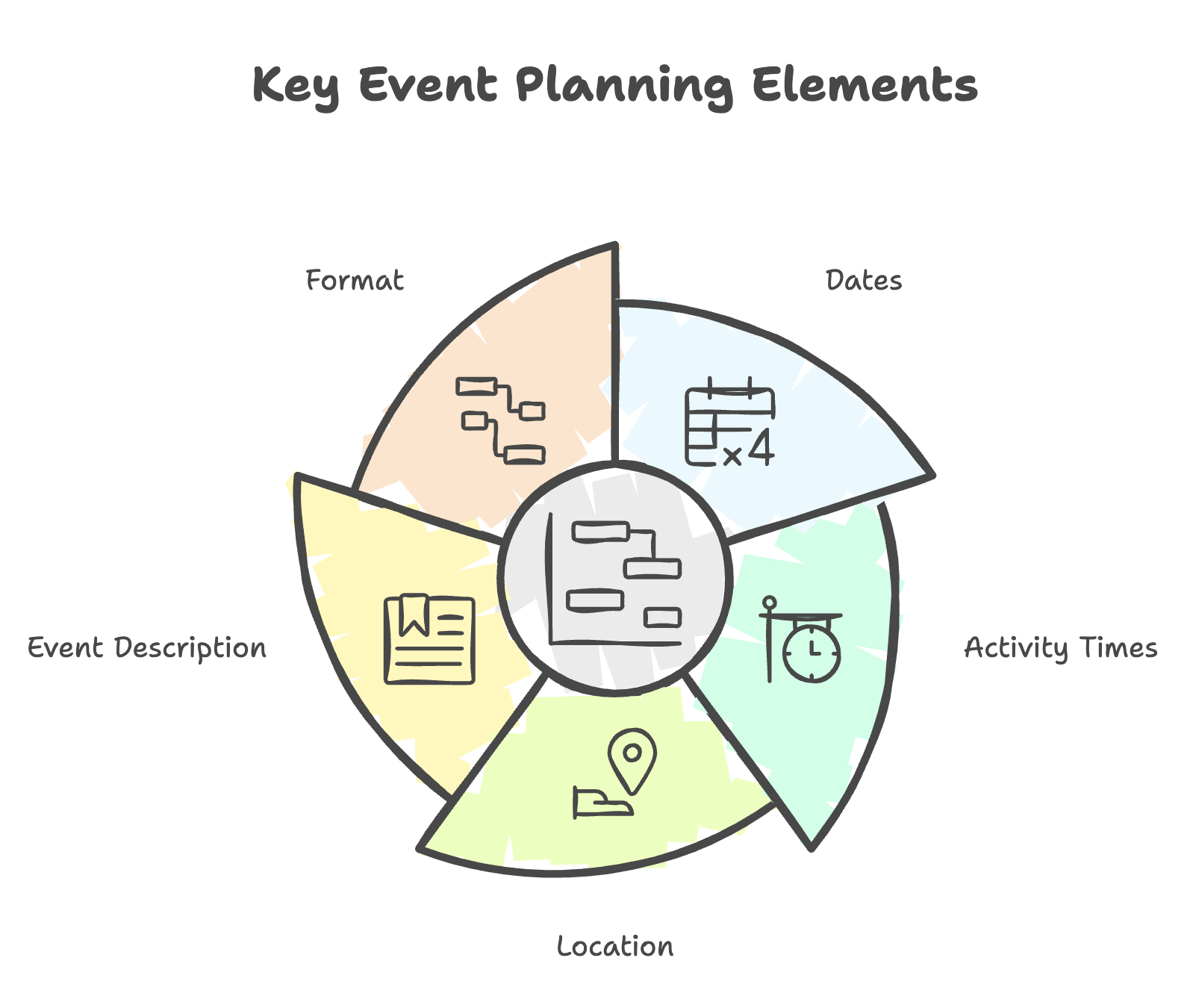
Here is the essential information you’ll need to include in the overview:

  • Event name
  • Dates
  • Activity times
  • Location
  • Event Description
  • Format

Step 2. Define the Objective

Ask yourself, what is the purpose of the event? Is it to generate leads, drive sales, or build brand awareness? Once you’ve identified the main objective, you can start aligning all the other event elements around it.

Define the objective as clearly as possible. Here are some examples:

  • Meet and network with our community of stakeholders, including clients, prospects, and partners.
  • Educate customers on a significant new product launch or brand change.
  • Generate sales for our annual holiday promotion.
  • Acquire new customers in our market.

Step 3. Identify the Target Audience

Who is this event for? Is it for existing customers, new prospects, or partners? The answer to this question will dictate the event’s tone, messaging, and overall experience.

For instance, if you’re planning a conference for C-level executives, you want to ensure the venue is upscale and the topics are relevant to their needs. On the other hand, if you’re planning a customer appreciation event, you want to ensure it’s fun and interactive.

Be as specific as possible when identifying the target audience. Here are some examples:

  • College students who are interested in starting their own business.
  • Working professionals in the industry who are looking for a new job.
  • Stay-at-home parents who are interested in earning an income from home.

Step 4. Set the Tone

What kind of feeling do you want your guests to have when they leave the event? This is what we call the event’s “tone.” The tone should align with the event’s objective and target audience.

For instance, if you’re planning a conference for industry thought-leaders, you would want the tone to be professional and informative. On the other hand, if you’re planning a customer appreciation event, you would want the tone to be fun and festive.

Some examples of event tones include:

  • Intimate and exclusive
  • Fun and festive
  • Professional and informative
  • Luxurious and extravagant

Step 5. Choose the Type of Event

There are many different types of events, but some of the most popular ones include conferences, conventions, trade shows, and exhibitions. Events can also be classified by their size, such as small (under 100 people), medium (100-1,000 people), or large (over 1,000 people).

Here are some examples of event types:

  • Conference: A gathering of people to discuss a particular topic or share information.
  • Convention: A large gathering of people centered around a shared interest, goal, or industry.
  • Trade Show: An event where businesses showcase their products or services to potential customers.
  • Exhibition: A public event where businesses display their goods or services for the first time to generate awareness. 

The type of event will depend on the goals, target audience, and budget. For instance, a trade show might be the best option if you’re trying to generate sales. If you’re trying to build brand awareness, then an exhibition might be the better choice.

Step 6. Choose the Date and Location

The date and location of the event are two of the most important factors to consider. The date should be chosen based on the availability of the venue, the target audience, and the event’s objective. For instance, a date near the holiday season might be the best option if you’re trying to generate sales.

The location should be chosen based on the type of event, the target audience, and the budget. For instance, a city with a strong business presence would be the best choice if you’re planning a conference for industry thought-leaders.

Step 7. Set Roles and Responsibilities for the Team

Now that you have the basics of the event planned, it’s time to start putting together a team to help make it happen. 

Depending on the size and scope of the event, you might need to hire an outside company to help with logistics. You will also need to decide who will be responsible for marketing, budgeting, and customer service tasks.

Many different roles must be filled to successfully plan and execute an event. Here are some of the most important ones:

  • Event planner: The event manager is usually the first point of contact for the client or customer. They are responsible for developing the event concept, setting the budget, and managing the logistics.
  • Event coordinator: The event coordinator works closely with the event planner to ensure that all event details are taken care of. They are responsible for booking the venue, arranging transportation, and ordering supplies.
  • Event marketing manager: The event marketing manager is responsible for promoting the event to the target audience. They develop and implement marketing plans, create promotional materials, and manage social media campaigns.
  • Event sales manager: The event sales manager is responsible for generating revenue for the event. They sell tickets, sponsorships, and exhibitor space.
  • Customer service manager: The customer service manager is responsible for ensuring attendees have a positive experience at the event. They manage customer inquiries, resolve complaints, and provide information about the event.

Depending on the size of your organization and your budget, one person may assume more than one of these roles, or even all of them.

Step 8. Selecting the Right Event Mobile App 

Deciding on the right mobile event app for your event can be daunting. With so many different options on the market, it’s essential to take the time to consider your needs and find an app that will fit both your event and your attendees. Some things to keep in mind include:

  • The app should be easy to use and navigate. Attendees should be able to find the information they need without difficulty.
  • The app should be compatible with multiple devices (IOS and Android). Not everyone uses the same type of phone, so it’s essential to choose an app that as many people can access as possible.
  • The app should offer features that are relevant to your event. For example, if you’re hosting a conference, you’ll want an app that allows attendees to create their own schedule, view speaker bios, and read up on sponsors.
  • The app should be updated regularly. With new versions of iOS and Android released every year, you will need to ensure your app is always up-to-date. Otherwise, attendees may not be able to access it on their latest phone or tablet. By keeping these things in mind, you can be sure to choose the suitable event mobile app for your needs.

Step 9. Create a Minute-by-Minute Update of the Event

This is one of the key ways conference apps streamline event operations and reduce confusion during live events. It should include all the required details, such as the start and end time, the location, the speakers, and the activities.

The schedule should also be updated regularly so that attendees can stay up-to-date on the latest information.

Here is an example of an event schedule:

  • 9:00 am – Registration and Breakfast
  • 10:00 am – Opening Keynote
  • 11:00 am – Breakout Session 1
  • 12:00 pm – Lunch
  • 1:00 pm – Breakout Session 2
  • 2:00 pm – Breakout Session 3
  • 3:00 pm – Breakout Session 4
  • 4:00 pm – Closing Keynote
  • 5:00 pm – Networking Reception
  • 6:00 pm – Event Ends

Step 10. Develop a Marketing Plan

Remember that organizing an event is not just about logistics but promoting it to the right audience. The marketing plan should be developed based on the objectives of the event, the target audience, and the budget.

The marketing plan should include a mix of traditional and digital marketing tactics, such as print advertisements, online ads, email marketing, and social media.

Here are some examples of a marketing plan:

  • Print ads in local newspapers and magazines
  • Online ads on event websites and social media
  • Email marketing to potential attendees and past participants
  • Social media campaigns on Facebook, Twitter, and Instagram
  • Direct mail to potential attendees in the target area

Step 11. Keep an Updated To-Do List

Organizing an event can be a logistical nightmare. There are many details to keep track of, from the venue to the catering and marketing. Keeping an updated to-do list is essential to ensure that nothing is forgotten.

The planning checklist should be updated regularly and shared with the event team, so that everyone is on the same page.

Here is an example of a to-do list:

  • Confirm venue booking
  • Order catering
  • Create event website
  • Print promotional materials
  • Ship event supplies to the venue
  • Coordinate with volunteers
  • Finalize speaker lineup

Organize Your Event and Improve Attendee Engagement with Yapp

Each event comes with its own unique set of challenges. But with the right tools and execution, any event can be a success. This is where Yapp comes in.

With Yapp, you can easily create a custom event app without coding. Attendees can use the app to stay up-to-date on the latest information and interact with other attendees. You can use it to keep everyone up-to-date via push notifications. For larger events, you can even create a second smaller app to be used by your organizing team to coordinate the behind the scenes details and logistics needed to make the event a seamless success!  

Get started with Yapp‘s free trial today to make your next event a success!

Mobile Event Apps for Non-Profits: How to Save Time, Money, and Stress

  • Yapp shows how nonprofit event apps can save time, money, and stress by replacing scattered planning tools with one mobile hub.
  • Centralized schedules, updates, and event resources make event management more efficient for lean teams.
  • Nonprofits planning events with limited staff and budget should use this strategy.

How can non-profits simplify event planning without overspending?

Planning a fundraising gala, community forum, or volunteer training event takes serious coordination—and for non-profits, every dollar counts. Too often, teams waste time juggling spreadsheets, paper handouts, and endless email chains just to keep attendees in the loop. That’s where mobile event apps for non-profits come in.

At Yapp, I’ve seen small organizations achieve big results by centralizing their event information in a mobile app. Instead of stressing about last-minute schedule changes, they send push notifications in seconds. Instead of printing thousands of sheets, they cut costs (and help the planet).

When I worked with a nonprofit director last year, she told me the app “felt like hiring an extra event coordinator—without the extra salary.” That’s exactly the type of support resource-strapped teams need.


What makes a mobile event app essential for non-profits?

From tighter budgets to limited staff, nonprofit leaders face unique challenges. A good mobile app helps overcome them by providing:

  • Cost savings: Eliminate printing costs and reduce wasted materials.
  • Instant updates: Push notifications keep attendees informed in real time.
  • Engagement tools: Features like polls, Q&A, and discussion feeds bring people closer to the mission.
  • Centralized hub: Store schedules, bios, maps, and resources in one easy-to-navigate place.
  • Accessibility: Apps work on any device, making it simple for diverse audiences to participate.

When I guide new customers through their first app build, I emphasize how these features aren’t just “nice-to-haves”—they’re mission-critical. Non-profits can’t afford wasted time or resources, and technology should work as hard as they do.

One of my favorite examples is Schools That Can, an educational nonprofit that used Yapp for its 10th annual National Forum. With more than 150 participants, they ditched the spreadsheets and paper packets. The result? A 66% adoption rate, 2,700 sheets of paper saved, and smoother logistics for 96% of attendees. That’s real impact.


How can your nonprofit start using mobile apps today?

If you’re wondering whether your nonprofit is “big enough” or “tech-savvy enough” to use a mobile event app, here’s my advice: start small and build from there. At Yapp, I often walk teams through their first app in under an hour. Once they see how easy it is, they can’t imagine running events without it.

Here’s a simple roadmap to get started:

  1. Pick one event—a fundraiser, board retreat, or volunteer summit.
  2. Upload your essentials—schedule, directions, bios, and sponsor info.
  3. Enable notifications—set reminders for key sessions or calls-to-action.
  4. Invite attendees—share the app link through email or social channels.
  5. Measure success—track adoption, engagement, and money saved.

Every nonprofit we support ends up discovering hidden value. For some, it’s saving thousands of dollars on printing. For others, it’s volunteers feeling more connected and invested. And for many, it’s the confidence of knowing they can deliver a professional event experience without breaking the budget.

Ready to make your next event better? Start your trial now!

conference crowd

How to Leverage Your Event App for an Optimal Event Experience

conference crowd
  • Yapp shows how to get more value from your event app by using it intentionally before, during, and after the event.
  • Best practices around communication, content, and engagement help create a smoother and more useful attendee experience.
  • Event teams that already have an app and want stronger results should use these tactics.

Considering an event mobile app for your next event? You’ve come to the right place!

Event mobile apps are a must for any organization seeking to increase interaction and engagement for their events.

In this post, we’ll review your options for creating an event app and what features you can leverage to create the best experience for your next event.

How To Create an Event Mobile App

There are two options for creating an event app. If you’re looking for a fully customized, standalone event app, you will likely need to hire a developer to create one for you from scratch.

Option #1: Custom Standalone Event Apps

While this does allow for more control and custom features, this route can be expensive, time-consuming, and difficult to get right.

Still, for organizations with large event budgets, highly specific branding, or feature requirements (e.g. South By Southwest or the World Economic Forum), a standalone app can be the right choice.

Option #2: Container Apps for Events

Alternatively, most event managers opt to use event app solutions that utilize a container app to greatly reduce costs.

With a container app, event planners can utilize a purpose-built app creation platform to construct their event app, avoiding the design, development, and project management skills needed for creating a custom app from scratch.

Container apps like Yapp come with features typical of the most successful event mobile apps and take a couple of hours rather than weeks (or months) to set up.

Using a container app with strong editing tools is a great choice for event managers looking for a full-featured yet budget-friendly option for building an excellent event mobile app.

How to Increase Your Event Mobile App Engagement

Creating an event app does not have to be a big investment. And it can still deliver on attendee engagement, cost reduction, and help create a better event experience when done correctly.

engage attendees

Here are some tips on how to leverage your event app for an optimal experience.

Use push notifications wisely

Push notifications are a great way to keep attendees updated on important information, such as schedule changes or announcements.

However, overuse of push notifications can be annoying and may cause attendees to uninstall your app. So use them sparingly and only for the most important information.

Make sure the app is easy to use

Attendees should be able to easily find the information they’re looking for in your app. The navigation should be intuitive and the design should be clean and simple.

If your app is confusing to use, attendees will be less likely to use it. So try not to overload attendees’ attention with too many pages within your app. We recommend 4-6 max.

Include relevant content

Your app should focus on content that is relevant and helpful to attendees at your event. This often includes a schedule of events, speaker bios, session descriptions, maps, and more.

Again, including too much content will make your app seem cluttered and will make it more difficult for attendees to find the information they’re looking for. Keep it crisp and to the point!

Keep the app up-to-date

Attendees will expect your app to be up-to-date with the latest information about your event. Make sure to regularly update the app with any changes or new information.

update your app

For custom, standalone apps, this can be tricky because updating them sometimes means re-submitting them to the app store for both iOS and Android and awaiting a fresh approval.

The last thing event organizers want is to be waiting on an approval for a time-sensitive update while your event is going on.

With a container app, app store approvals are managed at the container level by the service provider, so that your event mobile app can be updated instantly.

Being able to publish event updates quickly and confidently can help event organizers focus their time on other aspects of event management.

Promote the app before and during the event

Make sure attendees know about your app before the event by promoting it in your marketing materials.

During the event, promote the app through signage, announcements, and interstitial slides. The more people who use your app, the more useful it will be at driving engagement with your audience.

Get feedback and make improvements

After your event, get feedback from attendees about their experience with the app. Use this feedback to make improvements for future events.

Event mobile apps like Yapp will even let you perform simple polls to get your users’ anonymous opinions about their experiences of your event. You can use similar features to collect feedback about each session your attendees participate in.

Now that we’ve discussed your options for creating an event mobile app and how to leverage it to get the most engagement from attendees, let’s wrap it up with 8 simple tips for a successful event overall.

8 Tips For a Successful Event

Embrace Modern Trends

By leveraging your digital event app, you can create a more modern and convenient event experience for attendees.

Paper event materials can be costly to print and ship. In addition, attendees often turn down single-page flyers from sponsors and certainly do not prefer to walk around with huge paper binders containing event information. Those days are behind us.

Event apps are becoming more popular and are a great way to enhance the attendee experience while lowering your own event costs.

Leverage Tech to Enhance Networking

One of the most important things attendees expect to do at your event is network. An event app can be a great tool for networking by enabling attendees to create digital profiles, share bios and contact information, and easily find each other online during and after the event.

Many conference attendees report that the most valuable takeaway is the relationships that they formed or strengthened during the event. A great event app can foster social engagement and help create space for these relationships to grow.

event networking

Appreciate Your Sponsors

Your sponsors are a big part of your event. They provide the financial support that allows you to put on a great event, so make sure you’re leveraging your event app to show appreciation for your sponsors.

Include their logos in the app and make sure attendees know who they are. You can also use the app to promote special deals or offers from your sponsors.

By showing your appreciation for your sponsors, you can build stronger relationships and ensure their continued support.

Additional Sponsor Tips

  • Utilize eye-catching banner advertisements near the bottom of the screen, where a user looks to navigate through the app.
  • A splash page that highlights sponsors for a few seconds is a great option to increase your top exhibitors’ reach.
  • Sponsored push notifications are also a fantastic way to increase a brand’s visibility. Use these sparingly though!

Keep App Updated After Event

After your event is over, attendees will still use your app. They may use it to look up contact information for someone they met or recall the name of a speaker or a particular slide from the schedule of events.

The post-event experience should carry forward the positive energy from the actual event.

Use your app to stay connected with attendees after the event is over and make sure they have a positive experience.

Capture Data and Measure Your ROI

Make sure you’re capturing data through your event app. This data can be used to measure the success of your event and make improvements for future events.

You can track things like how many people used the app, what features they used, and how long they used it.

This data will be invaluable in planning future events and making your next app even more useful to your audience.

Make Sure the Event App is Compatible With Different Devices

Make sure your event app is compatible with different devices such as iOS and Android devices, and that everything works properly on different screen sizes. This will make it easy for attendees to use the app and ensure that all of their data is in one place.

Don’t worry about outdated platforms like Blackberry and Windows Phone. Their market share has shrunk to the point of irrelevance.

By making your event app adaptable, you can make sure that everyone can take advantage of its features.

Include Customer Service Contact Information

Include customer service contact information in your event app. This will ensure that attendees can reach someone if they have any problems with the app.

By including customer service contact information, you can make sure that attendees have a positive experience.

Conclusion

To wrap up, it’s important to ensure your event app is kept up-to-date and is promoted before and during your event.

To continue improving your app and event experience, get feedback from attendees after the event.

Also, be sure to optimize the attendee experience with helpful communication and interactive features, appreciate your sponsors, and capture data to measure your ROI.

By following these tips, you can leverage your event app to create a more modern and convenient event experience for attendees.

If you’re in search of a mobile app to assist with your next event or conference, Yapp can help.

Our full-featured mobile event app can help you collect all the information about your event in one location, making it easier for attendees to have everything they need on their mobile device.

Try it today!

Attendees walking through a conference event floor

The Ultimate Guide to Mobile Apps for Events and Conferences

Attendees walking through a conference event floor
  • Yapp explains how mobile apps for events and conferences centralize information and improve attendee engagement.
  • Schedules, notifications, networking, sponsor promotion, privacy controls, and analytics help events become more efficient and interactive.
  • Organizers evaluating the value of an event app or planning a new rollout should start here.

What are Mobile Apps for Events and Conferences?

A mobile app for events and conferences is a software application designed to make your event or conference more organized, efficient, and engaging.

The app can be used to centralize all the information related to your event or conference in one place. This way, attendees can have everything they need at their fingertips, including the schedule, list of speakers, map of the venue, and more.

Mobile apps for events and conferences can also facilitate communication and networking among attendees. For instance, attendees can use the app to share photos and interact on social media or on an event-specific feed within the app itself. 

The Benefits of Mobile Apps for Events and Conferences

When it comes to events and conferences, there are a lot of moving parts. From planning to execution, keeping everything organized and on track can be difficult. That’s where mobile apps can help. A good mobile app for events and conferences can make life much easier for organizers and attendees. 

Here are some benefits of using a mobile app for your next event or conference.

Support Engagement on Mobile Devices

With more and more people using mobile devices, it’s never been a better time to create a mobile app that allows attendees to get information and engage with your event right from their phones.

Using a mobile app, you can ensure that all the information related to your event or conference is readily available on attendees’ mobile devices. This includes the schedule, list of speakers, map of the venue, and more. Additionally, a mobile app can facilitate communication between the organizer and attendees and networking among attendees.

Attendees can also use the app to communicate and provide feedback about their experiences through polling features. 

Set Up Your Event Easily

Creating an event with an event mobile app is easy! With just a few clicks, you can add all the essential details about your event, including the date, time, location, and more. You can also add photos to give your event page a personal touch. And once you’re finished, you can share it with your attendees and staff with just a few clicks. 

With all the information related to your event or conference centralized in one place, you can save a lot of time, money, and effort in terms of event planning and execution. For example, centralizing your event information allows you to drastically reduce or eliminate paper programs and printing costs and the logistics of shipping and distribution at the event.

Push Notifications for Sharing Event Information

One of the great benefits of using a mobile app for your event is the ability to send out push notifications. This way, you can remind attendees about essential aspects of the event, such as upcoming scheduled sessions, speaker keynotes, and more.


push notifications from event mobile app

Push notifications allow you to communicate with attendees about last-minute changes or updates. For example, you can notify people through a push notification if there’s a change in the schedule or if a speaker has to cancel. 

Push notifications are a quick and easy way to keep attendees updated and informed about all aspects of your event or conference.

Be Environmentally Friendly

Event mobile apps can help event managers reduce the event’s environmental footprint by using less paper. For example, an event mobile app can send electronic notifications instead of paper notifications. It can also be used to create a digital rather than a paper program.

Event mobile apps can also be used to collect data electronically instead of on paper forms. By using less paper, event mobile apps can help to reduce the impact on the environment.

Can Be More Cost-Effective with Container Apps

Event managers have two options when considering an event mobile app: a container app or a custom-built (or white-label) standalone app. A container app is a single app that can house many different event apps within it. In contrast, a custom-built event app is built by a developer specifically and solely for your event.

While creating a standalone app can provide more options for customization, they require far longer to develop and are often much more expensive than container apps. In addition, app store approvals typically take much longer for standalone apps and can lead to delays in getting the most up-to-date content out to your attendees.

Learn more about how Yapp’s container app delivers on features while saving your event budget!

Create Networking Opportunities

A mobile app can also be used to create networking opportunities among attendees. With a mobile app, attendees can easily connect by posting about the event on a social feed within the app. Additionally, they can use the app to network with exhibitors and sponsors by locating their profiles and any digital materials within the app. Ideally, attendees should be able to share their contact information, a photo, bio, and any social links within the event app to connect with others both online and offline.

By using a mobile app for your event or conference, your event can become more interactive and engaging for attendees. 

Gather Data

A mobile app can be a powerful tool for gathering data about your event or conference. With a mobile app, you can quickly get attendees’ engagement and activity details. For example, the best mobile event app providers enable event managers to see important metrics such as total app installs, device breakdown (iOS vs. Android), and total views of specific pages within the app. 

event mobile app analytics

Additionally, you can also use the app to collect feedback from attendees. By obtaining information on your event or conference, you can improve the entire experience for attendees. 

You may also use the data to inform future events and conferences. The ability to gather data through a mobile app provides event and conference organizers with a valuable tool for improving the overall experience for attendees.

Showcase Your Event Sponsors

A mobile app can also help you create more opportunities for sponsors and attendees to interact. By using a mobile app, you can provide sponsors with more exposure and visibility. You can also use the app to offer sponsors more value for their investment.

For instance, the app can promote sponsors’ products and services to attendees. You can also use the app to give sponsors an additional presence at your event or conference. Doing this can create more sponsor engagement opportunities and generate more revenue for your event or conference

How to Get The Most From a Mobile Event App

Now that you know all the benefits of using a mobile event app to support your next event let’s talk about some specific ways you can leverage your app to improve attendee engagement at your next event.

Build an Event Information Page

The first place to start with your event mobile app is to create an event page where you can share details about what users can find while using your app. You can also add images, videos, and call-to-action buttons to create a customized and professional-looking page that will help users understand what they can find in your app and encourage them to explore further. 

Create an In-App Social Feed

App users are increasingly expecting to have a social experience when using apps. By allowing users to post photos or videos and comments or engage with other users’ posts through liking or commenting, you can create a more engaging experience that keeps users coming back. 

As a bonus, by including a social feed in your mobile event app, you will be able to keep all interactions uniquely focused on your own event. Further, you will be able to easily analyze event engagement within your app rather than tracking external social media platforms. 

Moderate Your Social Feed

Another key benefit of having an in-app social feed is the ability to moderate the content that gets posted. Inappropriate content can damage your app’s reputation and cause users to lose trust in your community. As your app administrator, protecting your user community from inappropriate content is vital. So be sure to use moderator settings to review content before it’s published. 

Utilize Scheduling Features

Organizing your event schedule can be daunting, especially if you have a lot of different activities or multiple tracks to manage. Scheduling tools are an event mobile app feature designed to make things easy by organizing everything chronologically, by department, focus, day, or whatever you need. 

Simply add all your tracks, meetings, workshops, and activities into one place so you can focus on what’s essential and leave the details to the app.

Keep Your Staff Informed with Announcement-Only Feeds

Any business owner knows that keeping your employees in the loop is key to ensuring a well-oiled event machine. Whether you’re sharing a last-minute schedule change, our alerting the appropriate party of technical difficulty- and admin-only feed can help you get the word out quickly and efficiently. 

Protect Attendees And Their Privacy

It’s crucial to find an event mobile app solution that allows you to dictate who should have access to the app and who, if any, should be restricted.

Leading event app solutions allow organizers to create public apps that anyone can download and use as well as private apps limited just to a specific list of attendees. In addition, conference and event organizers should look for mobile app platforms that enable them to revoke access from specific individuals at public events.

Further, in an age of social media behemoths seemingly doing whatever they want with user data, attendees may appreciate the privacy that comes with using an in-app feed. The most reputable event mobile app solutions will not sell users’ data. When organizations treat their users’ data with respect, it fosters a safe environment in which people feel comfortable sharing their information and interacting with your app.

Clone Your App To Streamline Your Next Event

 Finally, use app cloning to quickly create a new app based on an existing app for similar or repeating events. This will allow you to create a new app with similar functionality to an existing app or create a new one based on an existing one but with different features. 

Cloning can save time and money by allowing you to to base your new app on an existing app rather than starting from scratch. It can also quickly create multiple versions of an app for testing or for different market segments.

Conclusion 

If you’re looking for a mobile app to help with your next event or conference, check out Yapp. With Yapp, you get all the above mentioned features, benefits, and more. Our full-featured mobile event app builder is affordable and easy to use, perfect for limited event budgets.

Yapp can help you centralize all the information related to your event in one place, making it easy for attendees to have everything they need at their fingertips. 

Give Yapp a try today.


What Do the Latest Updates from Apple Mean for Your Events?

  • Yapp explains how Apple updates can affect event apps and mobile event planning.
  • Understanding platform changes helps organizers make better decisions about app delivery and attendee experience.
  • Event planners concerned about Apple-related app changes will benefit most from this guide.

Savvy event planners have been using technology to their advantage at events for a long time. What do the latest announcements at the September 9th, 2015 #AppleEvent mean for the future of your events? Here’s our run-down of the major announcements along with what the implications of each could be on your upcoming events. 

1. Supercharge the mobile app for your event with 3D Touch

Apple Event 3D Touch Giphy

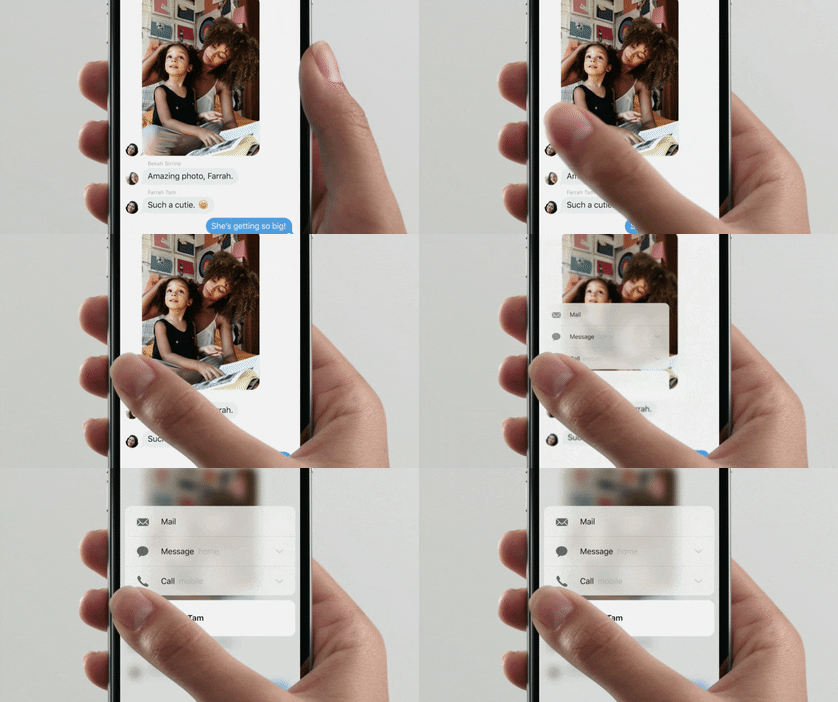
What’s 3D Touch, you ask? This feature aims to make user experience smoother and faster. As described by Apple in the related Press article: “iPhone 6s and iPhone 6s Plus introduce new ways to navigate and experience iPhone by sensing pressure to enable new gestures — Peek and Pop™ — so you can dip in and out of content without losing your place.”  This will mean a host of possibilities for your in-house developers or mobile app company (spoiler alert: we here at Yapp are working on some ideas!)

Your attendees will save time (and taps) with the following:

  • Preview tabs or pages of the app without clicking into them
  • Get directions to your event location with just one deep press on the address in the event app
  • Upload photos to the feed in the event app with just one click
  • Deep press on another attendees photo for shortcuts to network with them or see their latest tweets about the event
  • View documents without downloading them

2. Upgrade presentations at your events with Apple TV

Apple Event 2015 Apple TV Siri Giphy

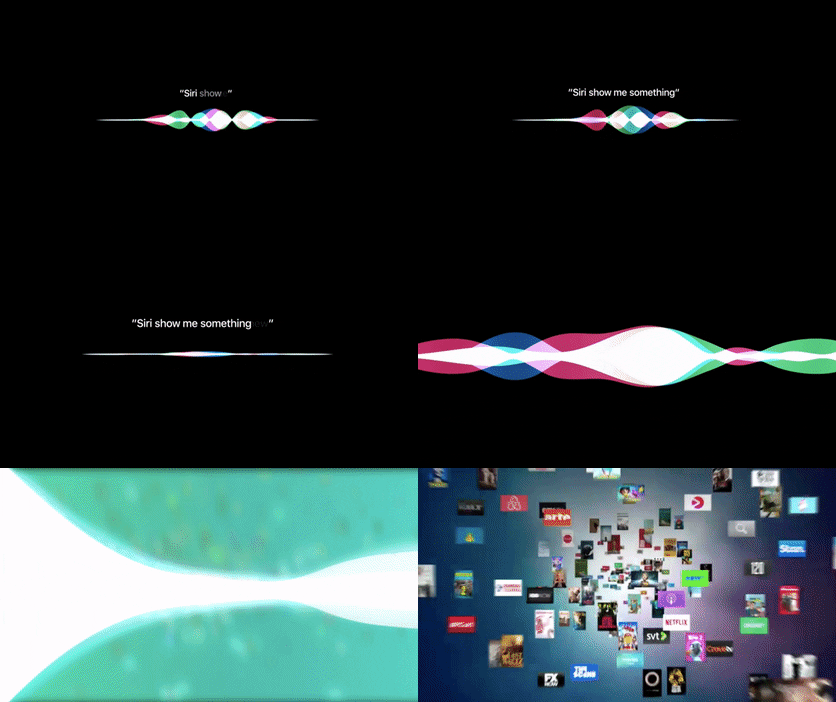
Apple TV comes with a TV-optimized version of iOS (tvOS), Siri support (digital assistant at your event, anyone?), apps in the new app store and a snazzy new remote. Leverage the best of these enhancements and you’re guaranteed to wow your attendees with an engaging presentation. Make a powerful statement by quickly switching between apps or ask Siri questions to search your apps or the web. Create an animated screensaver showcasing logos, speaker information, sponsors and more. Why limit yourself to just PowerPoints?

3. Gamify your event with photo contests

Apple Event 2015 iPhone Selfie Giphy

Create buzz around your event with a photo contest. Make it a selfie contest where attendees can use the new 5MP HD-front-facing camera even if your event has low-lights. Or, ask attendees to tap into their creative side for a live photo contest using the unique new live photos feature for some cool giphy type photos. Then, post to your Yapp news feed.

4. Move aside computers and paper (and Microsoft Surface), enter iPad Pro

Apple Event 2015 Apple Pencil Giphy

The newest iPad, iPad Pro, features a 12.9 inches screen (slightly larger than older versions), a multi-tasking tool, 2732 x 2048 pixels Retina display (better than even that for Macbook Pro), 10 hours of battery life and two stellar accessories: smart keyboard that attaches to the iPad and Apple Pencil with insane precision.

What does all these tablet enhancements mean for your events?

  • Goodbye paper! Check-in using iPads just got faster (and might we say, cooler?)
  • Need attendees to sign during check-in? That just got easier with an Apple Pencil.
  • Your exhibition hall just got more interactive with live demos at booths using iPad Pro
  • Expect more attendees on their iPads instead of computers using the new keyboard
  • More easily and quickly create and edit apps from this powerful new tablet

Other major things we learned at the #AppleEvent?

5.Apple Watch just got more stylish with new gold and rose gold finishes as well as some designer collections such as the one from Hermes. 

6. Apple is putting more emphasis on gaming (the new Apple TV remote has Wiimote-style controls). 

7. Apple CEO, Tim Cook, can dress to impress even in jeans. 

8. There’s a new monthly payment plan for iPhones which includes AppleCare+ and option to get a new iPhone every year. 

9. One Republic can be available for a concert in 10 minutes notice (“We didn’t even know we were playing until ten minutes ago” – Ryan Tedder of One Republic). 

Are you ready to #Apple upgrade your events? What other tools and features do you use to enhance the event experience for your attendees?

All giphys here are from the Apple Events video.

Tips & Tricks for Creating a Stellar Event App

tip6-EVENT
  • Yapp shares practical tips and tricks for getting more value from an event app.
  • Better setup and smarter feature use help improve both organizer workflow and attendee experience.
  • Event organizers who want stronger app results without extra complexity will benefit most from these tips.

Yapp is perfect for events of all shapes and sizes. From birthday parties to fall break trips to conferences, you can pick and choose your template pages to fit your needs.

Here’s what you’ll need in your Yapp:

  • Invitation: Here’s where you’ll put all of your basic event information. If your event is one day, invitation is perfect. If it last’s longer, use Information instead. And, if you’re using Eventbrite for ticketing or registration, replace this page with the new Tickets page, which can display all of your event info as well as link to sell tickets. This page is a must-have for most events; it holds all the vital details, including the location’s address which links directly to Google (or Apple) maps.
  • Schedule: If you’re packing in workshops, conference sessions, or activities, this will help you keep track of everything. Linked addresses can go in here as well, so there’s no getting lost from one thing to the next. If you’re running a lot of different sessions or activities, or have a conference with multiple tracks, get excited — we have a multi-track schedule page coming soon as a premium add-on.
  • People: Use this to replace those expensive bio books that end up collecting dust as soon as the day is over, conference organizers. Ask your speakers, organizers, or attendees to put their information into a spreadsheet (formatted like our upload template) and then send it our way — we’ll upload all of those bios into your Yapp quickly and inexpensively. This page is also perfect for showcasing sponsors*; include their logos, company names, bios and websites as resources for attendees. If your event is less formal, this is a great page to store contact information so that the group or specific members can easily be reached.
  • News Feed: We’ve featured our News Feed a few times in Tips & Tricks. With it, you can send push notifications, which makes it great for event updates and announcements. But, the page also works like a group chat, which means if your event is a vacation with friends, you can use it to plan travel arrangements and keep track of who owes who money.
  • Crowd Pics: Sharing photos is fun whether it’s with friends, family or co-workers. Anyone with your Yapp can post photos into this page, making a collaborative commemoration space. It has also been used for scavenger hunts, and all the photos can be downloaded afterward to create albums for event guests.

*For bigger sponsors you want to highlight, try adding their logo to a custom cover page. Email us for info!

Depending on what type of event you’re creating for, our other template pages may also be helpful for organizing. The above are the staples, but there’s always room for creativity. Then, once you’ve published your app, it’s time to share and promote. Check out our post full of sharing tips, and let us know what creative ways you’ve used to promote your event apps!

Multi-Track Schedule: Help Us Build It!

Quick Summary

  • Yapp shows how to build a multi-track schedule so event apps can support more complex agendas.
  • Better schedule organization makes it easier for attendees to find the sessions that matter to them.
  • Conferences and events with multiple tracks will benefit most from this feature.

mts2


We’re running a crowdfunding campaign in hopes of funding four template pages to add to the Yapp platform. All four are pages you’ve asked for that we’re excited to see on Yapp. Each week of the campaign, we’ll be featuring one of the four pages, showing you how it works, what it can do, and why you should help fund it!

Multi-Track Schedule.

This page is in high demand by conference and event organizers. In its most literal form, multi-track schedule is great for events with multiple tracks — different workshops, sessions, goings-on for different types of attendees.

mts

But, the page can also be used to distinguish between simultaneous events that aren’t necessarily “track” based. For users like Edcamp organizers — some of our most dedicated Yappers — with multiple sessions taking place at once all in different rooms, the tracks could be the room numbers. Any session with a red coloration is in room 101.

Or, let’s say you have a multiple day event with long schedules for each day. Rather than having one super long schedule that users have to scroll through every day, or having 5 different schedule pages, you can assign each day a track color. Users will click the ‘Schedule’ icon, choose the day and see the list of events happening then.

Though multi-track is generally though of to be a tool for conferences and big events, ours will be simple yet powerful enough to work beyond those boundaries. To build multi-track schedule, we’re hoping to raise $4,500. If you’d like to see this page added to our platform, or need it in your Yapp ASAP, please contribute to fund it. If you give $80 or more, you’ll have access to the page in your account once it becomes available. You won’t be charged unless the campaign succeeds.

Feature Friday: Event Apps

  • Yapp highlights event app examples and ideas in a Feature Friday roundup.
  • The post helps readers see how different events use apps to improve communication and organization.
  • Event planners looking for practical inspiration will benefit most from this feature.

It’s Feature Friday and this week, we are are highlighting websites that make event planning all the more easy—besides Yapp, of course!

Mindnode: in the early stages of your event, this will help you organize your thoughts and ideas in a visual way, so your plans look awesome, and they are easy to keep track of!

Punchbowl: a website that helps you plan your perfect party, from creating invitations to managing RSVPs to finding a venue. You can conduct polls, seek local vendors and organize party supplies, all on one platform.

Plancast: a social calendar that you can share with your friends. Everyone submits their plans, so you can see what your friends are up to, and if they are doing something that you would want join in on!

Wherevent: a great way to easily discover different events that are happening near you. You can also see who is attending!

Tiny Prints: if you’re looking to add a little unique flare to your save-the-dates, invitations and thank you cards, then check out this website; it provides custom event invitations and cards!

TopTablePlanner: having trouble organizing your guests during mealtime? This app lets you drag and drop tables and guests to digitally create your event’s seating chart. You can also include meal selection and cake, dessert and gift tables.

Do you know of others? Let us know!