Tag Archives: ios apps

Introducing the Eventbrite Tickets Template Page

EB
  • Yapp introduces an Eventbrite tickets template page to make ticketing information easier to share inside an app.
  • A more direct ticketing setup helps connect registration flow with the event app experience.
  • Event teams using Eventbrite for registration will benefit most from this feature.

Putting together an event takes a lot of time, organization, and awesome tools.

Now, two of your favorite tools are joining forces to streamline your event management from start to finish. Yapp has partnered with Eventbrite to bring you our newest template page: tickets.

If you already use Eventbrite for ticketing and event management, all you have to do is open up the Yapp for your event, add the Tickets page, then sync your Eventbrite account to import your event.

If you aren’t familiar with Eventbrite, it’s the world largest self-service ticketing company that allows people to easily host, promote and discover events they’ll love.

By bringing our services together, your users will be able to get everything they need to attend and have a great time at your event, all in one place.

Head to Yapp now to check out the new page. If you have feedback, send it our way. And, if you’re excited about the Yapp/Eventbrite friendship, spread the word and help get more organizers on board!
What the Tech?! Two-step Verification

twostepver
  • Yapp explains two-step verification in a simple way as part of its tech explainer series.
  • The post helps readers understand a basic security concept that matters in everyday digital life.
  • Readers who want approachable guidance on online security topics will benefit most from this article.

Two-step Verification, n;

A process that adds an extra layer of security to your private accounts by asking for secondary authentification of your identity. This process is used by most cloud services, including Gmail, Apple, and Dropbox. By enabling two-step verification, it is marginally more difficult for hackers to access your accounts.

Most two-step processes involve you connecting a phone number to your account email. When you log in from a new device, computer, or incognito browser, you’ll be prompted to enter the code that was sent to your phone. Basically, you’re required to know something as the account holder, and possess something that the account owner possesses. The ATM is one of the most common multi-factor machines — it requires you to possess your bank card and know your PIN number. The likelihood that someone who is not you will know both of these things is slim, so you are granted access to your account. On the web, we use passwords to access our accounts. While some people are excellent at creating “unhackable” passwords, most people are still using their cats name backwards with their birth date. Secure your passwords with the extra deadbolt that is multi-factor authentication, using a service like 1Password, LastPass, and/or two-step verification services offered by individual apps.

After scares like Heartbleed, the Apple iCloud photo leak and Dropbox‘s recent account info leak, adding two-step verification to your accounts is especially important. In short, it means that even if your account emails and passwords are accessed illegally, your email, cloud storage, credit cards, and personal information are safe.

Product Update: Control Your News Feed Posts

tip4-AONF
  • Yapp highlights News Feed posts as a way to keep app content fresh and timely.
  • A feed-style update format helps users share ongoing news and keep audiences engaged inside the app.
  • App creators who want more dynamic, repeatable content will benefit most from this feature.

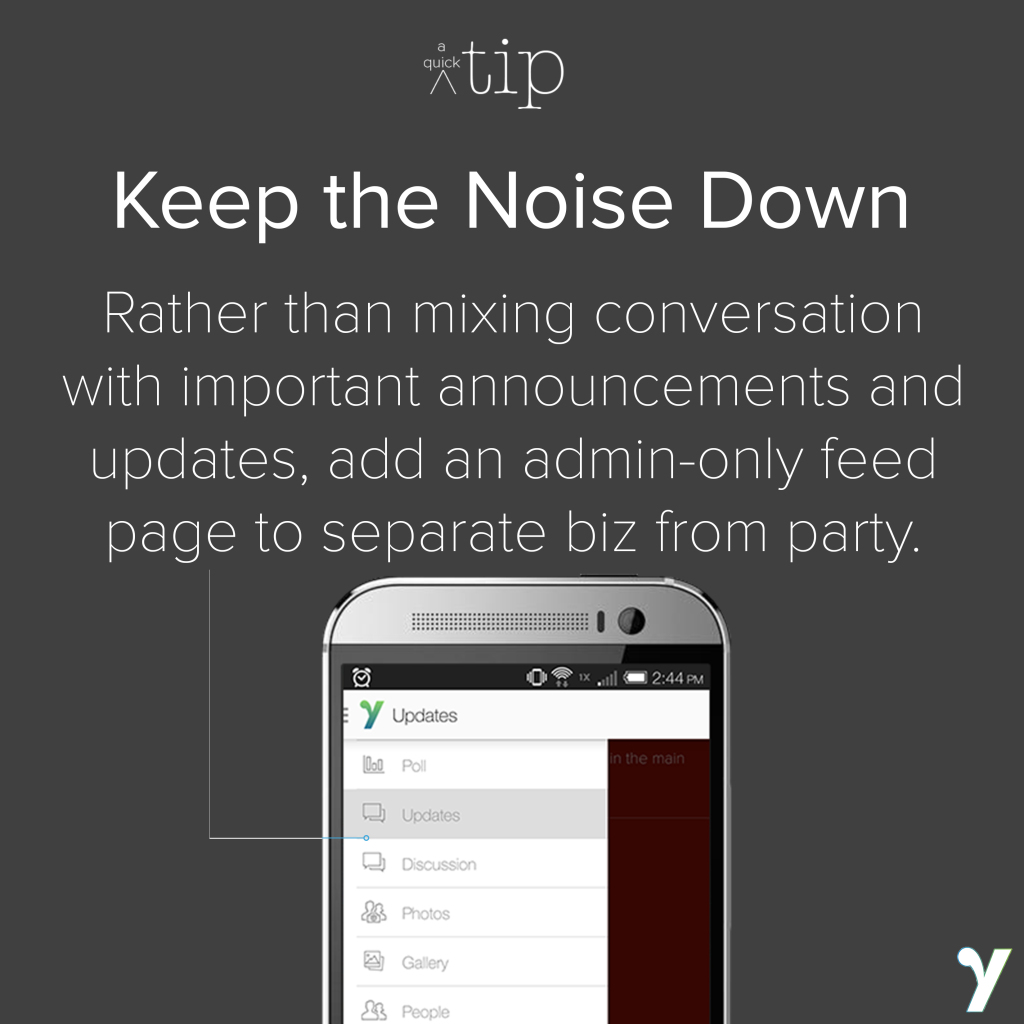
Depending on your event or group, an open News Feed page might not be the easiest thing to control. There are a few different ways to take control of the page, and a few useful ideas for making use of our premium admin-only news feed page.

With our basic news feed page, anyone who has your Yapp on their phone can post in comments, questions, and pictures. The only way right now to control this is to delete notifications after the fact and, sometimes, that’s too late.

We built our admin-only News Feed template page to address these issues. With it, you can toggle who has the ability to post into the news feed, choosing Creator Only (you and anyone else you add to your account via Account Settings) or Everyone. We’ve seen many teachers and other educators use this page in their classroom to great success. It cuts down on the number of notifications users receive, and makes it easier to separate important updates from conversation.

One of the cool ways we suggest you use this new page (which you can purchase to add to your account by emailing us) is in conjunction with your basic news feed. Use the basic feed as a place for discussion, photos, questions, and comments. If you’d like, we can even change your app’s settings so that only posts from the administrator (e.g., those posted in the admin-only news feed) will go out as notifications to your users. Then, add the restricted feed page and use it to post important updates, like schedule changes, homework assignments or 5-minute warnings.

You can purchase the admin-only news feed page for $49, which allows you to use it in an unlimited number of apps created with your account as long as you stick with Yapp.

What the Tech?! NFC

nfc-george-seinfeld copy
  • Yapp explains NFC in a simple, approachable format for readers who may know the term but not the details.
  • The post turns a technical concept into an easy-to-follow explanation for everyday audiences.
  • Readers interested in common mobile technology terms will benefit most from this article.

Near Field Communication (NFC), n;

A short-range wireless field that allows for communication between two objects. NFC is used in mobile devices to allow for over-the-air transfer of information, including mobile payments. The newest iPhones are the first Apple products that incorporate NFC to allow for Apple Pay.

NFC emerged out of radio-frequency identification (RFID), which is a one-way communication from one object to another. It first appeared in 2006 in a Nokia flip phone, and has since grown from “beam” technology (like bump, where contacts could be transferred just by holding two NFC-enabled phones near each other) to Google Wallet and Apple Pay. The phone can communicate through an electric field with other devices, like credit card scanners, to transfer information. NFC is also being used by many city commuters who tap-to-enter their buses and subways; right now, these are mainly physical cards with the technology, but with Apple’s new integration of NFC, phones could soon be the ticket (pun intended) to ride.

While Google Wallet and Apple Pay depend on your phone to store information and communicate with scanners, there are physical cards incorporating this technology. Coin, a small credit-card sized device, promised to store eight cards and work like your plastic credit or debit cards. More recently, Plastc launched on , boasting storage for 20 credit, debit and gift cards, an e-ink touchscreen (that allows you to switch between them), an EMV chip (to replace the swipe-and-sign cards), and the ability to function with your default card should the battery die. With the growing acceptance of NFC, the traditional overstuffed leather wallet could go the way of the flip phone.

Product Update: A Change to Theming

  • Yapp shares a theming update that changes how app styling and visual presentation work.
  • Better theming controls help creators build a more polished and on-brand mobile experience.
  • Users focused on app design and customization will benefit most from this update.

As we work to make Yapp better, we’ve decided to make a big change to the way that theming works.

We’re saying goodnight to our current theme library starting November 30th and switching over to a more modern and technically-efficient system, which incorporates our newest Basic theme in light and dark.

stylepicker

The new styling tool will sit at the top of the editor screen. If you want to change your color or style (Light or Dark), you can click to expand and see a variety of colors.

With this new design, our users will have a (literal) rainbow of color options to choose from, plus additional opportunities to customize. If the color you want isn’t an option, we’ll be able to easily work with you to add it. New features — including a more DIY cover page and the template pages you’ve been asking for, among other new things — will be seamless additions.

Some of our users have already been using the styling tool rather than the theme library. For our longtime users, the old themes will remain available until November 30, when we switch things over. If you don’t move your account to the new look before November 30, your theme will change to the Basic style in a color that matches the previous look.

We hope you’ll check out the new style tool and give us your feedback! If you have any questions or concerns, please reach out to us via email.

Tips & Tricks: Easily Store Your PDFs and Documents

  • Yapp shows how to store PDF files in the app so important documents stay easy to access.
  • Centralized file storage helps reduce confusion and gives users one place to find needed resources.
  • Event organizers and internal teams sharing documents will benefit most from this tip.

Have a lot of documents to share with your users? There are a few ways to view them in Yapp before we develop a dedicated page for viewing.

The best way we recommend sharing your documents with your users is through sharing links. Upload the PDFs/documents you want to share to Google Drive or Dropbox. Then, take the sharing links generated by Google or Dropbox and paste them into a Simple Text page (like we show in the image above). Sometimes, those links are really long and ugly, so try using a shortener like bit.ly to get a nice, clean look.

This is our favorite way because it keeps your Yapp uncluttered and lets your users download the documents to their phone or iPad if they choose. If your documents pertain to a certain item on the schedule or people page, you can also paste the link into the description section of the event or person entry.

You can also save your documents as image files and upload them into a gallery page. This shows all the documents in thumbnail and can be enlarged to be read.  However, with this method, each page has to be saved as a separate image and can’t be downloaded, making for a long process for you and hard to read documents for your users.

Have other tips or ideas about sharing PDF and other document files? Let us know!

Tips & Tricks: Notifications Keep Your Users Engaged

  • Yapp shares tips for using notifications to keep users engaged without overwhelming them.
  • Smarter notification strategy helps improve attention, participation, and overall app value.
  • App creators and event teams using push notifications will benefit most from these tips.

The fun doesn’t stop after you’ve created and shared your Yapp. Now that you have people using it, keep them coming back for more!

Use the News Feed page to send out announcements throughout your use of the app, from “The keynote starts in 5 minutes!” to “There are 3 grab bags left at the door — come and get them!”

People have also made the News Feed into a collaborative game page. Want to have a scavenger hunt? Send out clues via News Feed push notification and have players respond either with a statement or photo in response within the app.

By filling your app with information beyond what they could get in a paper program. Include links, collaborative photo and text pages, use push notifications, and post poll questions, the app becomes a more fun and functional necessity. Plus, if you keep a laptop or tablet handy, you can edit and refresh pages throughout the day. Using this as a way to reveal speakers, information, or schedule events is a great way to make people check page; you can also add links to download the slideshows after presentations are finished!

If you’re looking for a page purley for Announcements, we have a premium admin-only news feed available. Just send us an email if you’re interested!

Meet Yapp: Our New Product Video is Up!

  • Yapp introduces a product video that helps explain what the platform does and why it matters.
  • A clear visual overview makes it easier for new audiences to understand Yapp quickly.
  • Prospective customers and event planners exploring Yapp for the first time will benefit most from this resource.

This summer, we did a lot of updating to Yapp, inside and out. The site and apps have a cleaner look and much improved performance, and we have new features and goodies cranking for you to see in the fall.

So with all of this new stuff, we decided we also needed a new introductory video to make it even easier for you to share what your favorite app maker is all about. Enjoy and share!

A huge thanks to Sean Meehan, who directed and edited; Chris Loughran, who shot; Lindsey Simcik, Donald Chang and Steven Conroy, who acted; Cesar Suarez who composed the original music; JCC Manhattan for the event space; NearlyNewlywed.com for the wedding attire, and the entire team at Yapp.

Tips & Tricks: Sharing Your Yapp

  • Yapp shares tips for making it easier to share an app with the right audience.
  • Better sharing practices help increase visibility, adoption, and event readiness.
  • App creators focused on distribution and user uptake will benefit most from these tips.

You’ve spent a few hours putting together an awesome app, complete with all the info your group could possibly need. Now, it’s time to share it. We’ve pulled together a few proven tips and ideas to help you get the word out.

tip2-customize

Customize your ID. Once you publish your Yapp, you’ll see an option to customize your Yapp ID. This adds a little flair to your Yapp and simplifies sharing with friends, family, colleagues and others. If you don’t see the blue ‘Customize’ button after you publish, you can tap the Gear icon in the upper right corner of your Yapp’s info card on the dashboard and choose “Customize.”

Spread the word. Now that you have your ID, share it! You can do this using one of the 5 options on your dashboard (email, Twitter, Facebook, QR code, and SMS text) or you can send it out through your own email client, phone, or other method.

tip2-share
You should include your sharing link in the body of the email just in case users have trouble with the buttons. This way, they’ll still be able to refer back to retrieve the app, simply by tapping the link in the email.

It’s also helpful to include download instructions. We’ve put together an easy 3-step script that you can copy, paste and distribute:

  • Visit my.yapp.us/[CUSTOMID] on your iPhone or Android
  • You’ll be taken to the app store to download Yapp.
  • Open Yapp and [Your App Name] will sit inside.

Have other great ideas for sharing your Yapp? Let us know in the comments!

What the Tech?! WYSIWYG

  • Yapp explains WYSIWYG in plain language so readers can understand a common digital editing term.
  • The post turns a technical acronym into something practical and easy to grasp.
  • Readers curious about web and content creation terminology will benefit most from this article.

139076266

WYSIWYG, adj.;

What You See Is What You Get; describes an online editor that lets you easily build blogs, websites and apps. Often also called a ‘drag-and-drop’ editor, these tools take away the need to know code and have professional design skills to build an online presence. It is often pronounced “wizzy-wig.”

With this kind of building tool, the user (that’s you!) views something close to if not exactly the end result while creating. You’ll see exactly where the buttons and widgets will go, how fonts will appear, how movement will interact with sections. This is the method used by tools like Wix and Weebly for website building, and also on Yapp.

The screen you see in the center of the Yapp editor is almost identical (currently at least, on iOS) to how the app will look on your phone or tablet. Our co-founders wanted to create a super-simple app-builder that would let any and everyone create mobile apps for the parts of their lives that are most important to them. From that vision, our drag-and-drop editor was born. This concept and execution has resulted in a ton of success for Yapp, including the recent selection of our CEO and c0-founder Maria Seidman as an Emerging Entrepreneur of 2014 finalist in Entrepreneur Magazine. We want to add even more exciting WYSIWYG features in the future to keep our editor convenient and helpful for our users.