Yapp shows how a mobile-first communication strategy can improve employee engagement across the organization.
Better reach, faster updates, and easier access to information help employees feel more informed and involved.
Companies with distributed or deskless teams will benefit most from this approach.
Think about it: Employees these days aren’t chained to desks like they used to be; they’re buzzing around with smartphones and tablets. So, why not meet them where they are? That’s the whole idea behind mobile-first communication strategies for employee engagement.
Yapp makes it easy with its versatile app platform. Imagine whipping up a custom app without needing a computer science degree! The intuitive editor lets you drag and drop elements to create something as unique as your brand. You can even mix and match customizable templates to fit your style. Need some inspiration? Yapp’s templates are ready for your personal touch.
Now, what about keeping everyone informed and engaged? Yapp offers features like announcements, schedules, and even a social feed. It’s like having the whole office in your hand! Real-time updates mean everyone gets the memo, even if they’re sipping a latte at their favorite café.
Why does it work so well? Well, when people can access what they need without jumping through hoops, they stay in the loop. Imagine trying to read War and Peace on a sticky note—doesn’t work, right? Yapp’s got you covered with a slick, pocket-sized solution.
How Mobile Tech Boosts Engagement
Ask anyone—how do you improve employee engagement with mobile technology? Well, you make them feel like part of a community, even when they’re miles apart. Yapp’s got social feeds that let employees connect and share. It’s like throwing a digital water cooler into the mix. People love to chat. Let them.
Push notifications keep everyone on their toes. And let’s be real, nothing says “important” like a well-timed buzz on your phone. Forget sticky notes on monitors. Notifications are where it’s at. Stay in the loop, wherever you are.
Interactive polls let you gather insights faster than a speeding bullet. Want to know if that new policy is a hit or miss? Just ask. And those photos from the company picnic? Share them in-app. Employees love to see their smiling faces. It’s like building a scrapbook in real-time.
Yapp’s people directory is a lifesaver. It helps you find who’s who, just when you need it. Need to chat with HR? A few taps and you’re connected. It makes networking feel like less work and more fun. Check out how easy it is with Yapp.
Reaping the Workplace Benefits
Let’s dive into the benefits of mobile communication in the workplace. You save trees by cutting down on paper. And who doesn’t want to be a bit more eco-friendly? Yapp lets you digitize everything, from schedules to documents. Mother Earth approves.
Flexibility is another perk. Update a policy on the fly? Check. Add a last-minute meeting? Double-check. With Yapp, you’re not tied to a desk, and neither are your updates. See how Yapp keeps you agile.
Then there’s the cost. You can save a ton by ditching printed materials. It’s not just about being green—it’s about being savvy. And hey, who doesn’t like a little extra in the budget for a team outing?
And let’s not forget—data is king. Yapp’s analytics give you the lowdown on how your team’s engaging with the app. Is Jane in accounting reading announcements? Is Bob from sales checking the schedule? You’ll know. These insights help you shape future strategies. Dive into data-driven decisions with Yapp.
Of course, nothing’s perfect. Implementing a new system has its hiccups. Maybe not everyone’s tech-savvy. Maybe your Wi-Fi’s spotty. But once you iron out the wrinkles, the benefits shine brighter than a new phone screen.
In a nutshell, mobile-first strategies aren’t just a trend—they’re a game-changer. And with tools like Yapp, you’re not just keeping up with the times—you’re ahead of them. Ready to make your next event better? Start your trial now!
Yapp shows how a mobile-first approach can improve team motivation by making communication more immediate and accessible.
Consistent updates and easier engagement help teams feel more connected to goals, wins, and daily progress.
Organizations that want to strengthen morale and motivation across teams should use this strategy.
Getting your team fired up and genuinely involved is a piece of cake when you embrace a mobile-first strategy. And by “piece of cake,” I mean it still takes work—just a different kind. Mobile apps are where everyone seems to live these days, so why not meet them there?
Your employees are scrolling through their phones more than they’re checking email, which is exactly why a mobile-first communication strategy works so well for modern teams. So, by using mobile apps to communicate, you’re jumping into the same stream they’re already swimming in. This isn’t just about blasting out announcements; it’s about creating a dynamic space where employees can share, connect, and engage.
Think of it like this: You wouldn’t bring a horse to a car race. So why stick to old-school communication methods in a smartphone era?
Yapp, for instance, offers an intuitive editor for creating sleek, custom apps without needing to decipher complicated codes. You can whip up a platform that reflects your brand’s personality faster than you can say “Let me check my emails.”
Revolutionizing Employee Communication Through Mobile Apps
Enhancing employee communication through mobile apps isn’t just convenient—it’s a game-changer. Imagine having all your team updates, schedules, and even social feeds in one app. It’s like having a Swiss Army knife in your pocket but for work.
Apps like Yapp let you create multiple page types, from announcements to social feeds, making sure everyone stays in the loop without wading through a sea of emails. It’s like having your entire office in your back pocket, especially when paired with employee engagement strategies for better communication that keep teams informed and motivated.
Communication in the workplace often gets sidetracked by too many meeting invites and not enough actual interaction. But with the right app, you can streamline this. You can send unlimited push notifications, create interactive polls to get real-time feedback, and even let your team share photos. It’s about building a community, not just checking off tasks.
And let’s face it—no one likes outdated info. With real-time updates, you can keep everyone informed instantly. Need to let the team know about a last-minute change? Done. It’s like having a walkie-talkie but way more sophisticated.
Plus, with Yapp’s analytics, you can see how engaged your team really is. Are they participating, or just lurking? Knowing this helps tailor your approach for maximum motivation. Want to see how this plays out? Check it out here.
Real-World Benefits and Challenges
So, what’s the real scoop on using mobile apps for communication? The benefits are plenty. Greater engagement, cost savings on printing materials, and eco-friendly practices are just the start. Not to mention the flexibility to update everything in real-time. It’s like being able to change the script in a play without anyone noticing.
However, not everything’s sunshine and roses. There are challenges, too. For instance, the potential for tech glitches (we’ve all been there with apps freezing at just the wrong moment) and ensuring everyone actually uses the app.
It’s one thing to create an app; it’s another to get people onboard. You might need to sweeten the deal—maybe with some incentives or gamification elements.
Moving to a mobile-first strategy isn’t just a trend it’s a necessity, and streamlining internal communications helps make that shift easier across teams and locations. Whether you’re trying to motivate a diverse team spread across time zones or just keep everyone in the loop for the annual company retreat, mobile apps offer a seamless, engaging way to enhance communication.
And hey, if it helps reduce email clutter, that’s a win in my book. Now, who’s ready for the next team update… on their phone? Ready to make your next event better? Start your trial now!
Yapp shows how an affordable custom app can improve team connectivity without requiring a large software budget.
A centralized, mobile-friendly hub helps teams communicate more clearly and stay aligned more easily.
Organizations looking for a low-friction way to improve internal connection will benefit most from this solution.
Building Bridges with Custom Apps
Creating a custom app for your team isn’t just about ticking off a to-do list—it’s about crafting an engaging digital journey. Think of it as giving your team a virtual playground that mirrors your brand’s culture. A custom app isn’t merely a collection of features; it’s a dynamic tool to enhance communication and engagement.
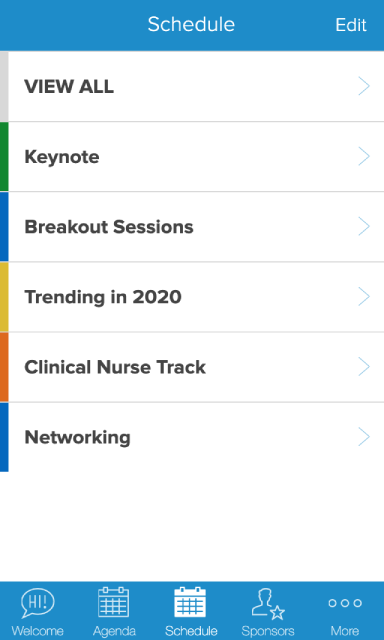
Remember those hefty printed schedules? They belong in a museum! With Yapp’s multi-track schedule feature, managing events is as simple as pie. Real-time updates keep everyone in the loop—no more flipping through pages or missing out on key sessions.
Supercharge Team Communication
Communication is the lifeblood of any successful team. A custom app can act as your team’s digital nerve center, amping up the usual group chats. Whether it’s sharing quick announcements or diving into detailed project updates, everything is centralized.
Push notifications are a lifesaver. Need to remind your team about that budget meeting at 3 p.m.? A push notification ensures no one forgets. And with the ability to send unlimited notifications, you can keep everyone informed without overloading them.
Polls can be a fun and interactive way to gather feedback or make decisions. Want to know if your team is craving pizza or tacos for the next meeting? Run a poll! With Yapp, it’s as easy as a few taps. The result? Instant insights into your team’s preferences.
Affordable Solutions for internal communications
Let’s talk about budgets. Not every team has a treasure chest of gold coins at their disposal. That’s where affordable internal communications solutions—like Yapp—step in. Digital apps cut down on printing costs and reduce paper waste, making them a budget-friendly and eco-conscious choice. By leveraging these features, you make your events smoother and more efficient.
With Yapp, you can digitize practically everything—from schedules to sponsor lists to attendee directories. It’s all about making life easier and your events smoother. And the analytics insights Yapp provides? Priceless. Understanding user engagement levels and session feedback can significantly enhance future events, ensuring you’re not just speaking into the void.
Implementing a new app isn’t always a walk in the park. You might encounter a learning curve or initial resistance from team members. Technology has its quirks. Maybe someone forgets their password or misses an update. The key is to keep things simple, offer support, and gradually show the benefits.
Incorporating a custom app into your internal communications strategy can boost team connectivity and provide an affordable solution to otherwise costly problems. While it’s not a magic wand to solve all issues, it certainly makes the whole process more engaging and manageable. After all, who wouldn’t want a little extra help in making things run smoothly?Ready to make your next event better? Start your trial now!
Yapp outlines ten ways conference mobile apps improve attendee satisfaction and overall event success.
Better communication, easier navigation, stronger engagement, and more accessible event content help create a smoother experience.
Conference organizers who want happier attendees and better event outcomes will benefit most from this guide.
Mobile apps have become an essential component of any successful event. They provide a centralized location for all relevant information, improve communication between attendees and organizers, and offer a platform for engagement and networking.
As conferences can be expensive to plan and execute, it’s important to ensure that you’re getting a good return on investment (ROI) for your efforts. A conference mobile app can help maximize your ROI in a number of ways.
First and foremost, a conference mobile app can save you money by reducing your printing costs. Rather than printing out hundreds of pages of agendas, maps, speaker bios, and other materials, you can simply upload this information to your app. Not only is this a more environmentally-friendly option, but it can also save you hundreds or even thousands of dollars in printing costs.
In this article, we will explore the 10 ways conference mobile apps can improve attendee satisfaction and event success.
Maximizing Attendee Satisfaction with Conference Mobile Apps
A conference mobile app can help you generate revenue by offering sponsorships and advertisements. With a dedicated Partners page and sponsored posts in the Social Feed, you can offer sponsors more visibility and engagement opportunities than traditional print ads or booth displays. Plus, by offering detailed analytics on app usage, you can give sponsors a better understanding of their return on investment and help them see the value in sponsoring your event.
On top of that, a conference mobile app can help you increase attendance and retention rates. By offering easy registration and real-time updates, you can help attendees stay engaged and informed throughout the event. This, in turn, can lead to greater satisfaction and loyalty from attendees, and higher attendance rates for future events.
Here are 10 ways conference mobile apps can achieve this:
1. Easy Access to Information
The most significant advantage of a conference app is easy access to event information. Attendees can view the schedule, speaker bios, maps, and more all in one place. With Yapp’s template pages, organizers can create pages with rich text, images, and videos to display information in a visually appealing way. This ease of access saves time for attendees and improves the overall event experience.
2. Enhanced Social Interaction
Attendees want to engage with each other and discuss the topics being presented. With Yapp’s enhanced social feed page, attendees can post comments and photos, like and comment on other users’ posts, and even enable social feed moderation for more control over posts. This social interaction helps attendees connect with each other and the event itself.
3. Improved Schedule Management
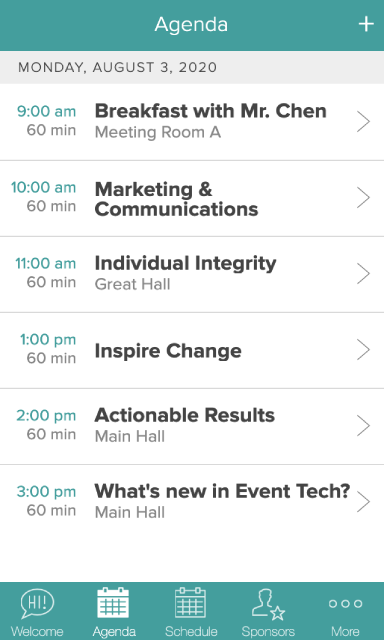
With Yapp’s simple schedule page, attendees can view the schedule for the entire event in one location. The page is organized chronologically and can be imported via CSV. With Yapp’s multi-track schedule page, attendees can view a schedule split by department, focus, or day, making it easier to manage sessions and events.
4. Document Storage and Sharing
Yapp’s document page allows organizers to upload and store PDFs and Word documents for attendees to download and share. Documents can be added to a specific page or attached to any schedule or multi-track page. This feature is particularly useful for presentations, speaker bios, and other event-related information.
5. Increased Networking Opportunities
With Yapp’s people page, attendees can showcase themselves, team members, or partners by including photos, names, titles, and bios or descriptions. Attendees can also connect with other attendees to build their professional network. The partners page can be used to promote exhibitors and VIPs, impressing them by showcasing their brand in the app.
6. Quick and Easy Communication
Yapp’s admin-only setting for the social feed page allows organizers to make important announcements or share exciting news. With the “Admin-Only” posts setting enabled, updates to this page can only be made by administrators. Additionally, with unlimited push notifications, these announcements appear directly to attendees’ mobile home screens, keeping everyone up-to-date with the latest information.
7. Efficient Feedback Gathering
Yapp’s simple poll page allows organizers to gather attendee feedback in a simple and efficient way. The page can hold one question and an unlimited number of multiple-choice options, making it perfect for gathering feedback, thoughts, and votes. Yapp’s session feedback page is another useful way to gather feedback on specific sessions or speakers.
8. Customizable Design
Yapp’s design customization options allow organizers to choose a theme color, add a custom cover image, and select a theme style to match the event’s branding. This customization adds an extra layer of professionalism to the app and helps attendees quickly recognize it.
9. Robust Admin Controls
Yapp’s admin controls provide a wide range of features to customize the app and manage content. These include custom IDs for easy app sharing, app privacy settings to control app access, content import for easy data entry, and app cloning to save time creating new apps. Additionally, Yapp offers analytics to monitor app usage and track engagement.
10. Ease of Use
Finally, conference mobile apps like Yapp are incredibly easy to use, both for event organizers and attendees. Yapp’s platform is user-friendly and requires no coding or technical knowledge to create and customize an event app. The intuitive interface allows users to easily add and edit information, manage schedules, and upload documents and images. On the attendee side, conference apps like Yapp are user-friendly and accessible, with intuitive layouts and a streamlined interface that make it easy to find the information they need and connect with other attendees.
Conclusion: Why Yapp is the Ultimate Solution for Conference Mobile Apps
After exploring the many benefits of conference mobile apps, it’s clear that Yapp is the ultimate solution for enhancing attendee engagement and satisfaction while driving greater success for your event. With Yapp’s template pages, admin controls, native features, integrations, design customizations, and exceptional customer support, you can easily create a powerful, high-quality conference app that meets the unique needs of your event.
Yapp’s intuitive interface and flexible customization options make it easy to create a mobile app that provides a seamless experience for attendees. The rich text page, enhanced social feed page, documents page, simple schedule, photo wall, people page, admin-only feed page, simple polls, multi-track schedule, and partners page offer a variety of tools for communicating information, building community, and driving engagement.
In addition, Yapp’s admin controls provide flexibility and control for event organizers. With custom IDs, app privacy settings, content import/export, social feed moderation, multiple administrators, and app analytics, you can easily manage your app and monitor its usage.
Yapp’s integrations with YouTube, Vimeo, Twitter, and Eventbrite provide additional tools for enhancing the user experience and driving greater engagement.
Lastly, Yapp’s exceptional customer support ensures that you have the assistance you need to create a high-quality conference app. With 24/7 support from a globally distributed customer success team, you can be confident that your app will meet the unique needs of your event and provide a valuable resource for your attendees.
Take your event to the next level with Yapp’s powerful conference mobile app solution. Try Yapp today with our 14-day free trial and experience the benefits of a high-quality conference app for yourself!
If you’re unsure about how to plan an important internal meeting or conference where employee engagement is essential, you’re not alone.
This is a common struggle for those who plan internal events and private membership conferences.
If that’s you, you’re in luck! Today we’re sharing a few key ways to increase engagement at your next internal or private event.
Tip 1: Connect on Social Media
Today, it’s all about connecting on social media- no matter what the event is.
For private events, this is still very important as it allows you to generate excitement and anticipation for the event itself.
Utilize hashtags, post behind-the-scenes photos/videos, give sneak peeks of the event space or keynote speakers, and more.
This is a great way to not only engage with those who are attending the event but also generate interest from those who are on the fence about attending.
You can also create a private Facebook group or LinkedIn group for attendees to connect with one another before, during, and after the event.
This is a great way to build community and keep everyone engaged throughout the entire process.
Tip 2: Make it Interactive
Try to get your attendees to interact at the event as much as possible.
This can be done in a number of ways, such as incorporating raffles and giveaways, having speaker Q&A panels instead of just lectures, and hosting networking opportunities.
Making the event interactive will not only keep attendees engaged during the event, but it will also create lasting impact so they’re more likely to return for the next one!
Tip 3: Get Feedback
Don’t forget to get feedback from attendees after the event! This can be done through surveys, post-event focus groups, or even just informally asking attendees what they thought of the event.
Collect this and share the best quotes with your organizing team.
Tip 4: Measure Engagement to Validate Your Efforts
It’s critical to track important metrics while monitoring engagement at your event.
As a good event planner, you need to know how to measure the success of your event marketing strategy.
Here are a few important metrics to track:
Event registration (if event attendance is not mandatory)
Highest Engagement Session or Speaker (based on session attendance)
Post-event survey responses and completion rates
With these metrics, you’ll be able to see what’s working and what isn’t when it comes to engagement.
This will help you to fine-tune your event strategy and ensure that each event is more successful than the last.
BONUS Tip 5: Do All the Above with an Event Mobile App
If you really want to take event engagement to the next level, consider using an event mobile app like Yapp, which can provide steps 1-4 in a single app.
An event mobile app will allow attendees to connect with each other, interact with event content, and provide valuable feedback – all in one place.
Social Feed: With features like push notifications, in-app messaging, and a social feed, you can be sure that your attendees will be kept informed throughout the event, even after it’s over.
Interactive Features: Additionally, it provides a way for attendees to interact with one another and share their thoughts and experiences, providing a greater sense of community for everyone.
Post-Event Surveys: With Yapp, you can easily collect feedback after the event by sending out surveys to all attendees. This valuable feedback will help you plan even better events in the future.
Event Analytics: Last but not least, Yapp’s event analytics allows you to see which sponsors or sessions are being engaged with the most, what content is being shared, and more.
Overall, using an event mobile app is an excellent way to increase engagement at your next internal or private event, and it can help you simplify the challenges of communicating with your attendees, too.
Additional Tips to Ensure Your Next Internal Event is a Success
While the tips above are an excellent resource to streamline event management and ensure your attendees are engaged, there are some essential planning best practices that can help you simplify event planning before it even starts!
Select your goals. First and foremost, you must define precisely what you’re hoping to achieve, without goals set ahead of time, you may find you’ve wasted time and resources prioritizing the wrong things.
Build an entertaining schedule. As an event planner, it’s important to arrange and space out your activities, talks, panels, etc. in a way that keeps attendees interested but not overwhelmed. Don’t cram too much into one day.
Identify your key metrics. Now that you’ve determined your objectives and the time frame you’re supposed to accomplish them, it’s time to consider how you’ll measure them. Decide on which key performance indicators (KPIs) matter to your team–we’ve given some examples above to help you get started.
Determine how you’ll measure KPIs. Flesh out your KPIs and goals by adding detail about how you’ll achieve them. What steps must team members take to ensure they can actually track and measure each key metric.
Why Use Yapp For Your Next Internal Event
Yapp is an event management solution that offers the easiest way to build your own internal event app using a simple drag-and-drop editor and features perfect for event managers without a design or development background.
With Yapp, you can build an internal event app that streamlines event planning and keeps team members engaged. Aside from empowering you to achieve all the tips mentioned in this post, Yapp offers the following impressive benefits.
No Coding or Developers Needed
No coding knowledge? No problem! You don’t need it with Yapp because Yapp does it all for you. Our simplified drag and drop features empower you to quickly add details, upload materials and plan for your event in days instead of months when working with a developer.
Customizability
Yapp allows you to customize your event app, down to the logo, with no coding skills required! With Yapp, you can dedicate the entire app to events like sales kick-offs, company offsites, or internal training sessions.
Better Team Communication
Your attendees aren’t the only ones that need to know what’s going on. With Yapp, your team members on the floor can easily download the event app and get instant updates regarding event details so they can adjust when needed to keep things flowing well.
Ready to make your next event as painless as possible? Try out Yapp today!
Yapp announces the sunsetting of Invitation and Information pages and explains what that change means for creators.
The update helps customers understand which features are being retired and how to adjust their app content moving forward.
Yapp users managing older app page types will benefit most from this notice.
We’re gearing up to launch a whole set of new mobile app features and as we do, we felt a little housekeeping was in order first. Since our Rich Text page has more functionality than our Information and Invitation pages, we decided to sunset our Invitation and Information pages.
Why an Invitation Page?
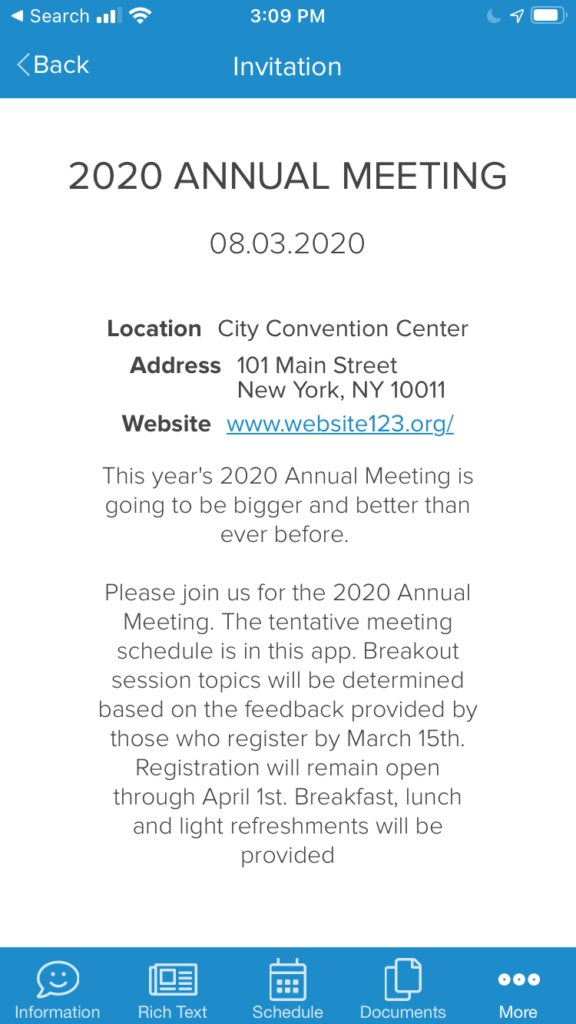
When we first created Yapp, the Invitation page was one of the first page types that we introduced. Since we originally developed Yapp as a mobile app builder for in-person events, the idea for this page was that it would serve as a splash page or teaser page for inviting people to your next event in the app. For example, I could share my app before my event kicked off with an Invitation page that provided app users with details about the upcoming event. Or, create an Invitation page for sharing the details of my next event with my app users.
Here is an example of an Invitation page:
Some Yapp customers also confused our Invitation page with the ability to invite people to their app, which is done instead from your Yapp dashboard or privacy settings. Since it’s important for us to eliminate confusion for a good user experience, we felt removing this page would help.
To invite someone to your app, you can do the following:
Add the email address to your privacy settings which will trigger an automatic invite email.
Click on the share button below your app on the Yapp dashboard to share via email, QR code, Twitter, Facebook, and one-off SMS messages.
Why an Information Page?
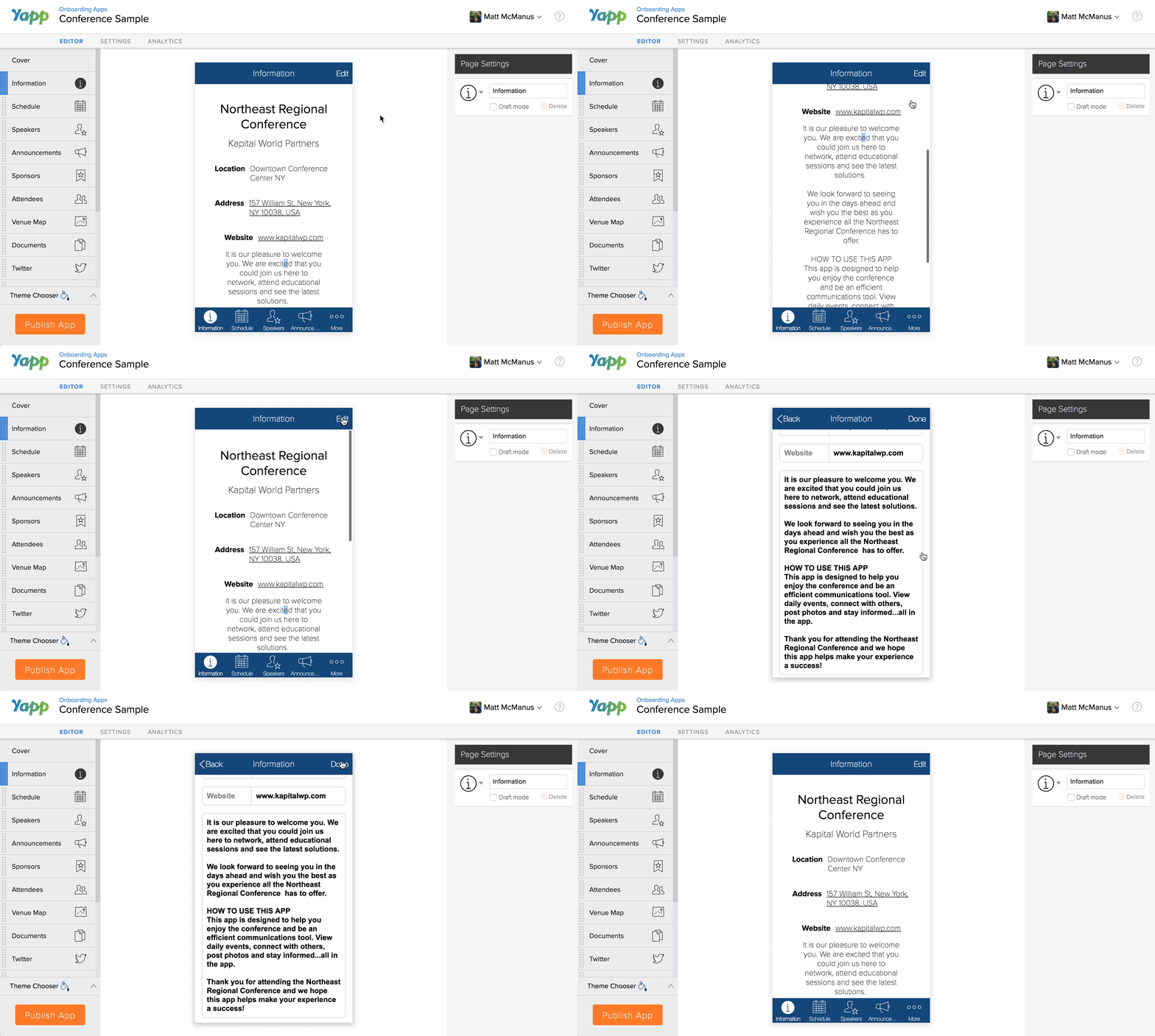
Core to Yapp’s values are ease of use and simplicity, and our Information page was created with that mission in mind. The Information page previously was a template-based page that included a handful of fields you could fill in such as Event Name, Date, Location, and Website URL. However, as our customers grew with our platform, they needed greater flexibility and customization of their content, and soon found this page to be a little too simple for their needs.
Here is an example of our basic Information page:
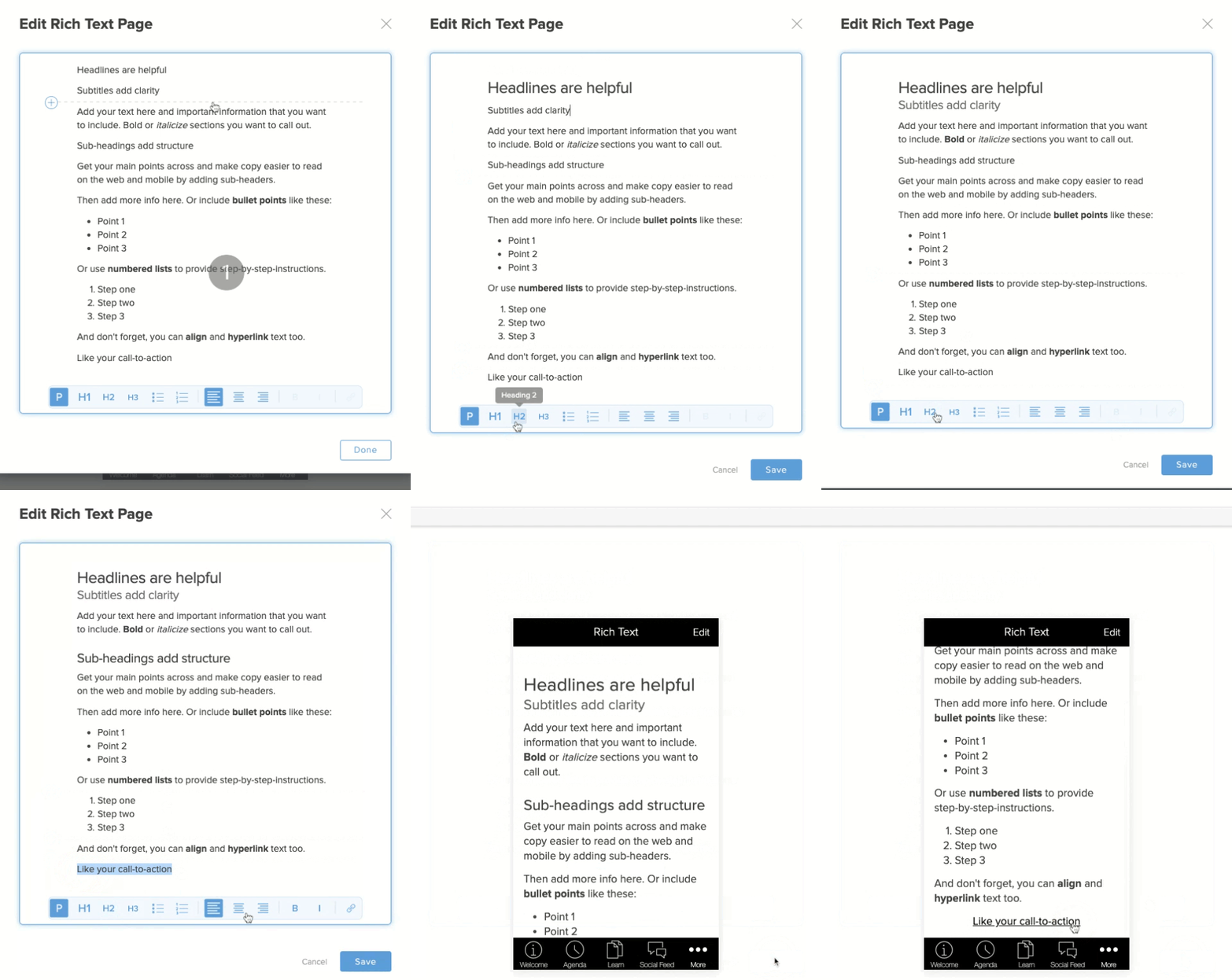
Now, we have our Rich Text page which allows you to add simple text and information about your event, community, organization, and app – just like you would have with an Information page. Plus, you can format text with bullets, numbered lists, headers, hyperlinks, call-to-action buttons, images, and videos. Read on to learn about using our Rich Text page in place of the Info page.
Benefits of the Rich Text Page
Our Rich Text page is one of our most flexible page types in our Yapp Editor, which is why it has taken precedence over our Information and Invitation pages. With Rich Text Editing you can:
Add bullets and numbered lists
Bold, italicize, and align text
Add H1, H2, and H3 section headers
Include JPEG and PNG images
Insert YouTube and Vimeo videos
Hyperlink text to link to external sites or in-page pages
Add call-to-action buttons for visually engaging links
Here is an example of our Rich Text page editing:
Migrating Your Invite & Info Pages
If you currently have Invitation and/or Information pages created in your mobile app(s), these pages will automatically be converted to Rich Text pages on our back-end, and there is nothing you need to do. The content should render and display exactly as you had it before – only with Rich Text functionality. However, if the content is not displaying correctly, please message us at support@yapp.us or start a live support chat with us so we may assist you.
https://vimeo.com/501914505
Information and Invitation Page Conversion
What’s Next?
Now that we’ve tidied things up a bit, we’re ready to move forward with more exciting and useful features for your Yapp mobile apps. Some features that we have planned as part of our product roadmap include, but are not limited to:
Improved internationalization of your apps
Uploading videos (not just images) to your Social Feed pages
Better functionality and design when viewing an app from your laptop/desktop
While we hope to release these features in 2021, our timeframe may change based on what our users need the most. So stay tuned for product updates and more with our YappStories.
Mobile phones have changed the way we communicate. Mostly, it’s been a great tool for communicating with family, friends, and coworkers. But every now and then, communication breaks down. This is especially true when people have different communication styles.
When communication breaks down, people can get easily frustrated or angry, especially when misinterpreting what you’re trying to say. So we thought we would share a few mobile phone jokes to help you lighten up the room when conversation goes awry, and make your team smile.
Yapp breaks virtual event planning into seven thoughtful steps that make online experiences easier to manage.
Clear planning, better content delivery, and structured communication help virtual conferences feel more polished and engaging.
Teams hosting virtual events for the first time or refining their process will benefit most from this guide.
There are instances when you may want to host a virtual event or conference over an in-person event. It may be a part of your planned strategy, or because your offline function was affected and is at risk of being canceled, or needs to switch to a digital format. For example, with COVID-19, many events or gatherings of 10 or more people have been canceled. Therefore, rather than withdrawing your annual conference, association meeting, or training, it may make sense to take your event online.To determine whether you should switch from an offline event to an online one, and the steps you need to take to make that happen, read on.
First: should you host a virtual event?
With more and more events canceled or people working remotely, you may be wondering whether you should host a virtual event. The first step is to determine whether it makes sense for your business to host a virtual event – logistically, and with consideration to your audience.Some events or conferences are all about the in-person experience, and recreating that can be challenging, but not impossible. Besides, event attendees may be purchasing a ticket specifically because of the activities or perks that they can expect at the venue. Prepared foods, free open bars, and live music concerts are all things that may not be possible to recreate online. Or, you can get creative with live food demos, cocktail recipes, and custom Spotify playlists for mimicking the experience. Alternatively, having world-renowned public speakers or exceptional talks and presentations are easier to recreate online.To determine whether it makes sense to take your event digital, start by creating a simple checklist of all of the activities, people, and sessions you have planned. This checklist will help give you a good overview of what will be possible to recreate online.
What logistics do you need to consider?
The first logistics that you need to consider are those directly tied to your event. These logistics include food and beverage or entertainment.Here are a few venue logistics you need to consider if you’ve booked a venue:
Confirm whether you’re able to get out of vendorcommitments. Some places may not allow you to cancel, or only reschedule your booking, so you’ll want to know this first.
Think about youraudience. For example, without a venue, you’re no longer limited to a certain number of attendees for activities or breakout sessions. By not being restricted to a place, you can expand your audience to other colleagues, friends, and referrals. Sure, you might lose a few people (who were only attending for the food or drinks), but you’ll likely gain more attendees who were previously restricted by the location or travel costs.
Without designated rooms for speakers and activities, you’ll need to consider how to recreate your schedule online. For example, you can create a Yapp Multi-Track page with dedicated Zoom Breakout Rooms meeting links that allow you to host individual breakout sessions online at the same time.
Similarly, you need to consider the legal logistics involved with taking your event online, such as with canceling vendor contracts or meeting compliance standards.
If you’re unable to cancel your venue or bound by specific terms of your agreement, then you’ll want to involve your legal team. They’ll be your best resource for understanding the terms and what you can or can’t reasonably do when negotiating your cancellation.
Similarly, you’ll want to think of any permits or licenses that you may have acquired for hosting your event. Do you still need them? Can you recuperate the costs of obtaining them? Can they be extended for future on-site events?
Next, taking your event online may involve security and compliance requirements that you’ll need to verify. For example, you may need to ensure that any new software used for hosting your online event meets standards such as HIPAA, ISO, or GDPR, depending on your event’s industry and regulatory requirements.
Finally, while many companies are already using video conferencing software for meetings or remote work, that doesn’t mean that these tools make sense for your online event. You need to consider the type of experience that you want to create, budget, features, security, and whether it makes sense for your business in the longer term. Therefore, here are a few software logistics you’ll want to consider:
The software you choose should be able to support multiple platforms. For example, some event apps are built only for iOS or only Android or lack web viewing. Since many people consume media on various devices, your best bet is to pick software that considers your audience’s media consumption and device needs.
Comparably, the software you use should allow you to engage attendees while providing excellent user experiences. For example, is the interface clean? Is it easy to view content on the app even with spotty WiFi? Can attendees easily chat and connect?
If you need to restrict your event, app, or content to a particular audience, then look for software with privacy settings. For example, if it’s an internal company event, you may want to restrict your app to a specific list of people, such as active employees only.
How do you take your event or conference online?
Once you’ve evaluated the pros and cons of taking your event online, you’ll want to formulate a plan for making the shift. Having clear next steps will allow you to achieve your desired results. To help you make the shift, here are seven steps for hosting an online event or conference:
Make a checklist of everything and everyone involved
The key to hosting a successful event or meeting is organization. To ensure you don’t miss anyone or anything, we recommend building a checklist of all your event to-dos. This foolproof event planning checklist provides some helpful tips for which tasks to accomplish months, to weeks, to the day before your event. Tasks like searching for sponsors, finalizing your speakers’ list and presentation times, sending reminders, and promoting your function are just some examples of what you’ll want to complete in advance.To help you organize your to-dos, try a simple checklist app like Todoist or a more advanced project management tool like ClickUp. The key is making sure everyone is aware of what needs to be accomplished and organizing those tasks to tackle them together.
Figure out your event strategy as a team
There are lots of different directions that you can take when building an event strategy. From incorporating content like blog posts to email marketing, and social media, your event strategy should be multi-channel and involve everyone on your team. Figuring out which channels to focus your energy on and what content to create are critical aspects of your event strategy that you’ll want to plan with your team. Remember to focus your efforts and not stretch yourselves too thin, especially if you’re on a tight deadline. To help you stay focused, consider the 80:20 rule, where you focus 20% of your effort on the key strategies that will likely yield 80% of your results.The right questions to ask yourself when figuring out your event strategy are:
Which channels produce the most qualified leads and customers?
What email reminders do you plan to send before, during, and after the event?
How will you use social media to promote your event or create engagement?
What other assets do you need to create to support your event?
Where will you host your content, files, presentations, and images?
By asking yourself these questions, you’ll be ready to host an online event, such as sending event change updates and push notifications via your mobile app.
Reach out to your speakers and vendors
By far, one of the most critical aspects of event planning is making sure that your speakers, sponsors, and vendors are well-informed.If you are still in the process of selecting speakers, consider sending them an outreach email that includes the details of your online event. This speaker outreach email highlights essential information for the speaker and includes a link for scheduling an online meeting.
If you already have your speakers selected, make sure to schedule a follow-up email for thanking them for presenting. Here’s a speaker gratitude example email that you can send.Also, you’ll want to email speakers, sponsors, and vendors about any event changes, including switching to an online format and any date changes. Vendors may need to work with you to rethink how they drive attendees to their website since there won’t be an on-site booth or table for them to visit in-person. Similarly, the sponsorship packages may have included specific on-site offerings that now need to be revised for online. For example, a sponsor may have had visibility on your printed banners, so you may want to reach out to them about doing mobile banner ads instead.
Get others engaged with reconfiguring your event
Even if you have a dedicated meeting planner organizing your event, you need to get others involved, especially when reconfiguring the virtual event setup. For example, you’ll need to set up a way for attendees to access the event online on the day-of, as well as the ability to register if they haven’t already.Setting up an online-only event page, for example, is different than an event page that has a location. For starters, attendees access the event through online meeting software instead of showing up at a physical location. Second, the way the page displays in Eventbrite and search engine results will be different. For example, if I search “events this weekend near me,” Google may show events from websites like Eventbrite that are at a venue near you based on your location.
Visualizing the way you want to set up your online event, such as activities and games for engaging attendees, can also be challenging when reconfiguring your event. For example, if you planned to run an on-site scavenger hunt, now you’re challenged with rethinking the scavenger hunt online. One option is a tool like Goosechase that lets you host both online and offline scavenger hunts by setting up photo, text, or location-based missions. Another option is to work 1:1 with someone who can help you set up your online event, such as through concierge services, where someone sets everything up for you.
Decide on the best software for hosting your event
Without the right software, hosting a virtual event will be difficult, or provide for a mediocre attendee experience. Therefore, you’ll want to ensure you have put the right tools in place, and tested them, before going live with your event. The essential features that you’ll need for hosting a virtual event are:
Social feed – for allowing attendees to connect and chat
Here’s a mobile event apps comparison chart for helping you to select the best software for promoting and hosting your online event:
When considering or implementing software to use for your event, you’ll also want to involve your engineering team for validating that it meets technical requirements. A few common IT standards that professional teams look for include: FISMA and ISO/IEC 27701. Also, they may need to conduct an infrastructure or security audit that requires completion of a questionnaire by the vendor to ensure it meets specific standards.
Update your marketing and sales content
Shifting to an online event strategy also requires updating any marketing and sales content that you previously published or had planned. The most critical content to prepare and update includes:
reminder emails and save-the-date
1:1 sales and outreach emails
customer success emails
push notifications
website homepage
event registration page
registration thank you page
schedule and anywhere dates appear
event URL and anywhere locations appear
banner ads, social ads, and paid ads
social media profile and feed images
You can also consider setting up social stories for sharing video tutorials, interviews, product sneak-peaks, and more. Also, transcripts of sessions, templates, checklists, cheat sheets, and guides, are other great examples of remarkable offers that you can easily make a part of your online event, and incorporate into your app.
Think beyond recreating a traditional offline event
Virtual events don’t have to be limited to recreating the offline experience online. Instead, think beyond redoing what you had planned and consider things you can online, like activities and games that were previously impossible or limited. Get creative with different ways of engaging your attendees, such as with a digital Q&A session or through a virtual competition equipped with points, badges, and rewards. Affected by the Coronavirus? Check out these COVID-19 YouTube trends, including using your app for providing work-from-home essentials, stress reduction, and in-home fitness resources while people are remote.In summary, hosting a virtual event could be an excellent move for your business, especially if your in-person event was postponed or canceled.
Since you’ve put in a lot of work into organizing your function, switching to an online format may be in your best interest. Therefore, remember to consider your strategy and get everyone on your team involved. Lean on vendors for work they can do for you and partner with other companies to get more exposure.Mainly, be smart about how you organize your virtual event and get creative! There are plenty of ways to create an engaging digital event using tools that you have or by incorporating new ones.incorporating new ones.
Yapp announces the retirement of Crowd Pics and News Feed pages and explains the transition for users.
The post helps app creators understand product changes, feature direction, and what to do next inside their apps.
Yapp customers using those legacy page types will benefit most from this update.
We hear all the time how much people love sharing photos and interacting with each other with Yapp. We also hear how critical Yapp is for communicating important updates to attendees. We’ve been thinking a lot about these two aspects of our product and we have big plans! Before we can roll out these bigger changes, we feel it’s important to tidy up the product. To learn more about the changes that are coming, read on.
Consolidating our social pages
You may have wondered what the difference was between our News Feed, Crowd Pics and Social Feed pages are. Don’t worry, you’re not the only one! Those pages came about over the years to achieve different goals. Yet, as the product has evolved, these pages started to share a lot of the same functionality. That’s why we’re consolidating these pages into the new, super-powered Social Feed page. Here’s what’s in store:
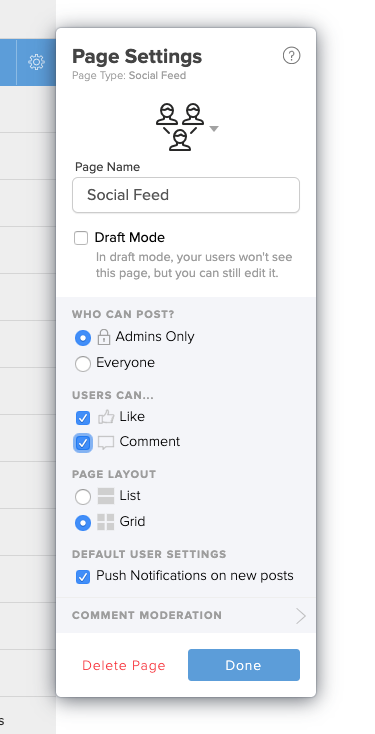
The new social feed page settings
Grid view
Our Crowd Pics page made it easy for users to upload photos and see them in a beautiful grid view. You can now do that with any Social Feed page! Open the page settings, change the layout to Grid, and hit publish. Now your users will see a photo-centric layout.
Admin-only posting
Many of our customers used the News Feed page to send important updates and alerts to attendees. You can now change the permissions on a Social Feed page that only allows App admins to post. This eliminates the need for a separate News Feed page.
Controlling user interaction
Ever wish you could disable comments on your Social Feed page and allow likes? What if you think “liking” is annoying, but you want to allow folks to respond with thoughtful comments? You can now turn off the ability to like or comment on any Social Feed page.
We have also made other improvements, including better push notification settings and design.
“Neat. The Social Feed page is receiving new features. What about my beloved Crowd Pics/News Feed page?”
In the coming weeks, we will be retiring our Crowd Pics and News Feed pages. This will involve migrating all existing users over to configured Social Feed pages. If you used a News Feed page for announcements, it will become a Social Feed page. The settings applied will be “admin-only” with disabled Likes and Comments.
If you used a Crowd Pics page, it will become a Social Feed page with Grid View enabled and disabled Likes & Comments. This should be a seamless and invisible transition for you. The only difference is that you will have access to all the features the Social Feed page has to offer. Want to enable Liking on what used to be your Crowd Pics page? Enable it and then click “publish”.
Despite the retirement of the old page types, when you go to add a new page to your app, you’ll see the same icons as before. The Crowd Pics icon will create a Social Feed page with the appropriate settings. We’ve renamed News Feed to Announcements, but the idea is the same as before.
Future plans for the Social Feed page
As we mentioned earlier, we have some big plans to improve the Social Feed page. Now that we have tidied up these page types, we can start to roll out some shiny, new features! Here are the next releases two on our roadmap:
Desktop Posting: We will be adding the ability to post to your Social Feed pages from the desktop. No need to go thumb-crazy on your phone screen if you have your laptop handy.
Scheduling Posts: We will be enabling the ability to add social posts in advance and send them out at a set time. This will only be accessible through our desktop editor.
We know many of you have been asking for these features. That’s why we’re doing our best to continue to support the feature folks have come to know and love. Further, this allows us to create new and interesting features that we hope you’ll find useful.
If you have any feedback for us, we’d love to hear it! What features are most important to you? Do you have reactions or ideas to all that we talked about above? Please share them here:
Yapp shows how a mobile event app can deliver value beyond a single event date.
Year-round use for communication, engagement, and content sharing helps teams extend app ROI and audience connection over time.
Organizations that want their event app to stay useful after launch will benefit most from this strategy.
Planning an event or annual conference is a lot of work, and building your mobile event app is only a small part of that. Often, people don’t think about building an event app until close to the actual date.
As more people ditch paper programs to go green, you’ll want to make sure you’re getting the most out of your app. So don’t wait until the last minute to think about it. Instead, consider all the ways you can engage your attendees year-round for the most event ROI.
One way to use your mobile app before event details are final is by building excitement in advance. Try giving a sneak peek at your schedule or sharing teaser posts about what users might expect. Sure, you might still be figuring out what that is, exactly, but everyone loves a good mystery. So start hyping up your event early.
Create “teaser posts” to get your users excited
If you know of activities that will excite your attendees, consider sharing it via social. You can use a Social Feed page to engage attendees in conversation. Or, build a News Feed page to share important announcements, like early bird pricing. Teasing a special offer, new product or service, or “save the date” are all great ways to energize your crowd.
Here is an example of a teaser post you can create and share on your social media feed page:
Other places you can share your invite including your website, blog, email marketing campaigns, and paid search ads. You can also consider placement through co-marketing efforts with vendors and partners.
To design something like this invite, you can use Adobe Photoshop or Illustrator. If you don’t have a designer on-hand to use those powerful tools, you can try Canva which has pre-designed templates. Either way, make sure you design something that is visually-appealing and enticing. That way they’ll be more likely to share your “save the date” with their colleagues and friends.
Give them a “sneak peek” of your event schedule
Nothing builds hype like giving attendees a sneak peek of your schedule. Even if you only have a few confirmed talks so far, that’s enough to create “buzz” about your event. Provide a preview of the talks they can expect in the form of a YouTube video, like the BOLD Conference by MINDBODY did in this example below.
Not particularly savvy when it comes to video editing, or don’t have the time? Try a video creation tool like Animoto or Adobe Spark that provides templates for easier editing. You can also consider having someone do the work for you, like hiring a freelancer or media agency.
Don’t have any talks scheduled at all yet? Use your mobile app for input on presentations and speakers that attendees would like to see. For example, you can create a Social Feed page for sharing presentation ideas. Then have people “upvote” or “like” those ideas. In your analytics, you can then see which titles got the most votes or likes for planning your event schedule.
Get feedback on planned activities or menus
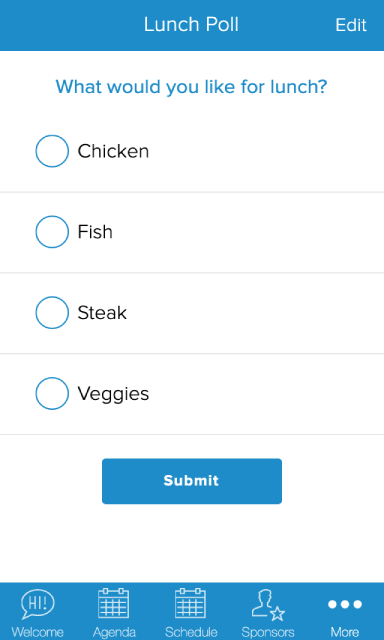
Aside from input on presentations, you can use your app for feedback on other activities. For example, you can survey people to see which nearby bars they would like to attend for a happy hour. You can also ask them about their menu preferences if you are planning on having lunch or dinner catered. One way to do this is by using a Poll page for simple surveys like the one below.
Apart from polling people about their food and beverage preferences, you can also ask other questions. Other examples of single-question polls you can create are:
What event date works best for you? – This is a good poll to ask when planning your event. For example, you can ask attendees what date and time work best for them. For example, Tuesday vs. Thursday or Morning vs. Evening. This lets you plan your event for the date that most people are likely to attend. That way, you get the most registrants and bang for your buck.
Which activity sounds the most fun? – Event-goers often look for more than keynotes and breakout talks. They want a fun, memorable experience. To understand what they enjoy, ask them which activity sounds the most fun to them. Group yoga or scavenger hunt anyone? That way you can ensure your event attendees have fun doing an activity that they enjoy.
Where did you hear about our event? – If you want to understand how your app users found out about your event, then ask them. Sure, UTM tracking info is great, but getting a direct answer from someone is even better. For example, they may have heard about your event from a colleague. But your analytics tells you otherwise. By confirming the true source, you can focus your efforts on the channels that are driving the most sales.
For more complex questionnaires, you can use a tool like SurveyMonkey or Typeform. Then in your app, you can include a link or call-to-action button that takes them to your form. This lets you get granular with your questions while providing a seamless app experience.
Manage day-of-event activities via your app
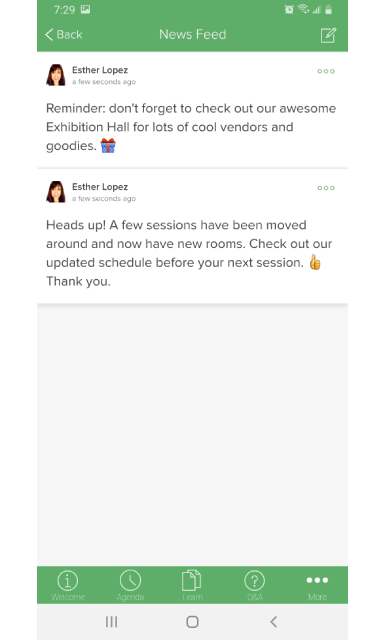
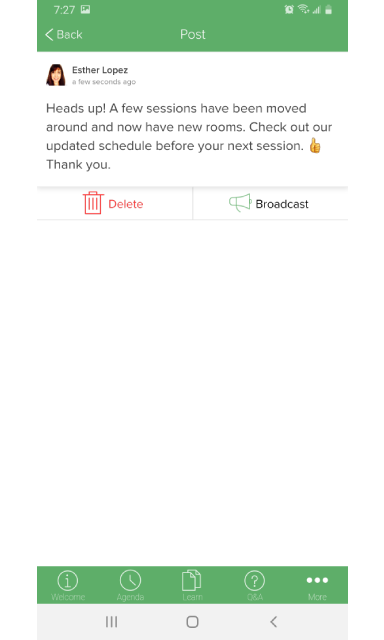
The main way that people use their event app is for managing day-of affairs. From managing your schedule to announcing room changes, your app is key for attendees. On the day of, event-goers will want to see the schedule, know where to go, and anything important. For example, if a session is now in another room, you can notify attendees via the app. This is a lot easier than reprinting and redistributing your paper program.
Reveal and publicize your finalized event schedule
Finally, the big day is here! Now that you have all of your speakers and sessions finalized, it’s time to announce it to your attendees. Make sure your Agenda or Multi-Track Schedule is published on your app. Then send users a notification via your News or Social Feed.
Users can then create a My Schedule page by picking the sessions that they want to attend. This personalizes your user’s experience and makes it easy to see their sessions. Now, no more having to dig through paper programs to find that talk or location.
Now that your schedule is complete, you can encourage the media to take an interest. For example, if you reached out when there wasn’t a session they cared about, they may have not responded. With your finalized schedule, there is now something that piques their interest. This is a great time, then, to reach back out.
Send notifications about important event happenings
A room change isn’t the only thing that you’ll want to notify your attendees about. Other types of helpful notifications you can send include:
Reminders to stop by your booth or exhibition hall
Updates about any new or exciting activities
Previews of upcoming sessions and keynotes
Be sure not to overwhelm your app users with too many notifications. Sending too many notifications may cause people to turn off your app notifications. This means that they may miss an important notification when there is one. To mitigate this, consider planning announcements and their send times in advance. For any unplanned matters, you can handle how to communicate that to users on a case-by-case basis.
Run a contest and announce the winner at your closing keynote
Everyone loves a good contest and prize, especially when they’re the winner. To excite your event-goers consider running a contest, such as a photo contest or idea contest. Then, build anticipation by waiting to announce the winner at your closing keynote. That way, not only will more people stay through the entire event, they’ll be more engaged. Plus, it’s a great way to get more exposure on social media or other channels.
To gather entries, people can share their photos via a form on your website, or you can build a Crowd Pics page in your app. You can then either have a panel of judges vote on them and select the winner. Or, leave it up to your attendees to choose the winner by having them “like” their favorite photos. Then the photo with the most “likes”, wins.
Engage app users and keep the convo going
Now that your event is over, you may think that there’s not much use for your app. After all, attendees aren’t checking the schedule, or need to know where to go. Right? Well, not exactly. Although your event is over, that doesn’t mean attendees stopped thinking about it. They may be reminiscing on the good time they had, things they learned, and what next year will hold. So why not deliver that?
Engage your app users after the event by sharing all the great photos that you and other attendees took. Further, people can keep chatting about session-related topics. Or, upload speaker presentation slides and videos that attendees can reference back to. The point is: you want to keep the conversation going so people will come back the following year (with friends).
Start promoting early bird registration for your next event
One of the best times to drive sales for your next event is by promoting early bird registration right away. Don’t wait until the following year to start early bird sales. Instead, begin it right after your event ends. Since attendees are still hyped up about the event, they are more likely to sign up soon after. Plus, people are still talking about your event on social media so it’s a great time to get referrals.
Here is an example of an early bird registration video by the American College Personnel Association for their annual #ACPA20 event:
In this video, ACPA keeps it simple (and budget-friendly) by creating a personal invitation video from their planning team. It’s also informational including when/where it is, what you can expect, and when to register for early-bird registration. Finally, it ends with a clear call-to-action that takes you to their website to learn more or register.
Share photos from the event on your app’s gallery page
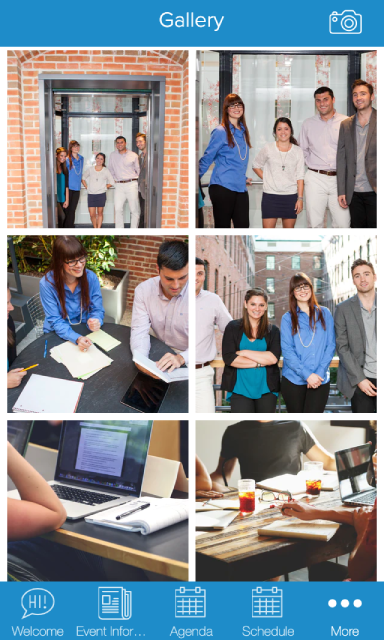
The best way to reminisce about an event and get people to continue talking about it is by sharing your photos with attendees. If you had a professional photographer on-site or want to share your company images separately from your attendees, then create a Gallery page. You can also create a Crowd Pics page for letting attendees upload and share their photos. This gets people talking and connecting over the great times they had.
Then, when next year rolls around, you can repurpose last year’s images for promoting your event. This gives people who don’t know about your event a great visual for what they can expect. Further, it reminds people who previously attended about the event, so they’ll sign up this year (if they haven’t already).
Don’t stop talking about or promoting your event
The last thing to consider is: don’t stop talking about your event. If it’s an annual conference, find ways to remind people about it all year long. If it’s a one-time event, think about other events or initiatives that are tied to that that attendees would be interested in. Whatever it is, think about how you can continue to engage your app users and attendees after the event.
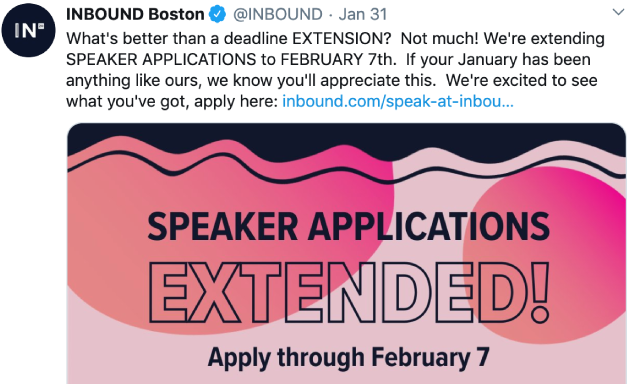
Here is an example of how the INBOUND Boston conference by HubSpot is using Twitter for gathering speaker applications through their website:
With your mobile app, you can include a link to your call for proposals, for example, and then send a push notification to your past speakers about presenting again this year. You can also post to your News Feed or Social Feed pages to see if any past attendees would be interested in speaking as well.
As you can see, there are plenty of ways that you can use your mobile app year-round for engaging your event attendees. While it may seem like a lot of work, there are tools, like the ones discussed, that can make this easier and faster for you. Therefore the next time you’re planning an event, consider all of the ways that you can promote your event, including using your mobile app, for the most ROI.
Want to see how you can implement these ideas with your mobile app?